Adding an Opportunity for a Split Gift





We have a family that has made a pledge of $25,000 but they are splitting the payments between siblings. If we add the $25,000 it will look like the donor only gave $8,333. What is the best way to add this as an opportunity?
Comments
-
Hi @Cara Perez,
Might depend on what you ultimately want to see and how your organization records Plans/Opportunities, but below are some thoughts that might get you to the right place.
The Plan/Opportunity has to "live" on one constituent's record. However, you can add the other family members as Plan Participants. This would allow you to access the Plan from each of those constituents' records. If one of the constituents is the primary decision maker or is your primary contact, then I might put the Plan on that person's record.
You can tie the revenue to the opportunity, even if the revenue is coming from a different constituent. So the Opportunity is on the primary person's record. And then you receive a payment from someone else in the family. That payment can be attached to the Opportunity and will count toward the Associated Revenue Total for that Opportunity.
To do that, you'll search for the Opportunity in the Add Payment window. I believe you could also attach the revenue to the opportunity after the fact by going to the Revenue page and then going to the Application Details section. You'll search for the Constituent who “owns” the opportunity.
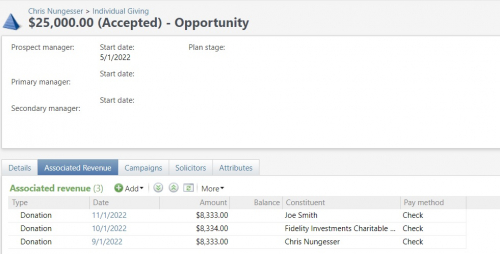
You can view all the gifts tied to the opportunity by going to the Opportunity and then clicking on Associated Revenue. You can see in the example below that the opportunity belongs to me. The three gifts have different dates and are from three different constituents.
I hope this helps. I apologize if I've massively misunderstood what you were asking about. But, if so, just write back. We'll figure it out.
Chris
0 -
@Chris Nungesser This is extremely helpful and exactly the result I was hoping for. Thank you so much for your thorough response.
1



Categories
- All Categories
- 6 Blackbaud Community Help
- 213 bbcon®
- 1.4K Blackbaud Altru®
- 400 Blackbaud Award Management™ and Blackbaud Stewardship Management™
- 1.1K Blackbaud CRM™ and Blackbaud Internet Solutions™
- 15 donorCentrics®
- 360 Blackbaud eTapestry®
- 2.6K Blackbaud Financial Edge NXT®
- 655 Blackbaud Grantmaking™
- 576 Blackbaud Education Management Solutions for Higher Education
- 3.2K Blackbaud Education Management Solutions for K-12 Schools
- 939 Blackbaud Luminate Online® and Blackbaud TeamRaiser®
- 84 JustGiving® from Blackbaud®
- 6.6K Blackbaud Raiser's Edge NXT®
- 3.7K SKY Developer
- 248 ResearchPoint™
- 119 Blackbaud Tuition Management™
- 165 Organizational Best Practices
- 241 Member Lounge (Just for Fun)
- 34 Blackbaud Community Challenges
- 34 PowerUp Challenges
- 3 (Open) PowerUp Challenge: Chat for Blackbaud AI
- 3 (Closed) PowerUp Challenge: Data Health
- 3 (Closed) Raiser's Edge NXT PowerUp Challenge: Product Update Briefing
- 3 (Closed) Raiser's Edge NXT PowerUp Challenge: Standard Reports+
- 3 (Closed) Raiser's Edge NXT PowerUp Challenge: Email Marketing
- 3 (Closed) Raiser's Edge NXT PowerUp Challenge: Gift Management
- 4 (Closed) Raiser's Edge NXT PowerUp Challenge: Event Management
- 3 (Closed) Raiser's Edge NXT PowerUp Challenge: Home Page
- 4 (Closed) Raiser's Edge NXT PowerUp Challenge: Standard Reports
- 4 (Closed) Raiser's Edge NXT PowerUp Challenge: Query
- 790 Community News
- 2.9K Jobs Board
- 53 Blackbaud SKY® Reporting Announcements
- 47 Blackbaud CRM Higher Ed Product Advisory Group (HE PAG)
- 19 Blackbaud CRM Product Advisory Group (BBCRM PAG)