Donation form add-in iframe displaying height 0





Hello all, when trying to create an add-in extension for donation forms, I've found that my add-in does not display on the “edit add-in” screen. When Inspecting Element, I can find that the height of the iframe is set to 0, and only by editing it manually am I able to see the contents.

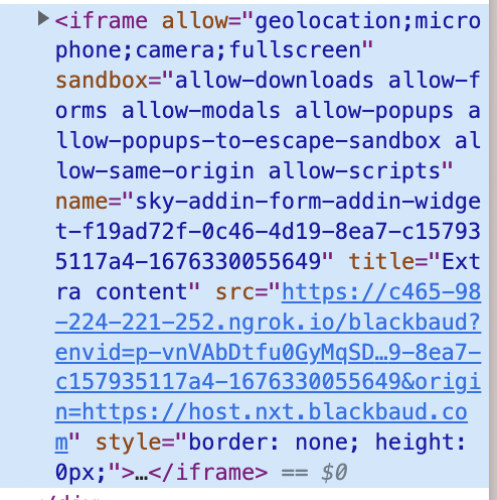
Does anyone know why this is happening? Is there a certain styling or id that I need to provide the element in order for it to display correctly?
(note: if I un-check the height styling in Inspect Element, it automatically replaces itself with “150px”, which confuses me as well.)
Comments
-
Hi @Samuel Low, per the documentation for the Donations extension points, are you calling the “authorized” event when your add-in is loaded in that “Edit add-in” modal?
0 -
Hi @Michael Tims, I have it set to call the “authorized” event when a button in that modal is clicked. However I can't click the button if the iframe has a height of 0. When I do edit the inspect element code to give it a height and click the button, it is able to authorize it fine.
0 -
@Samuel Low, the expectation of an authorized check for this modal is that it should be done programmatically, without user interaction. For example, using the add-in's provided `envid` to determine if the environment is authorized to use your add-in, and if so, then the `authorized` event can be sent. Otherwise the iframe's container is set to `display: none` which is why you are seeing the 0px height.
Are you able to describe your use case to require a button click to proceed with the authorization check and why a check cannot be done at load time, programmatically?
Thanks!
0 -
Hi @Samuel Low - my apologies, please ignore my previous reply. I believe there now can be a UX presented to the user to allow an authorization flow to proceed before needing to respond with the `authorized` event. So yes, you are right in assuming that the iframe should be displaying your UI so that a button can be clicked.
By default, the add-in framework should be detecting content size and auto-sizing the iframe to display it's full content. Do you happen to have your content's height set to a fixed value or 100%? I can try to reproduce if you can provide any helpful CSS styling that you use.
0 -
@Michael Tims I've tried having no height styling at all, relying on the contents to generate the height, as well as giving my container a set height of 100px. Neither of these have allowed it to show up.
Edit - this is the simple code I'm trying to display (obviously not the final product, but just for testing):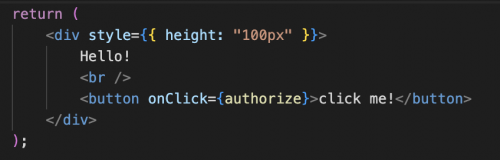
It isn't incredibly vital that this modal can show up as I can programmatically authorize it as you said, but I was wondering if the contents not being detected may at all be related to the fact that once the add-in is actually put into the donation form, it spins for a while before disappearing, leaving nothing inside the container that it should be within (see image below). I've tried console-logging when the form should be receiving the context location “form”, but nothing is being logged, indicating that my add-in isn't running at all. Do you know if this is related at all, or how to fix it?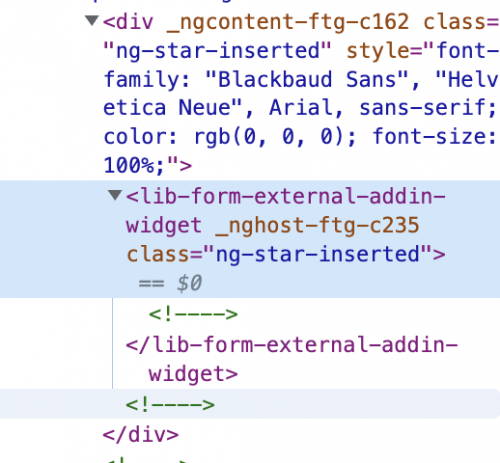 0
0 -
@Samuel Low - hmm, it sounds a lot like the add-in is timing out. There's a 10-second timeout for add-ins displayed in donation forms, where if they don't' respond during initialization then they're removed from the form.
Here's an example of the AddinClient initialization code, in the sky-addin-client lib README.
Notice a call to the `args.ready` callback needs to be made with `showUI: true` (I don't believe title is needed). Are you making this call? The call needs to be made in both locations, the actual donation form and the designer edit modal.
0 -
@Michael Tims I do call args.ready in all cases of the init function being called. Here's my code, with the “authorize()” call included to allow it to pass through the designer process:
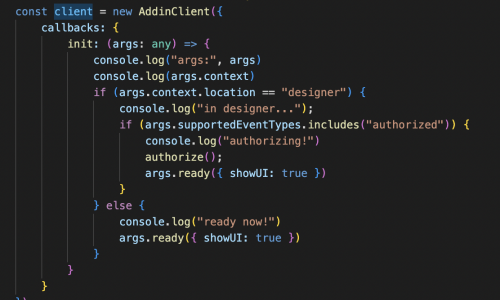
The console log “ready now!” is never called once it gets past the authorization, but the other logs ("in designer…", “authorizing!”, and the args and context) are all printed during the authorization stage. None of them, including the args and context logs are printed when it is added to the form.
0 -
@Samuel Low - yeah it just seems like the “authorize” event isn't actually going through in the correct order, so the add-in isn't being saved to the form resulting in you not receiving the `init` callback when the add-in attempts to load on the form.
The sequence is:
- Drag-and-drop add-in onto form from the toolbox
- “Edit add-in” modal is presented in which you must call the args.ready callback before attempting to authorize. At this stage the context's “location” value will be “designer”
- Call “authorized” event when ready to proceed or call “cancelled” event if the add-in is not authorized for use.
- If authorized correctly, your add-in will process the `init` callback again, to which you'll need to call `args.ready` again (the context's “location” value will now be “form”).
Try moving the code around so that you call `args.ready` before sending the “authorized” event and see if that helps at all. If that doesn't work, try adding a slight delay between the calls to `args.ready` and the sending of “authorized” event.
Sorry this doesn't seem to be as painless as possible. Once you get this working, if there's any suggestions you have for us to clarify the steps in the documentation, I can help pass that along to the team. I think we do need to at least clarify that `args.ready` needs to be called before the “authorized” or “cancelled” event occurs.
0 -
@Michael Tims Thanks for the guidance! It looks like the init call is working once it's added to the form now. However, the iframe is still showing up with height 0 inside of the form, same issue as what showed up for the authorize stage, so it looks like we're back to the original question.
I'm not using SKY UX for this project as I'm not using Angular. Is that a problem? Is it possible that it's unable to detect the content size because of that?
btw, sorry for the sudden name change! Had an account re-work 0
0 -
@Chariot Developers - No it shouldn't be an issue with a non-SKY UX add-in. There's a few of them out there running just fine using the `sky-addin-client` library. Let me see if I can reproduce with the simple container code you shared previously.
1 -
@Michael Tims Thank you for your help! Please let me know if there's any more information I could provide that might be helpful.
0 -
@Chariot Developers - I am unable to reproduce from a simple HTML/JavaScript (little bit of jquery) app.
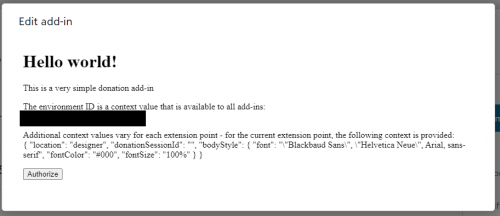
JS Code is not doing anything special:
var client = new BBSkyAddinClient.AddinClient({
callbacks: {
init: function (args) {$('#environmentId').text(args.envId);
$('#context').text(JSON.stringify(args.context, null, 2));// wire up a click handler for the login button
$('#authorize').click(authorize);// inform the host page that the add-in is ready to be shown
args.ready({
showUI: true
});
}
}
});Some padding for the body:
body {
padding-top: 5px;
}HTML:
<body>
<div id="donationContent">
<div id="helloWorldContainer">
<h1 style="margin-top: 0;">Hello world!</h1>
<div>This is a very simple donation add-in</div>
</div><p>
<div>The environment ID is a context value that is available to all add-ins:</div>
<span id="environmentId"></span>
</p><p>
<div>Additional context values vary for each extension point - for the current extension point, the following context is provided:</div>
<span id="context"></span>
</p><p>
<button id="authorize">Authorize</button>
</p>
</div>
</body>So the iframe auto-sizing appears to be fine in general (I've tried Chrome and Firefox on Windows). Are you adding any additional CSS styling to the body of your page? If you'd like to PM me some additional code to reproduce, I'd be happy to troubleshoot further. I can also probably troubleshoot if you served up a test version of your add-in somewhere.
0 -
Are you adding any additional CSS styling to the body of your page?
Aha, that was the problem! The body height was set to 100%. After overriding it for this page, the contents display correctly. Thank you so much for your help in debugging this!
One last unrelated question while you're here: I'm struggling to understand how the envId argument works / what exactly it is. Is it unique to the form that it's in, the user that's visiting the form, to the organization creating the form, or something else?
Thanks again for your time and help!!
1 -
@Chariot Developers An environment is a customer instance of the product - in this case RENXT. Each customer has a unique environment ID for their data, and data in an environment is separate from other environments' data. Each customer can also have multiple environments - for instance, they could have a staging environment and a prod environment, each with a unique environment ID.
In the donation form context, the envid parameter unique identifies the environment that created the form, which would therefore identify the organization that made the form and that the donor is donating to.
Hope that helps!
1 -
@Tim McVicker That helps a ton, thank you so much for the explanation!
0 -
@Chariot Developers In case it helps, here are some docs on the Blackbaud customer data model (including the concept of an environment):
https://developer.blackbaud.com/skyapi/docs/basics#customer-data-model
0 -
@Michael Tims @Chariot Developers Did you ever get an answer on this? I can't get my add-in to work on my donation form either. It works great on the designer and then on page load of my donation form, I get a CSP error.
0










Categories
- All Categories
- 6 Blackbaud Community Help
- 213 bbcon®
- 1.4K Blackbaud Altru®
- 403 Blackbaud Award Management™ and Blackbaud Stewardship Management™
- 1.2K Blackbaud CRM™ and Blackbaud Internet Solutions™
- 15 donorCentrics®
- 360 Blackbaud eTapestry®
- 2.6K Blackbaud Financial Edge NXT®
- 656 Blackbaud Grantmaking™
- 577 Blackbaud Education Management Solutions for Higher Education
- 3.2K Blackbaud Education Management Solutions for K-12 Schools
- 940 Blackbaud Luminate Online® and Blackbaud TeamRaiser®
- 84 JustGiving® from Blackbaud®
- 6.7K Blackbaud Raiser's Edge NXT®
- 3.7K SKY Developer
- 249 ResearchPoint™
- 119 Blackbaud Tuition Management™
- 165 Organizational Best Practices
- 241 Member Lounge (Just for Fun)
- 34 Blackbaud Community Challenges
- 37 PowerUp Challenges
- 3 (Open) PowerUp Challenge: Grid View Batch
- 3 (Closed) PowerUp Challenge: Chat for Blackbaud AI
- 3 (Closed) PowerUp Challenge: Data Health
- 3 (Closed) Raiser's Edge NXT PowerUp Challenge: Product Update Briefing
- 3 (Closed) Raiser's Edge NXT PowerUp Challenge: Standard Reports+
- 3 (Closed) Raiser's Edge NXT PowerUp Challenge: Email Marketing
- 3 (Closed) Raiser's Edge NXT PowerUp Challenge: Gift Management
- 4 (Closed) Raiser's Edge NXT PowerUp Challenge: Event Management
- 3 (Closed) Raiser's Edge NXT PowerUp Challenge: Home Page
- 4 (Closed) Raiser's Edge NXT PowerUp Challenge: Standard Reports
- 4 (Closed) Raiser's Edge NXT PowerUp Challenge: Query
- 796 Community News
- 3K Jobs Board
- 54 Blackbaud SKY® Reporting Announcements
- 47 Blackbaud CRM Higher Ed Product Advisory Group (HE PAG)
- 19 Blackbaud CRM Product Advisory Group (BBCRM PAG)