Applications





We really need to be able to add a bit of verbiage on that first popup that a prospective parent fills out to start an application! Is there a way to do this that I am missing?
Comments
-
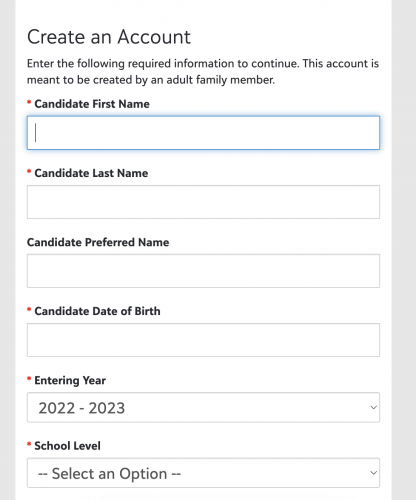
@Candi Roberts are you referring to the account creation page?
 1
1 -
@Bryan Lorenzo Yes! Is there a way to add something?
0 -
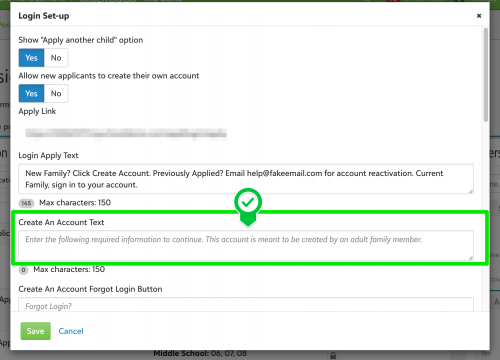
@Candi Roberts, yes you can adjust the default verbiage under the “Create an Account" header.
Navigate to Enrollment management > Admissions > Admissions setup > Application forms > Login setup. Here you will want to adjust the ‘Create An Account Text.' Note: there is a limit of 150 characters.
 2
2 -
@Bryan Lorenzo Thank you!!
0 -
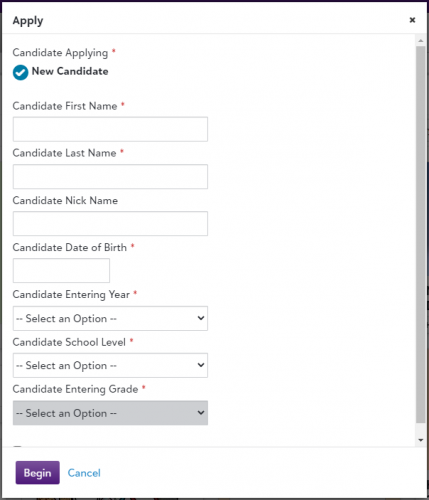
@Bryan Lorenzo That didn't end up being what I need. I need to be able to add text on this screen after an account is created:
 1
1 -
@Candi Roberts I haven't seen where this is possible. The only work around I can think of is to add a text box to your application at the very top.
0 -
@Candi Roberts, they will only see that message if they are using your “Apply Link" and using the "Create Account" option.
If the parent used the “+Apply Another Child” option from the Admissions Progress page or the “Apply Another Child” option from the resource board they will not see that message.
2 -
@Candi Roberts I use the “Candidate progress text” to provide parents with information such as deadlines, financial aid application link etc. But they only see that when they are viewing the checklist and not necessarily when they create an account and begin the application.
0







Categories
- All Categories
- 6 Blackbaud Community Help
- 213 bbcon®
- 1.4K Blackbaud Altru®
- 403 Blackbaud Award Management™ and Blackbaud Stewardship Management™
- 1.2K Blackbaud CRM™ and Blackbaud Internet Solutions™
- 15 donorCentrics®
- 360 Blackbaud eTapestry®
- 2.6K Blackbaud Financial Edge NXT®
- 656 Blackbaud Grantmaking™
- 577 Blackbaud Education Management Solutions for Higher Education
- 3.2K Blackbaud Education Management Solutions for K-12 Schools
- 940 Blackbaud Luminate Online® and Blackbaud TeamRaiser®
- 84 JustGiving® from Blackbaud®
- 6.7K Blackbaud Raiser's Edge NXT®
- 3.7K SKY Developer
- 249 ResearchPoint™
- 119 Blackbaud Tuition Management™
- 165 Organizational Best Practices
- 241 Member Lounge (Just for Fun)
- 34 Blackbaud Community Challenges
- 37 PowerUp Challenges
- 3 (Open) PowerUp Challenge: Grid View Batch
- 3 (Closed) PowerUp Challenge: Chat for Blackbaud AI
- 3 (Closed) PowerUp Challenge: Data Health
- 3 (Closed) Raiser's Edge NXT PowerUp Challenge: Product Update Briefing
- 3 (Closed) Raiser's Edge NXT PowerUp Challenge: Standard Reports+
- 3 (Closed) Raiser's Edge NXT PowerUp Challenge: Email Marketing
- 3 (Closed) Raiser's Edge NXT PowerUp Challenge: Gift Management
- 4 (Closed) Raiser's Edge NXT PowerUp Challenge: Event Management
- 3 (Closed) Raiser's Edge NXT PowerUp Challenge: Home Page
- 4 (Closed) Raiser's Edge NXT PowerUp Challenge: Standard Reports
- 4 (Closed) Raiser's Edge NXT PowerUp Challenge: Query
- 796 Community News
- 3K Jobs Board
- 54 Blackbaud SKY® Reporting Announcements
- 47 Blackbaud CRM Higher Ed Product Advisory Group (HE PAG)
- 19 Blackbaud CRM Product Advisory Group (BBCRM PAG)