Pledge Reminders based on installments





I'm trying to use Power Automate to create an Excel file from all gifts with a pledge balance on them, and pull out all the information on installments (what has been paid, and installments that are scheduled, with dates).
Which API has the information on gift installments? And where should I look for this?
I have another posting in the Community where I'm asking about creating an Excel file and saving the output to SharePoint. You're welcome to post information on how to do that here, instead.
If I create a variable to calculate the number of months overdue, will PA allow me to add a column to the output of my Excel file? My variable will calculate the number of months overdue.
I also need to include Addressee/Salutation and Address Info in the output. Can my output include both Constituent and Gift info, from two separate APIs?
Thanks.
Comments
-
@Chris Zello
Now that Gift v2 is available, you can get installment and payment details of a pledge by calling those API endpoints. (it is not available in Blackbaud connector yet, so you will need to use SKY Add-in connector Blackbaud send HTTP action. Read here on how:1 -
@Chris Zello
Forgot to answer about addressee/salutation: you can use the Blackbaud Constituent connector..there's an action for Name Summary: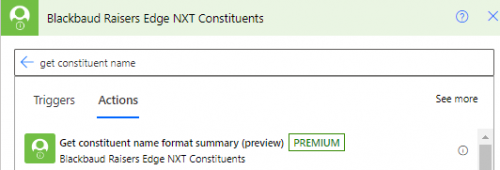 1
1 -
@Alex Wong
Thank you Alex. I was able to test it out on a gift record with a pledge balance and see data. Still need to do some other work on it.1 -
@Alex Wong
I could use some guidance…I am trying to do this in order to run a list of the last pledge installments. I seem to be missing a step…as the flow states there is no starting point? Can you help…?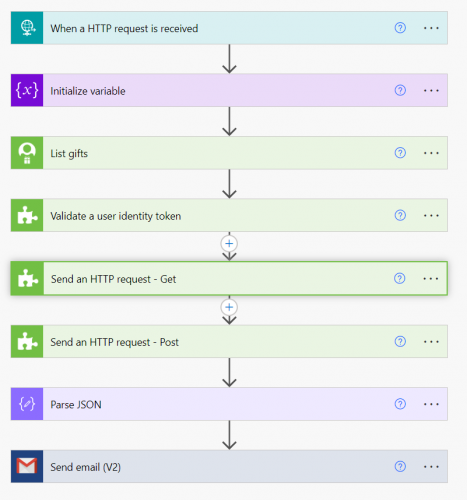 0
0 -
can you elaborate on what you trying to do here? what do you mean by “run a list of last installment"?
0 -
Sure…trying to run a list of installments and find the last installment date and then run a list of all upcoming installments for next month so that we can send them a note letting them know that the last payment is coming due.
0 -
@Bob Rickards
Unfortunately, it is not easy to do this only in Power Automate flow. Since the Gift v2 to get installment and payment is per pledge, you will have to get ALL pledge's installment and payment to do what you want to do. At least you will need to do all pledge where balance is not 0.Below is what you “can” do in 1 flow, but I strongly recommend handling this with installment and payment data already stored somewhere (sharepoint list/excel/csv, data warehouse, etc) and query from there.
So first step is to know how many you are dealing with. Run a gift list with gift type = pledge. Then filter (using Filter action) the returned gift array on balance property greater than 0. see how many non-paid off pledge you have. (if pledge is paid off, then the pledge is not needed in your processing).
then from this filter action, you will get an array of pledge that's not paid off, you will need to use Apply to Each on each pledge, and get installment and payment information from the pledges. you can then use “last(installment_array) and the month of this being next month. you will need to consider if payment is already applied to this installment either fully or partially paying the installment off (as pledge balance not 0 does not ”exactly" mean last installment is unpaid)
0








Categories
- All Categories
- 6 Blackbaud Community Help
- 211 bbcon®
- 1.4K Blackbaud Altru®
- 402 Blackbaud Award Management™ and Blackbaud Stewardship Management™
- 1.1K Blackbaud CRM™ and Blackbaud Internet Solutions™
- 15 donorCentrics®
- 360 Blackbaud eTapestry®
- 2.6K Blackbaud Financial Edge NXT®
- 655 Blackbaud Grantmaking™
- 576 Blackbaud Education Management Solutions for Higher Education
- 3.2K Blackbaud Education Management Solutions for K-12 Schools
- 941 Blackbaud Luminate Online® and Blackbaud TeamRaiser®
- 84 JustGiving® from Blackbaud®
- 6.7K Blackbaud Raiser's Edge NXT®
- 3.7K SKY Developer
- 248 ResearchPoint™
- 120 Blackbaud Tuition Management™
- 165 Organizational Best Practices
- 240 Member Lounge (Just for Fun)
- 34 Blackbaud Community Challenges
- 37 PowerUp Challenges
- 3 (Open) PowerUp Challenge: Grid View Batch
- 3 (Closed) PowerUp Challenge: Chat for Blackbaud AI
- 3 (Closed) PowerUp Challenge: Data Health
- 3 (Closed) Raiser's Edge NXT PowerUp Challenge: Product Update Briefing
- 3 (Closed) Raiser's Edge NXT PowerUp Challenge: Standard Reports+
- 3 (Closed) Raiser's Edge NXT PowerUp Challenge: Email Marketing
- 3 (Closed) Raiser's Edge NXT PowerUp Challenge: Gift Management
- 4 (Closed) Raiser's Edge NXT PowerUp Challenge: Event Management
- 3 (Closed) Raiser's Edge NXT PowerUp Challenge: Home Page
- 4 (Closed) Raiser's Edge NXT PowerUp Challenge: Standard Reports
- 4 (Closed) Raiser's Edge NXT PowerUp Challenge: Query
- 796 Community News
- 3K Jobs Board
- 54 Blackbaud SKY® Reporting Announcements
- 47 Blackbaud CRM Higher Ed Product Advisory Group (HE PAG)
- 19 Blackbaud CRM Product Advisory Group (BBCRM PAG)