Issues with Attendance and Infractions





I am having two issues which make automating infractions for attendances extremely challenging and wondering if others are finding this too or just don't use the system because it is not accurate enough?
We set up attendance rules in conduct so that when the teacher picks an unexcused absence, an infraction is given to the student awarding them points (e.g. 1 point for tardy, 4 for missed class). These email to the advisor and student and are visible to teachers. We also added infractions so that when the student gets 8 points, an official notice is emailed to the student, parent, and advisor and visible to teachers. When they reach 14 points total, an infraction is emailed to the same group as the 8 point but saying they now have a Sunday morning study hall they'll have to do. As the points accumulate, other infractions go out giving them work hours to work off and so on.
However, two issues cause inaccuracies to occur:
- Teachers can take attendance for classes they had days and/or weeks ago, if they didn't take attendance. When they do so, the infraction goes out dated current day, not date of class, and it is impossible to know that it was not for that day. We have attendance settings set to shut off at midnight, which is does for teachers editing attendance, but not for teachers who never took attendance deciding to do days after the fact. Blackbaud tells me this is a feature, not a bug.
- If a teacher marks a student as absent then the student comes to class, they change the status to late. The infraction has already fired that the student is late to class and does not change. This happens a lot! The conduct manager has to find them (cumbersome and time consuming) and manually remove the original infraction.
- Infractions are not consistently firing. We've had several cases (we know of) where a teacher marks 3 students tardy and saves attendance and does not change it. Only 1 of the 3 email an infraction and show it in the system. The other 2 get nothing.
These issues make our point system highly inaccurate. It's frustrating because if it worked, it would be a huge timesaver, but instead it is a huge time sink.
Comments
-
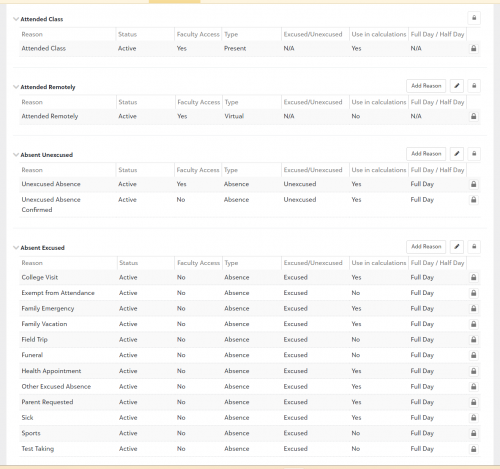
For context, I work at a 6 - 12 school. Our approach to dealing with some of the problems that you described is to allow teachers to only enter attendance reasons that do not directly trigger the conduct rules. The options are: PRESENT, ABSENT, TARDY, and TARDY-10 (tardy more than 10 minutes).
We refer to those codes as unresolved because the absence/tardy is neither excused or unexcused at that point.
The attendance coordinator then looks at those attendance reports and changes the reason to excused or unexcused, based on all information available. After a day or two, if the student has not arranged for the parent or a teacher to provide documentation to justify an excuse, the absence/tardy is changed to unexcused.
The unexcused reasons are connected to the conduct infractions and points.
This means less work for the teacher and more work for the attendance coordinator. The teacher doesn't have to figure out if the student's absence or tardy is excused or not. The teacher only has to report that the student was physically present in the classroom or not.
The attendance coordinator takes the phone calls and emails from parents, and the lists of students travelling for athletic events, music performances, field trips to here or there, etc., etc. etc. She pre-marks many planned absences based on information received, and deals with the rest after the absence. She works with the Dean of Students to deal with the oddball cases.
The big advantages are that
- the classroom teacher's task is very simple (present, late, or absent), and
- the student doesn't get a premature infraction that has to be backed out of the records.
6 -
We have definitely dealt with these issues! It is SOOO complicated to fix those absences that turn into tardies after the fact! Nothing is automatic but the triggered infraction itself and that is only corrected by hand. The conduct feature is not really designed to use with attendance in my opinion. However, it's the only thing that is there to use, so we keep trying. We have multiple people working on attendance all of the time here to keep up!
2 -
Our approach to dealing with some of the problems that you described is to allow teachers to only enter attendance reasons that do not directly trigger the conduct rules. The options are: PRESENT, ABSENT, TARDY, and TARDY-10 (tardy more than 10 minutes).
We refer to those codes as unresolved because the absence/tardy is neither excused or unexcused at that point.
We have a very similar process that works for us! As registrar, one of my duties is “attendance manager” to change those to excused or unexcused.
0 -
@Ellen Hackeman We handle things nearly identical to Brian Gray. Our teacher's responsibility is simply to report who is physically present or not. The reason why a student absent is determined by our attendance manager which avoids all of the issues you are describing.
1 -
@Brian Gray @Geoffrey Goodfellow (Courtney Stern, I couldn't find your link)
We are in the process of setting up a new system and I came across your posts as I was thinking about implementing Attendance/Conduct. Do you mind showing a screenshot of your Attendance Setup? I assume Present, Absent, Tardy, etc. are Attendance Categories. How does the Excused/Unexcused work with Absent? Thank you!
0 -
@Jennifer Welch - I wrote up our process and added some screenshots. It's too long to post here. See this Google Doc.
2 -
@Brian Gray thank you so much for taking the time to document this. I so appreciate it as I'm sure others will also.
0 -
@Brian Gray Thank you so much for sharing your Google Doc. My only question is how and/or when does the attendance manager mark the absences “unresolved.” Does the attendance manager get an automatic notification of the absence which triggers him/her to investigate it? Can you describe the process from the moment a child is marked absent by the teacher? What happens next? Thanks for your help.
0 -
My only question is how and/or when does the attendance manager mark the absences “unresolved.” Does the attendance manager get an automatic notification of the absence which triggers him/her to investigate it? Can you describe the process from the moment a child is marked absent by the teacher? What happens next? Thanks for your help.
@Steffany Fedor - We have two people who do the front-line management of attendance. The Upper School receptionist/switchboard operator, and the Middle School receptionist/admin assistant. We are a day/boarding school, 700 students in grades 6-12.
There are no automated notifications sent to them. They look in several places for information about absences:
- emails from coaches and group sponsors about students who will be away for athletics or other events
- emails from parents
- phone calls from parents
- information from our Health Center staff
Based on what they know from those sources, they update information in Academics > Attendance > Student attendance. They make calls to parents of day students who were reported absent from 1st period if they haven't already heard from them.
When they decide that they are not likely to get an explanation for an absence quickly, they mark it as unresolved so that they remember to check on it later in the day.
At the end of the day, students who have any unresolved infractions get an automated email from a program I wrote. (The email also goes to the parents.)
The student has a couple of days to get an explanation for the absence into the hands of the attendance clerk. That may be a call or email from a parent. It could be an email from a teacher whose class ran long (to explain a tardy to the next class). The student may give the clerk enough information to resolve it (e.g., the student was on a school trip and the clerk overlooked the name on the list).
After the time has expired, the Deans of Students take over. They may investigate further (or not - depending on what they know about the student). At that point the absence may be marked as excused for some reason or may be marked as unexcused.
The best thing about this process is that I have nothing to do with the day-to-day operation.
0












Categories
- All Categories
- 6 Blackbaud Community Help
- 211 bbcon®
- 1.4K Blackbaud Altru®
- 403 Blackbaud Award Management™ and Blackbaud Stewardship Management™
- 1.2K Blackbaud CRM™ and Blackbaud Internet Solutions™
- 15 donorCentrics®
- 360 Blackbaud eTapestry®
- 2.6K Blackbaud Financial Edge NXT®
- 659 Blackbaud Grantmaking™
- 579 Blackbaud Education Management Solutions for Higher Education
- 3.2K Blackbaud Education Management Solutions for K-12 Schools
- 943 Blackbaud Luminate Online® and Blackbaud TeamRaiser®
- 84 JustGiving® from Blackbaud®
- 6.7K Blackbaud Raiser's Edge NXT®
- 3.8K SKY Developer
- 250 ResearchPoint™
- 120 Blackbaud Tuition Management™
- 165 Organizational Best Practices
- 241 Member Lounge (Just for Fun)
- 36 Blackbaud Community Challenges
- 37 PowerUp Challenges
- 3 (Open) PowerUp Challenge: Grid View Batch
- 3 (Closed) PowerUp Challenge: Chat for Blackbaud AI
- 3 (Closed) PowerUp Challenge: Data Health
- 3 (Closed) Raiser's Edge NXT PowerUp Challenge: Product Update Briefing
- 3 (Closed) Raiser's Edge NXT PowerUp Challenge: Standard Reports+
- 3 (Closed) Raiser's Edge NXT PowerUp Challenge: Email Marketing
- 3 (Closed) Raiser's Edge NXT PowerUp Challenge: Gift Management
- 4 (Closed) Raiser's Edge NXT PowerUp Challenge: Event Management
- 3 (Closed) Raiser's Edge NXT PowerUp Challenge: Home Page
- 4 (Closed) Raiser's Edge NXT PowerUp Challenge: Standard Reports
- 4 (Closed) Raiser's Edge NXT PowerUp Challenge: Query
- 798 Community News
- 3K Jobs Board
- 56 Blackbaud SKY® Reporting Announcements
- 47 Blackbaud CRM Higher Ed Product Advisory Group (HE PAG)
- 19 Blackbaud CRM Product Advisory Group (BBCRM PAG)