Setting wildcard characters in report and query filters





Is there a known method to set wildcard or placeholder characters in filters set in queries or reports? For example, to filter in a report, quey, or chart organizer all reporting units ending in “20”; or beginning with “10” or similar options in chart organizers or page formatting?
Comments
-
0
-
@Kevin BrazellCan these be used in report filters, queries, and chart organizer filters? This is not a question on the search function. Thank you.
0 -
Wildcards are not available in the web view of FE NXT. So if you made a report or a Chart Organizer in the web view, you could not use wildcards.
In database view, wildcards can be utilized and they’re generally used for searching for records. Different fields in database view may allow for the use of them, so it might come down to you trying out different fields and seeing if the wildcards will produce the result you are looking for – for example if you go to filter a report by accounts, see if you can use wildcards in any of the fields involved with searching for an account(s).
The same explanation above could be said for VCOs. Perhaps when you filter for an account(s), try the wildcards in various fields to see if they may work.
Same thing with queries, you might find times when they could come into play. For example, one of those times could be if you choose your criteria operator of “Like.” Again, queries are quite vast, so there could potentially be other areas wildcards might work and it might just take trying out the wildcard in various fields to see if it produces the results you want.
So there could be instances when wildcards could be used, but, I would very much recommended that if you are using these wildcards, I would still look over your results and check to see if any accounts (or whatever it may be) are missing or shouldn’t be there. Wildcards can be very helpful, but they can pull in things you may not intend or leave out things you may want included.
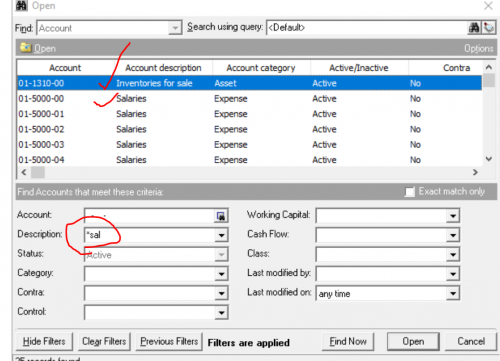
Here is an example. Notice how I searched for *sal and it pulled up these results. If I was looking for salaries, notice how the results also have “Inventories for sale.”
So again, even if you find that wildcards will work in certain fields, it’d still be very much worth you time to look over the results to make sure you are not missing anything and to make sure other “things” haven’t been added.
I hope this helps!
0 -
@Nate HugTHank you. This was for setting values in queries and chart organizers. I have submitted an idea request for this as this functionality has proven to be useful in other reporting tools.
0








Categories
- All Categories
- 6 Blackbaud Community Help
- 213 bbcon®
- 1.4K Blackbaud Altru®
- 400 Blackbaud Award Management™ and Blackbaud Stewardship Management™
- 1.1K Blackbaud CRM™ and Blackbaud Internet Solutions™
- 15 donorCentrics®
- 360 Blackbaud eTapestry®
- 2.6K Blackbaud Financial Edge NXT®
- 655 Blackbaud Grantmaking™
- 576 Blackbaud Education Management Solutions for Higher Education
- 3.2K Blackbaud Education Management Solutions for K-12 Schools
- 939 Blackbaud Luminate Online® and Blackbaud TeamRaiser®
- 84 JustGiving® from Blackbaud®
- 6.6K Blackbaud Raiser's Edge NXT®
- 3.7K SKY Developer
- 248 ResearchPoint™
- 119 Blackbaud Tuition Management™
- 165 Organizational Best Practices
- 241 Member Lounge (Just for Fun)
- 34 Blackbaud Community Challenges
- 34 PowerUp Challenges
- 3 (Open) PowerUp Challenge: Chat for Blackbaud AI
- 3 (Closed) PowerUp Challenge: Data Health
- 3 (Closed) Raiser's Edge NXT PowerUp Challenge: Product Update Briefing
- 3 (Closed) Raiser's Edge NXT PowerUp Challenge: Standard Reports+
- 3 (Closed) Raiser's Edge NXT PowerUp Challenge: Email Marketing
- 3 (Closed) Raiser's Edge NXT PowerUp Challenge: Gift Management
- 4 (Closed) Raiser's Edge NXT PowerUp Challenge: Event Management
- 3 (Closed) Raiser's Edge NXT PowerUp Challenge: Home Page
- 4 (Closed) Raiser's Edge NXT PowerUp Challenge: Standard Reports
- 4 (Closed) Raiser's Edge NXT PowerUp Challenge: Query
- 790 Community News
- 2.9K Jobs Board
- 53 Blackbaud SKY® Reporting Announcements
- 47 Blackbaud CRM Higher Ed Product Advisory Group (HE PAG)
- 19 Blackbaud CRM Product Advisory Group (BBCRM PAG)