Employee Contact Information in Core





We have a new HR department that is recommending we remove all employee contact information from our Blackbaud database, except for work email. I'm looking for “best practices”, and would appreciate your feedback. Do you keep employee address and cell phone information in Blackbaud K-12, and if so, do you allow access to “non-teaching staff” role?
Comments
-
@Susan Hemingway Hi Susan, yes, we maintain cell and address for all current and former employees in our databases. All of that info access is controlled by security and roles. Only other teachers can view current teacher cells and address (no students, parents, etc.). We are a boarding school and not all teachers live directly on campus. Often we have to call their cell to get in touch.
2 -
@Susan Hemingway we also maintain our employee contact information - address and cell with school email and personal email. We need this information in BB because we sync with our communications software and our emergency management software. It is all synced with Core and refreshes on a nightly sync. Like Sandra, access to this information is controlled with security roles - we worked with HR to determine who would have access to view/edit this information - small, controlled group.
2 -
@Susan Hemingway, we keep all our employee information in Core. With security, only the correct people have access to see it. It also permits employees to edit their own information which helps us keep up with address and phone number changes more easily. We only share employee business email address with our students and parents. You might want to drill down on your HR's motivation of why they are wanting you to remove this information. Perhaps they have a rationale reason but one that can be solved within Core so that you do not need to remove the information. In our case, I found giving HR edit access to employee information in Core gave them the control they were after.
4 -
All,
I “second” the practice of keeping contact information, if only minimal, in Core because
- It streamlines the maintenance of data that must eventually flow into a bulk communication facility. [e.g. for us, Bright Arrow]
- Having the information closer to academic info makes it more available as needed by other teachers/administrators
- The role mechanism, although arguably overcomplicated, is sufficiently robust to provide necessary privacy/security
- I hate HR overreach ??
4 -
We also keep employee information in Core - with limitations on what fields are visible. For employees who are also parents - I make sure they understand how to edit their profile settings so they can hide their personal information from other parents if they so choose.
We are integrated with Raiser's Edge - and need employee home addresses in order to send acknowledgement letters and other solicitations.3 -
@Susan Hemingway
Our school stores address, personal & work email and cell phone for all staff & faculty. Cell phones and personal email for the Bright Arrow emergency notifications. Address syncs with Raisers Edge (when I run Connect RE I can see any changes and notify HR with updates). Only select staff have access to addresses. We had an “incident” several years back and decided it wasn't necessary for all staff to view one another's address. Best of luck with finding a solution for your school.1 -
@Katherine Nolte
Thank you!0 -
Hello Candate,
How do you limit visibility on faculty and staff address, phone number visibility to limit parents form viewing it?
Thank you.
~Sharie
Davis Waldorf School
Davis, CA0 -
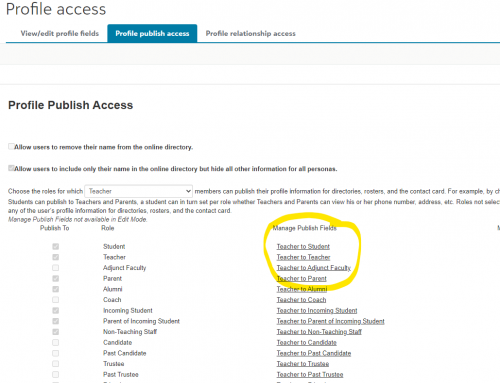
@Sharie Sprague by default, the system does not show wireless phones, home addresses, etc. You can check your settings by navigating to Core > Security > Profile access > Profile publish access
Keep in mind if an employee is also a parent, then yes, this information would be visible unless the user decided to mark it private. As a user, you can update your own settings to control which personal information is published to the online community. From the top navigation menu, select your name, Settings, Privacy.
0 -
@Bryan Lorenzo THANK YOU!
0 -
@Susan Hemingway I was dealing with this same issue when you posted this concern. I had to put in a chat request because I couldn't navigate past this screen. I didn't know that the choices in the center of the screen shot I have included opened another menu. Now I am all set and everyone can view faculty profile pictures and their school email but not any personal info. ?
 0
0 -
@Susan Hemingway I would like to add a tangential question to publishing employee records in Core. How do you all handle Job Title? We are wanting to replicate in BBEM an employee directory we host in Sharepoint now that includes Job Title. It seems we can include a Job Title as part of the “Current” Business data of a user's Contact Card, but it seems Job Title should be part of Employee Role data. I'm wondering if we should make a Role for each Job Title at our school. This will allow for a more accurate historical record in BBEM as Roles change. However I don't see a way to display Role in the Faculty/Staff Directory. Thoughts?
0




















Categories
- All Categories
- 6 Blackbaud Community Help
- 211 bbcon®
- 1.4K Blackbaud Altru®
- 403 Blackbaud Award Management™ and Blackbaud Stewardship Management™
- 1.2K Blackbaud CRM™ and Blackbaud Internet Solutions™
- 15 donorCentrics®
- 360 Blackbaud eTapestry®
- 2.6K Blackbaud Financial Edge NXT®
- 659 Blackbaud Grantmaking™
- 579 Blackbaud Education Management Solutions for Higher Education
- 3.2K Blackbaud Education Management Solutions for K-12 Schools
- 943 Blackbaud Luminate Online® and Blackbaud TeamRaiser®
- 84 JustGiving® from Blackbaud®
- 6.7K Blackbaud Raiser's Edge NXT®
- 3.8K SKY Developer
- 250 ResearchPoint™
- 120 Blackbaud Tuition Management™
- 165 Organizational Best Practices
- 241 Member Lounge (Just for Fun)
- 36 Blackbaud Community Challenges
- 37 PowerUp Challenges
- 3 (Open) PowerUp Challenge: Grid View Batch
- 3 (Closed) PowerUp Challenge: Chat for Blackbaud AI
- 3 (Closed) PowerUp Challenge: Data Health
- 3 (Closed) Raiser's Edge NXT PowerUp Challenge: Product Update Briefing
- 3 (Closed) Raiser's Edge NXT PowerUp Challenge: Standard Reports+
- 3 (Closed) Raiser's Edge NXT PowerUp Challenge: Email Marketing
- 3 (Closed) Raiser's Edge NXT PowerUp Challenge: Gift Management
- 4 (Closed) Raiser's Edge NXT PowerUp Challenge: Event Management
- 3 (Closed) Raiser's Edge NXT PowerUp Challenge: Home Page
- 4 (Closed) Raiser's Edge NXT PowerUp Challenge: Standard Reports
- 4 (Closed) Raiser's Edge NXT PowerUp Challenge: Query
- 798 Community News
- 3K Jobs Board
- 56 Blackbaud SKY® Reporting Announcements
- 47 Blackbaud CRM Higher Ed Product Advisory Group (HE PAG)
- 19 Blackbaud CRM Product Advisory Group (BBCRM PAG)