Use Manage Student Enrollments Promote before end of school year?





I am wondering what happens if I run the promote tool under Manage Student Enrollments before the end of the school year? I want to flag those students who are repeating or withdrawing now that contracts are done. This tool allows it to be done in bulk rather than one by one. Not sure if I run it early will it immediately promote them or schedule them for when the time comes?
Comments
-
@Brian Hoyt - My gut feeling is that it’s a bad idea to run the promotion tool at this point in the year. You set an effective date for withdrawing students as part of the process, but that’s not an option for promoting or retaining students.
You would have to set that effective date to be after the end of the current academic term. (If you don't, the student will be withdrawn from current courses on the effective date.)
The enrollment record for next year is not removed until the effective date, so you would still have to manually remove those enrollment records if you don't want those enrollment records included for the scheduling process.
1 -
@Brian Hoyt I think this is an interesting discussion. I agree with @Brian Gray that the promote/withdraw wizard is probably not the right tool at this point in the year, but I wish there were a right tool… we struggle at this point in the year to remove non-returning students from our “next year” lists. Using the manage enrollments tool will not allow you to remove students from the following year effective immediately. Ultimately we end up removing future enrollment rows by hand from withdrawing students' records, which does NOT seem like the optimal path and only works because we have a tiny population. Curious what other schools do to curate “next year" lists (ie. for distribution lists) at this time of year.
4 -
@Morgan Kunze Your issue is exactly mine as well. Building accurate next school year lists. We too manually delete rows which is cumbersome and potentially inaccurate at best.
0 -
@Morgan Kunze I also do this manually, which works because our attrition rate is rather low!
1 -
@Brian Hoyt We do the graduation and promotions only after 1. graduation has occurred, and 2. we are done sending any messages to this year's families. #2 includes messages about the release of end-of-year report cards.
0 -
@Morgan Kunze I build our Pushpage distribution lists using Advanced Lists. To address this issue, I build lists of “Rising Grade X” and I exclude those students marked as “not returning.”
0 -
@Morgan Kunze I build our Pushpage distribution lists using Advanced Lists. To address this issue, I build lists of “Rising Grade X” and I exclude those students marked as “not returning.”
How do you mark them as not returning? Do you do it before the end of the year?
0 -
@Brian Hoyt Since we are a k-12 school, the default is promotion so everyone gets an enrollment contact. As I learn about attribution, I indicate “not returning“ in their contracy.
1 -
@Morgan Kunze I generate a list of departing students and their parents, and then I create grade-level lists that exclude the departing families. Fortunately, our attrition rate is low so it's not a huge deal.
0 -
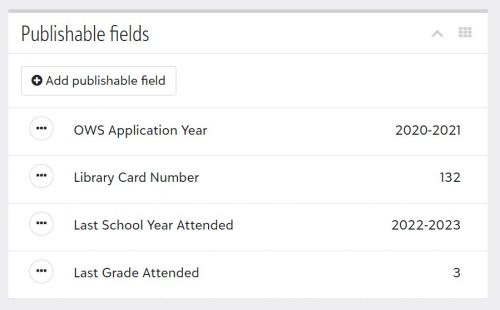
@Brian Hoyt I use Publishable Fields for this data and run Advanced Lists with those filters. When I'm importing new students, I add the fields in with a Data Import. I'm guessing this would be a field easily accessable if we used Blackbaud applications instead of Ravenna…see my attachment as an example.
1













Categories
- All Categories
- 6 Blackbaud Community Help
- 211 bbcon®
- 1.4K Blackbaud Altru®
- 402 Blackbaud Award Management™ and Blackbaud Stewardship Management™
- 1.1K Blackbaud CRM™ and Blackbaud Internet Solutions™
- 15 donorCentrics®
- 360 Blackbaud eTapestry®
- 2.6K Blackbaud Financial Edge NXT®
- 655 Blackbaud Grantmaking™
- 576 Blackbaud Education Management Solutions for Higher Education
- 3.2K Blackbaud Education Management Solutions for K-12 Schools
- 941 Blackbaud Luminate Online® and Blackbaud TeamRaiser®
- 84 JustGiving® from Blackbaud®
- 6.7K Blackbaud Raiser's Edge NXT®
- 3.7K SKY Developer
- 248 ResearchPoint™
- 120 Blackbaud Tuition Management™
- 165 Organizational Best Practices
- 240 Member Lounge (Just for Fun)
- 34 Blackbaud Community Challenges
- 37 PowerUp Challenges
- 3 (Open) PowerUp Challenge: Grid View Batch
- 3 (Closed) PowerUp Challenge: Chat for Blackbaud AI
- 3 (Closed) PowerUp Challenge: Data Health
- 3 (Closed) Raiser's Edge NXT PowerUp Challenge: Product Update Briefing
- 3 (Closed) Raiser's Edge NXT PowerUp Challenge: Standard Reports+
- 3 (Closed) Raiser's Edge NXT PowerUp Challenge: Email Marketing
- 3 (Closed) Raiser's Edge NXT PowerUp Challenge: Gift Management
- 4 (Closed) Raiser's Edge NXT PowerUp Challenge: Event Management
- 3 (Closed) Raiser's Edge NXT PowerUp Challenge: Home Page
- 4 (Closed) Raiser's Edge NXT PowerUp Challenge: Standard Reports
- 4 (Closed) Raiser's Edge NXT PowerUp Challenge: Query
- 796 Community News
- 3K Jobs Board
- 54 Blackbaud SKY® Reporting Announcements
- 47 Blackbaud CRM Higher Ed Product Advisory Group (HE PAG)
- 19 Blackbaud CRM Product Advisory Group (BBCRM PAG)