Move files from Tenant to one drive/ sharepoint- Power Automate





Hello, I am sure I saw recently it is possible to run a schedule to move docs from the hosted tenant area to sharepoint/ one drive- please help
Comments
-
@Ashley Gelderblom
it depends on what you trying to achieve, you may need RE:Queue which is another service you need to buy from Blackbaud.Can you explain more on what you mean by “move docs from the hosted tenant area”? What docs are you talking about, how are the docs created? Are you hosted on Azure or bb data center (not sure if that's the terminology)
0 -
@Alex Wong
Ah yes, we have queue, and have csvs being created on a schedule, so need to have those files moved/ copied from the tenant area to sharepoint0 -
@Ashley Gelderblom
there's 2 ways you can go about this.- create a flow that trigger on file modified on a sFTP connector trigger
- you can monitor specific folder for changes
- when the change happened, you just take the content of the file (that comes from the dynamic content of the trigger) and create a new SharePoint file with it
- depending on what file you are trying to download, the method is a little different, excel of word (your original post say “docs” but you reply say csvs)
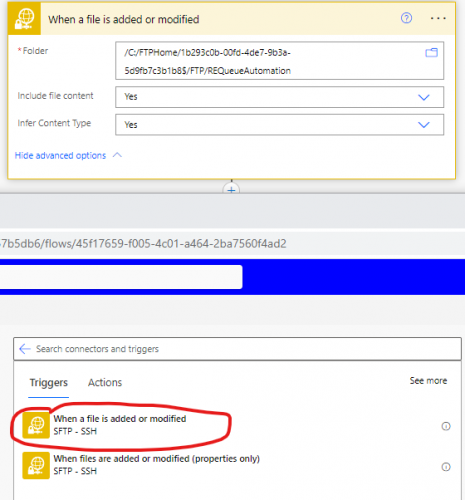
- create a flow that trigger on schedule
- if you set your RE:Queue to export at certain time of day, and you know your export will take 10 minutes, you can create a schedule flow that runs ~15-30 minutes after your RE:Queue scheduled run time, and take all the files in a folder.
- you will do the same with each file as mentioned above
0 - create a flow that trigger on file modified on a sFTP connector trigger
-
@Alex Wong is right on in his answer and if you want to save some time, I uploaded a flow for just that. It is flow #1 here.
0 -
@Dan Snyder
good stuff.Your post require the use of Encodian, which is free to some extent, but need to paid if you do anything more than a few actions a day.
There is a free option to use if you also have M365 license for excel (most probably already do).
Basically, it uses a Excel connector action for running a “script” that takes in csv and put the csv data into an excel file. You can read more about it here:
https://learn.microsoft.com/en-us/office/dev/scripts/resources/samples/convert-csv
Basically Office Script is a TypeScript which is a “stricter” version of JavaScript, so not exactly for the low-coder, however, the link above provide you with the code to use, so you should be ok.
@Heather McLean
Not sure if you want to (since this is a “pro-code” option, but “no-code” in the sense that the code is provided to you), but I have heard many that wants to take csv into excel and maybe good for the next PowerAutomate User Group to show?2 -
@Alex Wong that's great! Thanks for sharing and I'd love to see you present at the user group.
0 -
1
-
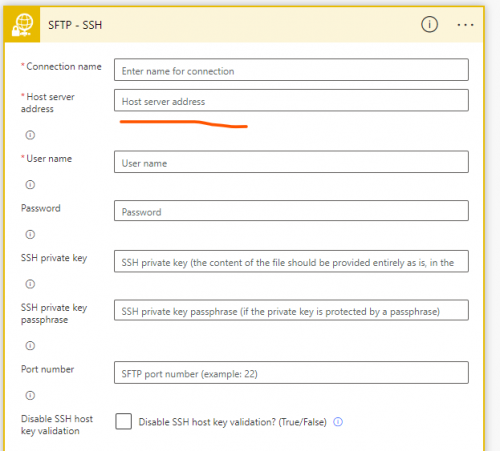
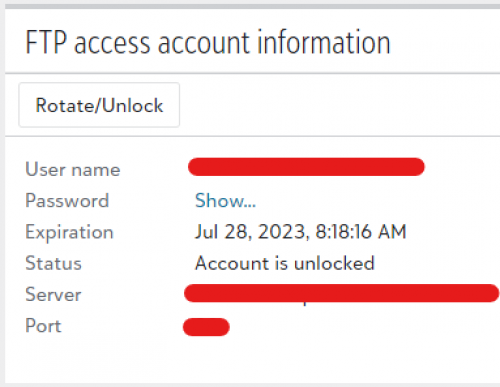
@Alex Wong Hi Alex, could you help with how I complete these details? particularly the host server address?
0 -
0
-
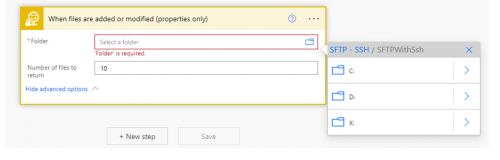
@Ashley Gelderblom You've been very helpful, I have got a bit further, now I need to nav to the folder, how do I do that please?
0 -
@Ashley Gelderblom
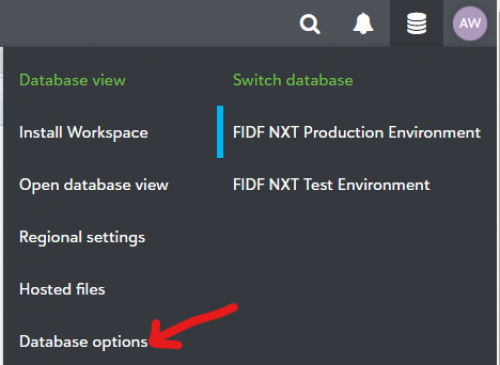
Open Hosted Files from RE NXT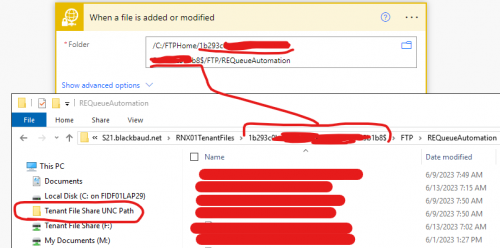
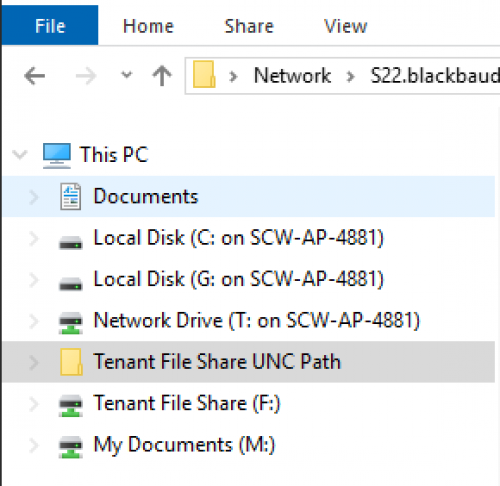
click on “Tenant File Share UNC Path”, which you will get this long alpha-numeric string,
The folder path is going to be:
/C:/FTPHome/1b293c******************************1b8$/FTP/REQueueAutomation
FTP and REQueueAutomation is the folder name drilling down from UNC Path.
This is how it is in Azure hosted RE NXT, I know it is different if you are Blackbaud hosted. You will need others (or support's) help if you are Blackbaud hosted.
0 -
@Alex Wong
Thanks we are BB hosted though tried your solution without any joy, anyone else able to help?0 -
0
-
@Dan Snyder Would you mind having a look at my recent post in this thread? are you able to help me navigate to the hosted folder?
0 -
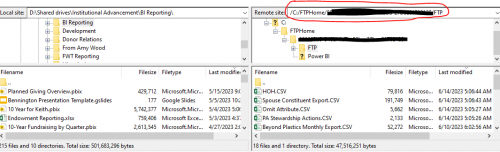
@Ashley Gelderblom How I was taught to get that information was to set up a connection via FileZilla and from there you will be able to grab the file path that you can paste into that step. Here is a guide to connecting to the hosted files with FileZilla.
Once you are connected, you will navigate to the location/folder where your files land and then you can grab the file path to use in your flow.
 0
0 -
Ok so turns out we are azure hosted, and apparently all other orgs that aren’t, will be moved soon according to BB. I did not realise the significance of navigating to the FTP folder, anything else and it failed. I finally managed to get this to work. Now the fun bit of automating EVERYTHING. Thanks all for your help.
1 -
@Alex Wong, I just found this thread and this is exactly the problem I want to solve. But will I need to keep after updating my FTP password every 90 days top keep this working?
0 -
@Susan Walters
yes.. that's a security policy of blackbaud, and you can only handle this way.However, if you use Query API, then you won't need to worry.
1









Categories
- All Categories
- 6 Blackbaud Community Help
- 211 bbcon®
- 1.4K Blackbaud Altru®
- 402 Blackbaud Award Management™ and Blackbaud Stewardship Management™
- 1.1K Blackbaud CRM™ and Blackbaud Internet Solutions™
- 15 donorCentrics®
- 360 Blackbaud eTapestry®
- 2.6K Blackbaud Financial Edge NXT®
- 655 Blackbaud Grantmaking™
- 576 Blackbaud Education Management Solutions for Higher Education
- 3.2K Blackbaud Education Management Solutions for K-12 Schools
- 941 Blackbaud Luminate Online® and Blackbaud TeamRaiser®
- 84 JustGiving® from Blackbaud®
- 6.7K Blackbaud Raiser's Edge NXT®
- 3.7K SKY Developer
- 248 ResearchPoint™
- 120 Blackbaud Tuition Management™
- 165 Organizational Best Practices
- 240 Member Lounge (Just for Fun)
- 34 Blackbaud Community Challenges
- 37 PowerUp Challenges
- 3 (Open) PowerUp Challenge: Grid View Batch
- 3 (Closed) PowerUp Challenge: Chat for Blackbaud AI
- 3 (Closed) PowerUp Challenge: Data Health
- 3 (Closed) Raiser's Edge NXT PowerUp Challenge: Product Update Briefing
- 3 (Closed) Raiser's Edge NXT PowerUp Challenge: Standard Reports+
- 3 (Closed) Raiser's Edge NXT PowerUp Challenge: Email Marketing
- 3 (Closed) Raiser's Edge NXT PowerUp Challenge: Gift Management
- 4 (Closed) Raiser's Edge NXT PowerUp Challenge: Event Management
- 3 (Closed) Raiser's Edge NXT PowerUp Challenge: Home Page
- 4 (Closed) Raiser's Edge NXT PowerUp Challenge: Standard Reports
- 4 (Closed) Raiser's Edge NXT PowerUp Challenge: Query
- 796 Community News
- 3K Jobs Board
- 54 Blackbaud SKY® Reporting Announcements
- 47 Blackbaud CRM Higher Ed Product Advisory Group (HE PAG)
- 19 Blackbaud CRM Product Advisory Group (BBCRM PAG)