Condition to get blank Opportunity Likelihood





Using Power Automate, I'm trying to send an Outlook email notification when a Opportunity is entered with a blank Likelihood field. (While this can be a required field in database view, it is not required in web view.)
How do I set a condition to find a blank Likelihood?
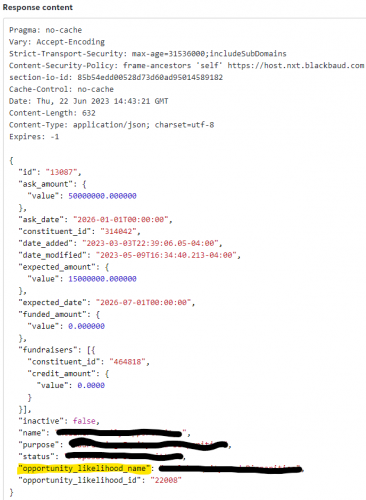
I've found the field I want in the Opportunity API. Get Opportunity has the "opportunity_likelihood_name" in the Response Content. So I know it exists, but how do I get to it for my Power Automate steps?
Thank you, Chris
Comments
-
@Chris Zello
you can use the Filter action on the list of opportunity that is returned by the list opportunity action. the filter “condition” should just be empty(….) is true.however, I don't see the field you are talking about being available, which API action/endpoint are you using
0 -
0
-
@Chris Zello
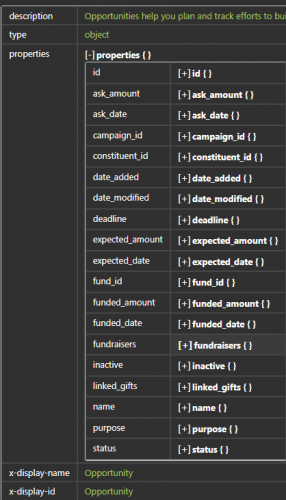
Can you screenshot a run that has the “opportunity_likelihood_name” field you talking about?I checked the schema and this property doesn't exist
 0
0 -
Now I think I see what you're saying @Alex Wong, in that when I look under “Application/JSON” the field I want doesn't exist. When I “Try It” and enter an Opportunity ID and hit Send, the field I want shows: "opportunity_likelihood_name".
Does this mean that this field isn't accessible because it isn't in the JSON?
0 -
@Chris Zello
if you see it in the output, then it is being returned, you just have to capture that field in your Parse JSON action. (I guess Blackbaud added it but forgot to update the documentation?)0 -
@Alex Wong @Chris Zello I just tried this out (as the button says) and if there is no likelihood value the field is not returned at all so I wonder if the empty function Alex mentioned will work if the field is not even there which is what you are looking for anyway?
0 -
@Dan Snyder
the field is only available on “get an opportunity” endpoint, it is NOT available on the list opportunity endpoint. The get an opportunity endpoint also did not document this field being available. I just tried it myself and did get the field returned in the response from the endpoint. NOTE that the Power Automate connector for action of Get an opportuntity does not “expose” this field neither in dynamic content.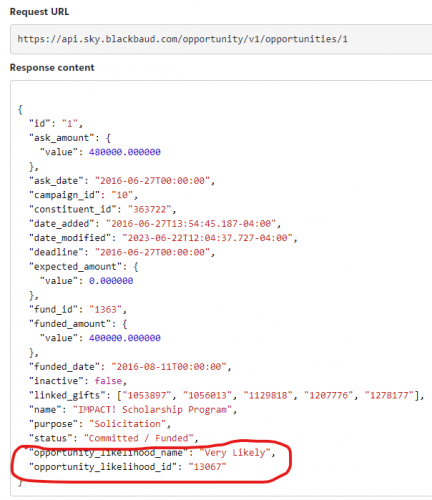
For what you want to do, you don't use Filter action like I mentioned before. Filter action intakes a list of records, and then filter on the properties. However, since Get list of opportunity API endpoint does not provide this field (opportunity_likelihood_name), then you can't filter.
To do what you want to do, you will have to make the flow use the get list of opportunity, can provide query parameter for opportunity “added” in the last day or week (depending on your interval of run). THEN you have to use Apply to Each opportunity ID and call the Get an opportunity endpoint using Blackbuad add-in Send HTTP Request action, then condition on opportunity_likelihood_name is empty.
1 -
@Chris Zello
in graphics of what you can do: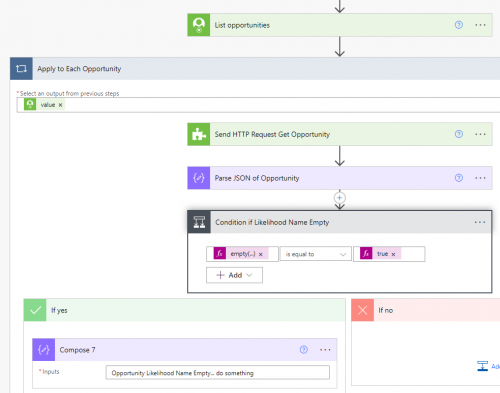
In the parse json, you need to make sure you have this:
"opportunity_likelihood_name": {
"type": "string"
},
"opportunity_likelihood_id": {
"type": "integer"
}
The Condition is an expression:
empty(body('Parse_JSON_of_Opportunity')?['opportunity_likelihood_name'])
1 -
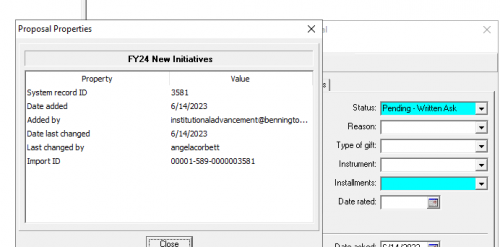
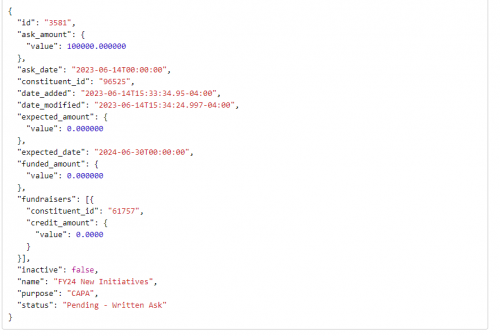
@Alex Wong Thanks for that clarification, I was actually using the Get Opportunity endpoint to test this out. We have renamed the likelihood field to Installments in database view so if you see from the screenshot below it is blank and then below is the result when I test it. Either way, I trust your solution more cause you have more API experience than me ?!
 0
0 -
@Dan Snyder
When a field is “empty” the API will not produce the property in JSON response. That's normal behavior, however, the issue is the API documentation did not document the 2 fields. I'm going to assume is an oversight when it was added to the actual API endpoint and forgot to update the documentation, I will submit a support case for them to fix that.2nd issue is with the Power Automate connector for Get an opportunity action, which is also missing these 2 fields, so will be reported to support at the same time.
1 -
@Alex Wong Thank you. I'm getting an error with the JSON code.
I've tried adding those lines you included, placing them below what is in the Schema but before the final curly bracket, but it won't save. Thoughts?
0 -
{
"type": "object",
"properties": {
"id": {
"type": "string"
},
"ask_amount": {
"type": "object",
"properties": {
"value": {
"type": "number"
}
}
},
"ask_date": {
"type": "string"
},
"campaign_id": {
"type": "string"
},
"constituent_id": {
"type": "string"
},
"date_added": {
"type": "string"
},
"date_modified": {
"type": "string"
},
"deadline": {
"type": "string"
},
"expected_amount": {
"type": "object",
"properties": {
"value": {
"type": "number"
}
}
},
"expected_date": {
"type": "string"
},
"fund_id": {
"type": "string"
},
"funded_amount": {
"type": "object",
"properties": {
"value": {
"type": "number"
}
}
},
"funded_date": {
"type": "string"
},
"fundraisers": {
"type": "array",
"items": {
"type": "object",
"properties": {
"constituent_id": {
"type": "string"
},
"credit_amount": {
"type": "object",
"properties": {
"value": {
"type": "number"
}
}
}
}
}
},
"inactive": {
"type": "boolean"
},
"linked_gifts": {
"type": "array",
"items": {
"type": "string"
}
},
"name": {
"type": "string"
},
"purpose": {
"type": "string"
},
"opportunity_likelihood_name": {
"type": "string"
},
"opportunity_likelihood_id": {
"type": "integer"
}
}
}0 -
@Alex Wong That did it! Thank you very much.
0 -
@Chris Zello In case you ever run into a similar scenario, there is another way to get the scheme for the Parse JSON action.
- Build the flow up to the Send an HTTP action.
- Save and run the flow.
- Copy the Body of the Output from the Send an HTTP action.
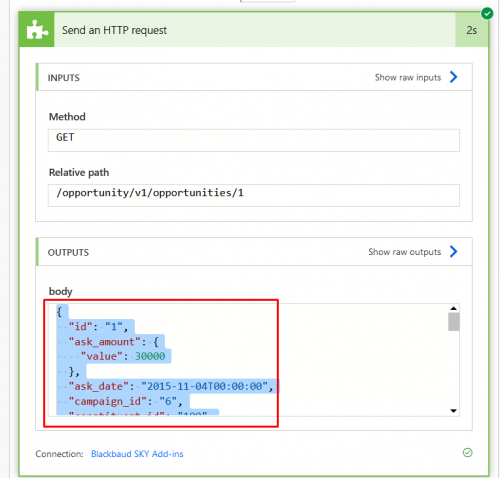
- Then Edit the flow and add the Parse JSON action.
- Click on the Generate from sample button on the Parse JSON action and paste the copied output into the new window.
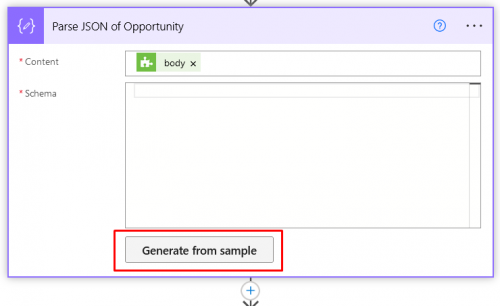
The generated schema will include all fields in the output. It is possible the generated schema can be wrong (i.e. a data type may be mis-identified, fields could incorrectly be included as required, etc.) but it usually pretty accurate and a good starting point if you don't have other documentation available.
2 -
@Ashley Moose @Chris Zello
Generally use of the Generate from sample is good, but it does not do well between integer and number. So if your sample JSON data has all integer, then the generator will put data type of integer which may not be what the field “can” return (i.e. ask amount should be number). Another situation is “null”.So it is still best to understand JSON a little more as you do Power Automate and know how to look and modify the JSON schema as needed.
In the API doc, you can click on the Schema tab and use the official FULL schema. In this situation, Blackbaud just forgot to update the schema.
0 -
@Alex Wong I totally agree! And thank you for calling out that specific examples. I find it is useful as a good starter, especially in instances where there is not good documentation, but you definitely need to understand the schema being provided in the JSON in case other errors occur.
0










Categories
- All Categories
- 6 Blackbaud Community Help
- 213 bbcon®
- 1.4K Blackbaud Altru®
- 402 Blackbaud Award Management™ and Blackbaud Stewardship Management™
- 1.1K Blackbaud CRM™ and Blackbaud Internet Solutions™
- 15 donorCentrics®
- 360 Blackbaud eTapestry®
- 2.6K Blackbaud Financial Edge NXT®
- 655 Blackbaud Grantmaking™
- 576 Blackbaud Education Management Solutions for Higher Education
- 3.2K Blackbaud Education Management Solutions for K-12 Schools
- 939 Blackbaud Luminate Online® and Blackbaud TeamRaiser®
- 84 JustGiving® from Blackbaud®
- 6.6K Blackbaud Raiser's Edge NXT®
- 3.7K SKY Developer
- 248 ResearchPoint™
- 119 Blackbaud Tuition Management™
- 165 Organizational Best Practices
- 241 Member Lounge (Just for Fun)
- 34 Blackbaud Community Challenges
- 34 PowerUp Challenges
- 3 (Open) PowerUp Challenge: Chat for Blackbaud AI
- 3 (Closed) PowerUp Challenge: Data Health
- 3 (Closed) Raiser's Edge NXT PowerUp Challenge: Product Update Briefing
- 3 (Closed) Raiser's Edge NXT PowerUp Challenge: Standard Reports+
- 3 (Closed) Raiser's Edge NXT PowerUp Challenge: Email Marketing
- 3 (Closed) Raiser's Edge NXT PowerUp Challenge: Gift Management
- 4 (Closed) Raiser's Edge NXT PowerUp Challenge: Event Management
- 3 (Closed) Raiser's Edge NXT PowerUp Challenge: Home Page
- 4 (Closed) Raiser's Edge NXT PowerUp Challenge: Standard Reports
- 4 (Closed) Raiser's Edge NXT PowerUp Challenge: Query
- 792 Community News
- 2.9K Jobs Board
- 53 Blackbaud SKY® Reporting Announcements
- 47 Blackbaud CRM Higher Ed Product Advisory Group (HE PAG)
- 19 Blackbaud CRM Product Advisory Group (BBCRM PAG)