Connect Sky Add-in to Power Automate flow





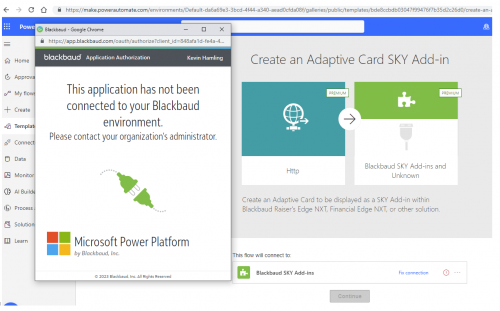
I am trying to create a new Power Automate flow using the Create an Adaptive Card SKY Add-in template in Dev. In order to do this, I have to connect the Blackbaud Sky Add-Ins to the flow. When I try to connect, I get popup below, “This application has not been connected to your Blackbaud environment.”
Comments
-
@Vicki Goodwin
I'm not sure if you have to do this but have you added the Blackbaud Sky Add-In to your connections? In Power Automate under Data- Connections- do you see Blackbaud Sky Add-In? Like below? You have to add it as a New Connection in order to use it.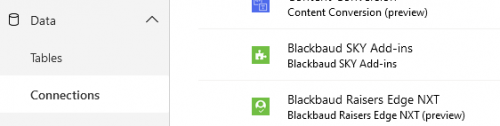 0
0 -
@Vicki Goodwin- My second thought is you need to create an application. Have you created an application before in Sky Developer? Then you connect your application to your Blackbaud environment (Test or Production) in the Marketplace.
There is a lot of documentation under the Microsoft Power Platform- Adaptive Card section to help you with that part. Or Add-Ins under the Sky Developer Documentation.
0 -
@Carolyn Grant - Our developer contacted me because I'm an administrator. This is the screen shot he sent me. I think I need to connect the sky add-in to the DEV environment but maybe I don't know where to do that. Very new to this part.
 0
0 -
Hi Carolyn, thank you for your response. My name is Kevin Hamling and I work with Vicki and have been a CRM developer for a while but am new to Sky APIs/Sky Developer. One question I should maybe start with is this… We need a premium license for Power Automate, correct? It seems we don't have that, so I think that is my issue.
In Power Automate, I tried to add the the Sky Add-Ins as a connection under Data – Connections, but I get the same error and the same “fix connection” link. I have not created an application in Sky Developer before. I am new to this and was trying to go through the example from the link - https://developer.blackbaud.com/skyapi/docs/addins/get-started/adaptive-card-addins to use the Adaptive Card add in with Blackbaud CRM, not from a custom Sky application. It sounded like I could do that and show the adaptive card as a tile or a flyaway. I created my developer account, registered the Dev instance of our CRM (hosted by Blackbaud), and then tried to follow the instructions in the link. Within the https://developer.blackbaud.com/skyapi/docs/addins/get-started/adaptive-card-addins link, I needed to know my CardServiceURL. To get that, I was pointed to the Power Automate link - https://docs.blackbaud.com/microsoft-connectors-docs/microsoft-power-platform/power-automate/adaptive-card-addins. Going through that link is when I get the error trying to add the Blackbaud Sky Add-Ins data connection.
0 -
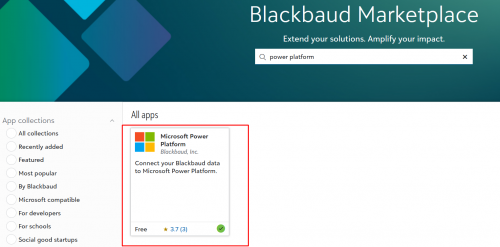
@Kevin Hamling and @Vicki Goodwin This sounds like it may be occurring due to the Power Platform not being connected in the Marketplace. Can you go to the Marketplace, search for power platform, and verify the app below is connected?
 3
3 -
@Ashley Moose
I connected Power Platform to the Marketplace as you mentioned and it is working now. That is what I needed to do and I thank you for responding.2 -
@Ashley Moose has the correct answer! @Kevin Hamling you need to go into the Marketplace and search for Power Platform and connect that to your environment. I haven't done that in so long I forgot it was needed. ?
0 -
Yes, that did it. Thank you both. I was able to create the flow, but apparently I cannot turn it on because we do not have a premium license. That looks to be our next step.
1 -
hello @Ashley Moose
Reg. The Power of Power Automate in Blackbaud CRM Empowering Major Gift Officers in Data Entry#bbdevdays
I’m reaching out from York University in Toronto. We are currently using Blackbaud CRM and are exploring your solution involving Power Automate and BB SKY PAI, specifically around managing Interactions and Steps within Power Apps.
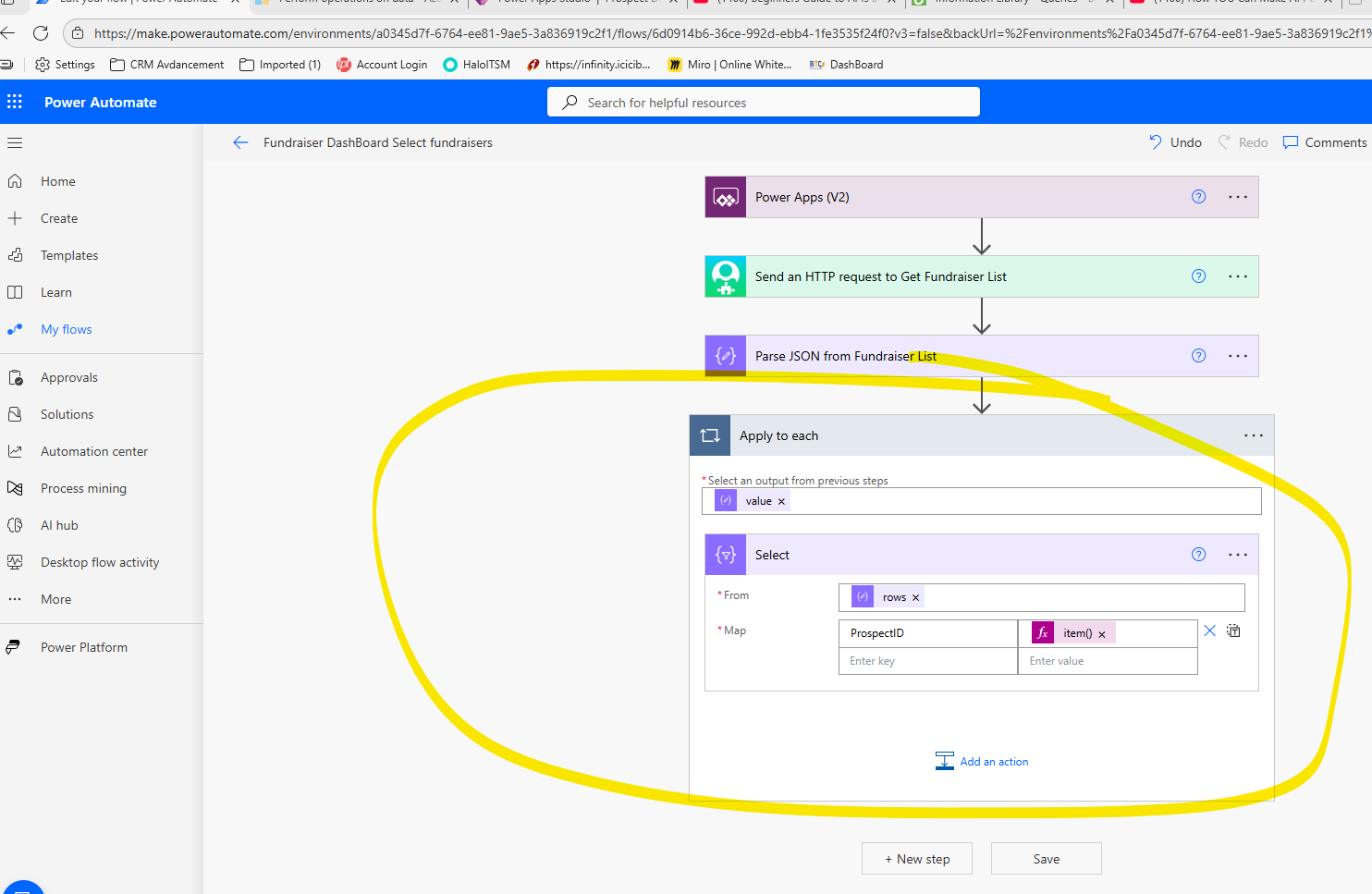
I’ve attempted to implement the solution, but I’m facing challenges with parsing JSON output and using it effectively in the Select data operation within Power Automate. Would it be possible to get a step-by-step video or documentation guide or walkthrough to help with the creation of this solution?
I am not getting select operation but default going as apply for each loop. not sure how you have able to map select operation ?
Thank you in advance for your support!
Best regards,
Balasubramani T Mohanasundaram0 -
@Balasubramani Thiruneirmalai Mohanasundaram - Recommend creating your own, new post for this. You'll get better visibility.
0 -
Hi @Balasubramani Thiruneirmalai Mohanasundaram - I do agree it's likely better to add this as a new post, but let's see if we can get you sorted out.
- Make sure you are calling this endpoint: /crm-conmg/fundraisers/List
- Then on the Select action, the Input should be taking the Value field. With you selecting Rows, that is likely what is forcing you into the Apply to Each loop.
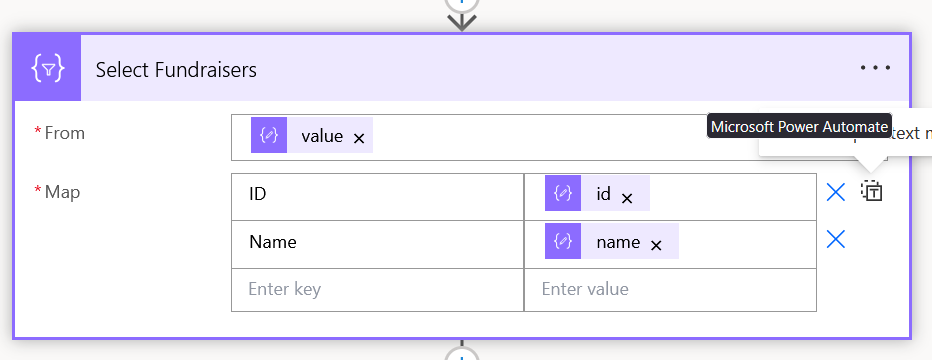 0
0














Categories
- All Categories
- 6 Blackbaud Community Help
- 211 bbcon®
- 1.4K Blackbaud Altru®
- 403 Blackbaud Award Management™ and Blackbaud Stewardship Management™
- 1.2K Blackbaud CRM™ and Blackbaud Internet Solutions™
- 15 donorCentrics®
- 360 Blackbaud eTapestry®
- 2.6K Blackbaud Financial Edge NXT®
- 659 Blackbaud Grantmaking™
- 579 Blackbaud Education Management Solutions for Higher Education
- 3.2K Blackbaud Education Management Solutions for K-12 Schools
- 943 Blackbaud Luminate Online® and Blackbaud TeamRaiser®
- 84 JustGiving® from Blackbaud®
- 6.7K Blackbaud Raiser's Edge NXT®
- 3.8K SKY Developer
- 250 ResearchPoint™
- 120 Blackbaud Tuition Management™
- 165 Organizational Best Practices
- 241 Member Lounge (Just for Fun)
- 36 Blackbaud Community Challenges
- 37 PowerUp Challenges
- 3 (Open) PowerUp Challenge: Grid View Batch
- 3 (Closed) PowerUp Challenge: Chat for Blackbaud AI
- 3 (Closed) PowerUp Challenge: Data Health
- 3 (Closed) Raiser's Edge NXT PowerUp Challenge: Product Update Briefing
- 3 (Closed) Raiser's Edge NXT PowerUp Challenge: Standard Reports+
- 3 (Closed) Raiser's Edge NXT PowerUp Challenge: Email Marketing
- 3 (Closed) Raiser's Edge NXT PowerUp Challenge: Gift Management
- 4 (Closed) Raiser's Edge NXT PowerUp Challenge: Event Management
- 3 (Closed) Raiser's Edge NXT PowerUp Challenge: Home Page
- 4 (Closed) Raiser's Edge NXT PowerUp Challenge: Standard Reports
- 4 (Closed) Raiser's Edge NXT PowerUp Challenge: Query
- 798 Community News
- 3K Jobs Board
- 56 Blackbaud SKY® Reporting Announcements
- 47 Blackbaud CRM Higher Ed Product Advisory Group (HE PAG)
- 19 Blackbaud CRM Product Advisory Group (BBCRM PAG)