Starting out with the prospect module





We are starting completely from scratch here and I was wondering if anyone could offer any insights / do's and dont's for setting this up. We have our very first meeting next week about ouor MD strategy in which we will discuss those known to us and how to start managing their records properly and then those not known to us which we will need to research. We've not adapted any of the drop downs yet so be really useful to get some ideas from those a bit further on than us! my email is claudia@leuchie.org.uk if easier to email direct! TIA!
Comments
-
@Claudia Wellwood We use the Prospect Module and I have completed it and it works well for us. Some suggestions for the drop down box. Now depending on if you are using Database View or RE NXT, since in Database View, you can make fields required and in RE NXT you cannot make all of many of them required. Below is the info for the Proposals/Opportunities
NAME: We make this required and it is text. I suggest name the proposal appropriately and include the year or FY, whatever you use in the name.
PURPOSE (also required and I suggest have them really mean something). Some of ours are: Capital Expansion, Education, Planned Giving, Sponsorships and then we have various names of Events.
FUNDRAISER: (again required): Very important
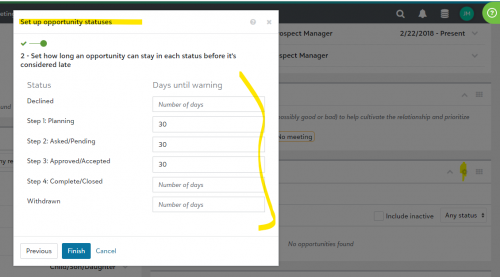
PROPOSAL STATUS (Required): Our status contains the following: Step 1:Planningh, Step 2: Asked, Step 3: Approved/Accepted, Step 4: Complete/Closed. We also have Declined and Withdrawn in this section. Also in RE NXT you can enter the number of days, the first three steps should be in.
Ask Amount (Required)
Ask Date: (Required)
Below is an example. Each time the Status moves from Step 1 to Step 3, the ask date gets updated. When we run an proposal/opportunity list in RE NXT, we use the Date Added (which the system produces) into RE as opposed to Ask Date. Found this to be more beneficial.
You can add other drop-downs for the ones below that are not required.
Make sure the gift officers fill this out as soon as they begin a proposal and make sure they have the info filled out correctly.
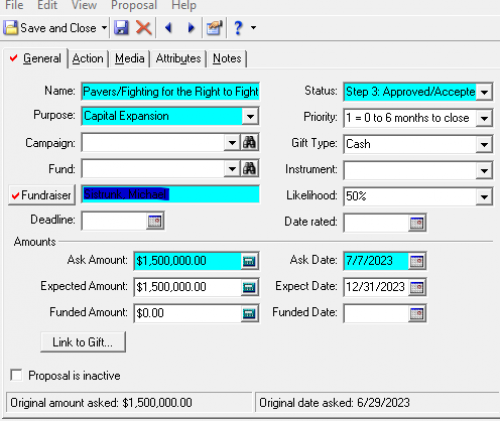
Now your ORG may want to do thing differently, but I found this to be the best for us, especially when we report on our gift officers for the FY and what proposals they have, what steps and which ones get funded. Once they get funded our gift processor puts in the amount, the funded date. changes the status to Complete and links the gift.
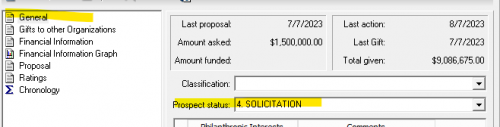
We also use the following for the Prospect Status : Our Prospect status contains the following: Step 1: Identification/Research, Step 2: Qualification, Step 3: Cultivation, Step 4: Solicitation, Step 5: Stewardship, Not a Major Gift Prospect at this time. In RE NXT we have how many days each of the 5 statuses should be in.
Hope this helps.
2 -
@Joe Moretti thanks so much – can you just explain to me what you meant at the end about how many days each of the 5 statuses should be in…? We have a long way to go but I want to ensure we start off on the right foot!
0 -
@Claudia Wellwood In RE NXT (cannot do this in Database View), pick any record, go to the opportunity tab, click on the setting wheel and here you can put the number of days that each status should be (the number of day is something your ORG needs to decide). When it goes past you will get a warning on the record. TAKE NOTE: You cannot query or report on this right now.
The same process for the PROSPECT STATUS.
 0
0 -
I've recommended the webinar “Power Your Fundraising with Actions and Opportunities” multiple times to people in the Community and my clients. It is available free and on demand from Blackbaud, once you fill in your contact info.
It will show you some best practices for how actions and opportunities work together for a moves management system, and I highly recommend the one hour investment of time!
Karen
2







Categories
- All Categories
- 6 Blackbaud Community Help
- 213 bbcon®
- 1.4K Blackbaud Altru®
- 403 Blackbaud Award Management™ and Blackbaud Stewardship Management™
- 1.2K Blackbaud CRM™ and Blackbaud Internet Solutions™
- 15 donorCentrics®
- 360 Blackbaud eTapestry®
- 2.6K Blackbaud Financial Edge NXT®
- 656 Blackbaud Grantmaking™
- 577 Blackbaud Education Management Solutions for Higher Education
- 3.2K Blackbaud Education Management Solutions for K-12 Schools
- 940 Blackbaud Luminate Online® and Blackbaud TeamRaiser®
- 84 JustGiving® from Blackbaud®
- 6.7K Blackbaud Raiser's Edge NXT®
- 3.7K SKY Developer
- 249 ResearchPoint™
- 119 Blackbaud Tuition Management™
- 165 Organizational Best Practices
- 241 Member Lounge (Just for Fun)
- 34 Blackbaud Community Challenges
- 37 PowerUp Challenges
- 3 (Open) PowerUp Challenge: Grid View Batch
- 3 (Closed) PowerUp Challenge: Chat for Blackbaud AI
- 3 (Closed) PowerUp Challenge: Data Health
- 3 (Closed) Raiser's Edge NXT PowerUp Challenge: Product Update Briefing
- 3 (Closed) Raiser's Edge NXT PowerUp Challenge: Standard Reports+
- 3 (Closed) Raiser's Edge NXT PowerUp Challenge: Email Marketing
- 3 (Closed) Raiser's Edge NXT PowerUp Challenge: Gift Management
- 4 (Closed) Raiser's Edge NXT PowerUp Challenge: Event Management
- 3 (Closed) Raiser's Edge NXT PowerUp Challenge: Home Page
- 4 (Closed) Raiser's Edge NXT PowerUp Challenge: Standard Reports
- 4 (Closed) Raiser's Edge NXT PowerUp Challenge: Query
- 796 Community News
- 3K Jobs Board
- 54 Blackbaud SKY® Reporting Announcements
- 47 Blackbaud CRM Higher Ed Product Advisory Group (HE PAG)
- 19 Blackbaud CRM Product Advisory Group (BBCRM PAG)