Pulling Primary/Salutation Addressee fields in NXT Lists for Mailing Lists





Hello! I am a new user to the database and NXT, and I wanted to try and streamline a process that was taught to me for Mailing Lists. I have been taught to pull mailing lists using Queries from the Database version of RE and export final results to Excel. The process is quite cumbersome as it involves merging multiple queries into a final mailing list. However, the database exports Primary Addressee and Salutation Addressee which is great for the mailing envelopes as our printer can print that data from Excel.
I have played around with Lists in NXT, but I cannot seem to pull primary & salutation addressee fields. It looks like I can only pull donor names, but I'd really like to pull mailing data.
Is this possible to do in NXT or should I stick with the database process?
Comments
-
@Sarah Williams - Welcome to BB Community! You should stick with the database process. Web View lists are not built out enough to support pulling mailing lists, yet.
2 -
@Austen Brown
Thank you, that is good to know!0 -
@Sarah Williams To make the process less cumbersome, instead of merging various queries, use RE MAIL Quick Letters. Put together all the various queries you are using, then in RE MAIL, put each of those queries into the SEGMENT Tab and use a hierarchy for the queries. Using the segment will see that your output will not contain duplicates, since if someone happens to be in two or three queries, it will only pull them once. Below is an example. You will not need to have an output query, I had it because I was doing something with them. I like using this because you can also determine if someone has a record and if they are a contact for an Organization, you can choose to mail to just the IND record or both. You can also choose if you want an appeal and/or package attached to each of the records as well.
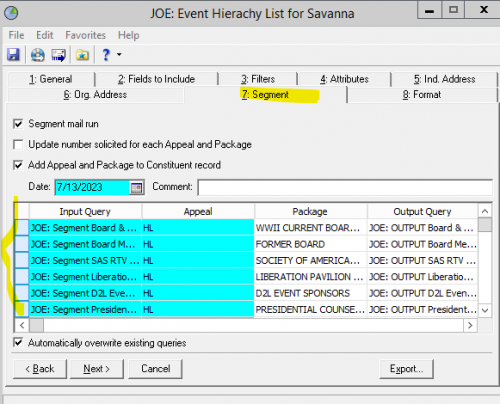
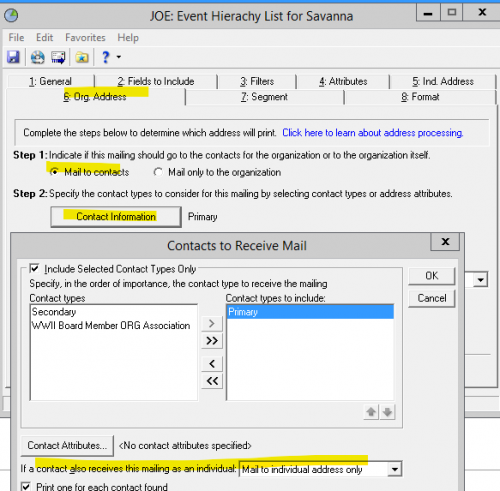
If you are not using RE Mail in database view for mailings, you are missing out on a simple process.
6 -
@Sarah Williams, what @Joe Moretti suggested is your best bet, as long as you don't need more complex export fields (like alumni graduation year, previous appeal giving summaries, society memberships, etc. We ourselves, do use a lot of customized fields in our mailings beyond addressee formats, and so alas, Mail is not adequate for us.)
To be perfectly honest though, you don't really need a ton of queries merged all together. You can usually accomplish the same result with one query, using carefully tiered parentheses in your criteria. However, I have learned from experience that this is too complicated for most new users. I have had to break down my parenthetical queries into multiple merged queries when I wanted to pass the process on to other people. I mention this to give you another perspective, that the merged query process you find cumbersome may itself have been simplified to make it more digestible. As you grow in experience with query grouping, you may be able to combine them into a single query down the road.
3 -
@Sarah Williams, what @Joe Moretti suggested is your best bet, as long as you don't need more complex export fields (like alumni graduation year, previous appeal giving summaries, society memberships, etc. We ourselves, do use a lot of customized fields in our mailings beyond addressee formats, and so alas, Mail is not adequate for us.)
To be perfectly honest though, you don't really need a ton of queries merged all together. You can usually accomplish the same result with one query, using carefully tiered parentheses in your criteria. However, I have learned from experience that this is too complicated for most new users. I have had to break down my parenthetical queries into multiple merged queries when I wanted to pass the process on to other people. I mention this to give you another perspective, that the merged query process you find cumbersome may itself have been simplified to make it more digestible. As you grow in experience with query grouping, you may be able to combine them into a single query down the road.
Thank you Faith - This is exactly what I was going to say!
I have worked in a lot of databases that have multiple queries merged together that are SO easy to compile into a single query. I wonder if this was a method that was taught to users a long time ago? I've been using RE since 1997 and I don't recall learning to do queries this way, even in the admin training from Blackbaud.
That being said, I've had occasion to use merges. But they are always done as a last resort, and for very complex situations.
Karen
0 -
@Karen Diener
Thank you!0 -
@Austen Brown in August 2023 you said "Web View lists are not built out enough to support pulling mailing lists, yet." Do you know if or when this will happen? I'm working on creating emails in WV and need to pull this information rather than an individual donor name, especially when there is a spouse on the record who is not his/her own constituent.
How many issues am I running into here? Will I need to make each spouse their own constituent in order to get every name in an email list? (Compared to Online Express where even non-constituents are in the Primary Addressee name field).0 -
I’ve started creating a free RENXT add-in for the Marketplace called NXTensions List Manager. I’ve already pulled in all the addressees and salutations but it is going to take a bit to recreate all the filter screens. Blackbaud doesn’t allow the list functionality to be extended, so I am having to recreate all the functionality from scratch. Before I get too far into it, I wanted to get the community’s feedback around when they use lists vs queries to pull data from RENXT.
0 -
Ken, I'd be careful putting in lots of effort on this. Lists is not a very good tool to produce mailings fully correctly, and trying to extend it to make it such would require a ton of effort, effort that BB should be putting into the web view in 2026. Of course, it's your time, your call, but TBH, as a consultant I would have a hard, hard time recommending to clients they do mailings directly from Lists. Is BB woefully behind on this? Yes. But we still have Mail in the db view and that gets the job done right. FWIW :)
1















Categories
- All Categories
- 6 Blackbaud Community Help
- 211 bbcon®
- 1.4K Blackbaud Altru®
- 403 Blackbaud Award Management™ and Blackbaud Stewardship Management™
- 1.2K Blackbaud CRM™ and Blackbaud Internet Solutions™
- 15 donorCentrics®
- 360 Blackbaud eTapestry®
- 2.6K Blackbaud Financial Edge NXT®
- 659 Blackbaud Grantmaking™
- 579 Blackbaud Education Management Solutions for Higher Education
- 3.2K Blackbaud Education Management Solutions for K-12 Schools
- 943 Blackbaud Luminate Online® and Blackbaud TeamRaiser®
- 84 JustGiving® from Blackbaud®
- 6.7K Blackbaud Raiser's Edge NXT®
- 3.8K SKY Developer
- 250 ResearchPoint™
- 120 Blackbaud Tuition Management™
- 165 Organizational Best Practices
- 241 Member Lounge (Just for Fun)
- 36 Blackbaud Community Challenges
- 37 PowerUp Challenges
- 3 (Open) PowerUp Challenge: Grid View Batch
- 3 (Closed) PowerUp Challenge: Chat for Blackbaud AI
- 3 (Closed) PowerUp Challenge: Data Health
- 3 (Closed) Raiser's Edge NXT PowerUp Challenge: Product Update Briefing
- 3 (Closed) Raiser's Edge NXT PowerUp Challenge: Standard Reports+
- 3 (Closed) Raiser's Edge NXT PowerUp Challenge: Email Marketing
- 3 (Closed) Raiser's Edge NXT PowerUp Challenge: Gift Management
- 4 (Closed) Raiser's Edge NXT PowerUp Challenge: Event Management
- 3 (Closed) Raiser's Edge NXT PowerUp Challenge: Home Page
- 4 (Closed) Raiser's Edge NXT PowerUp Challenge: Standard Reports
- 4 (Closed) Raiser's Edge NXT PowerUp Challenge: Query
- 798 Community News
- 3K Jobs Board
- 56 Blackbaud SKY® Reporting Announcements
- 47 Blackbaud CRM Higher Ed Product Advisory Group (HE PAG)
- 19 Blackbaud CRM Product Advisory Group (BBCRM PAG)