Survey: Should OneRoster output for SMS number be changed?





SMS Output Survey - Please reply with your thoughts/vote!!
Currently, the OneRoster SMS field returns the Text number setting from a user's Notification settings in BEM. This requires a user to “opt-in” to receiving texts.
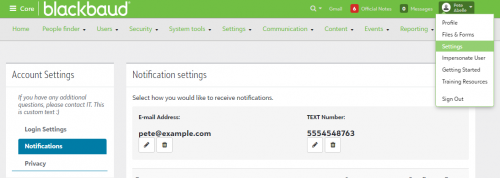
There have been some questions about changing the OneRoster output to use the Wireless phone from the Contact Card. Or to use Wireless phone if the Notification setting is blank or invalid.
This would allow schools to mass update the Wireless phone and have it appear as output for the OneRoster SMS field. It would also mean the user would no longer control whether they received texts or not from services that connect to BEM via OneRoster.
Before we make a change (or not), I'd like to hear from you. Put your vote in a reply.
Thanks in advance for your input!
Stephen Boyle
Product Manager, APIs & Integrations
Comments
-
@Stephen Boyle - I would expect/want OneRoster to use the number from the contact card.
We have far more wireless numbers on contact cards than we have Notification numbers.
The FCC requires all message senders to provide an opt-out mechanism, so users in the US will have an option to disable the text messages from any service that uses OneRoster to get their data.
2 -
@Stephen Boyle I do not have a dog in this fight as we don't use OneRoster to send SMS. However, I do have a couple of considerations from the EMS side of things:
Currently, our application requires a wireless phone as the main contact number for a parent and have a secondary field for “other phone” (it's the Business Phone field, but can be used for home, work, or anything else). Later in the application, we have the text notification block, where parents can sign up for text reminders. We make it clear that this is optional and while they provide their wireless phone number as part of the contact information, we will only text them if they register their wireless number in the text notification block.
If these merge and all wireless numbers in the Contact Card are used for texting, would this remove the activation requirement of the text notification block? And would the wireless number provided in the parent contact information area be automatically opted in, or would there need to be some sort of opt-in in that section to replace the text notification block?
Additionally, the text notification block requires the user to input their carrier and the SMS is sent as a short email to the carrier's designated email address (phonenumber@sms.att.net, for an AT&T number, for example). Would this replace that with an actual text message short code, or would users have to tell us their carrier up front as they currently do in the text notification block?
0 -
@Brian LeBlanc
You are exactly right about the benefits of the Notification text number over the simple Contact Card phone numbers.In this case, the system taking in the data from OneRoster would be responsible for making sure the number is appropriately verified for use. I do think those systems the schools contract with would have an incentive to use best practices for their communications (having your communication server marked as a spam server is very much to-be-avoided).
There are a wide variety of 3rd party solutions that use OneRoster output, whether API or CSV, and thus varied uses for that field. So, they might just need sms as a backup phone number. Or they could be an Emergency Notification service using it for “Pipes burst. Come get your kid." notices.
Understanding your expectations for this kind of data is exactly what I was hoping to hear, so thank you for your insight.
0 -
@Stephen Boyle
We definitely want OneRoster to export the Wireless # from the contact card. We have over 1500 parents and are having great difficulty getting them to register their phone # for SMS, so our use of OneRoster for our Emergency System is not possible. In addition, we would like the wireless # to also populate the phone call column. Parents tend to put one parent's cell # as a home # and then the entire family shares that “home #”, so now we do not have a way to make sure that every parent's cell # gets a phone call as well.0 -
@Josceline Reardon Your issue with “home” numbers actually being cell phones is why we moved away from using the Home number field entirely. It was causing way too many issues and there were serious data integrity fails that probably weren't much of a problem in the grand scheme of things but were driving me absolutely up the wall.
 Since we moved to our current system - requiring a wireless phone from everyone, labeling Business Phone as “Other Phone” and allowing parents to input whatever they want there, and not even displaying Home Phone - things have run much more smoothly.
 I was a little worried that we'd have a handful of people complain that they didn't have a cell phone and wanted to route everything through a different number, but honestly we have 8300+ parents in our database and I can't remember a single complaint.
0 -
@Brian LeBlanc so what do you pull in OneRoster? Our communications office wants to have a number on file that can receive an emergency call and One Roster only pulls the SMS notification # and the home #.
0 -
@Josceline Reardon we don’t use OneRoster for emergency text alerts. We do a nightly automated data export via CSV to our texting provider that bypasses the need for a OneRoster export. Our provider doesn’t have OneRoster integration so that wasn’t an option for us.
0 -
@Josceline Reardon
JFYI, OneRoster has two fields on users:- phone - returns the Home phone from the contact card. If empty, it returns the Wireless phone.
- sms - returns the Text number from Profile menu > Settings > Notifications. If empty, it returns nothing.
0 -
@Stephen Boyle Hi Stephen. Thank you! Is there a way to just disable the Home # in our system and then the SMS will populate the phone call # on OneRoster?
0 -
@Josceline Reardon
You can hide fields, like home phone, from student/parent/faculty roles in Core > Security > Profile Access. But I don't think you can prevent admin users from being able to add phones of a specific type.0 -
@Stephen Boyle, yea I was just wondering if we hide them in core, if OneRoster would still recognize that there is a number in the home phone field, or do we have to remove them all of the home #s?
0 -
@Josceline Reardon
OneRoster looks at the db not whether a field shows in the UI. So, the home phone has to be empty before we pull wireless phone for user.phone0 -
@Stephen Boyle hopefully my last question, you have been so so helpful with providing information on this, that I was unable to get from Support

Is there any way to have OneRoster include our other employee roles? Right now it just pulls “teacher”, but we have other roles like non-teaching, part-time, etc… I cannot put everyone under “teacher” role because in addition to access, it is also tied to contract deposits and the different roles pay different deposits. If not, what if I cloned the “teacher” role, could I name it “teacher2” for instance and would OneRoster pull it?
0 -
@Josceline Reardon
The only roles we currently include in the users output for OneRoster are students, parents and teachers. We don't use the others (yet), like administrator, guardian, relative, aide or proctor. And so the only staff included are the teachers/incoming teachers. And it does pull all clones of those roles.
The roles from the OneRoster spec, just for kicks.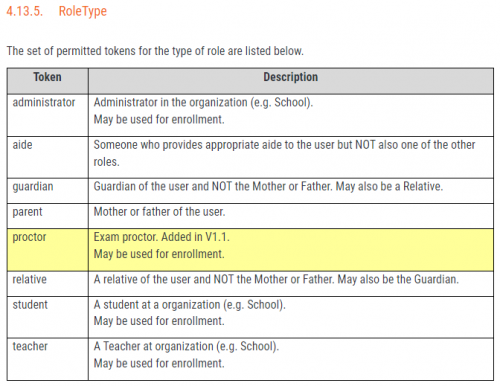 0
0 -
@Stephen Boyle so I cloned the teacher role and just named it “teacher2” for testing. I added the role to a test account and to a person currently “employed” with the “non-teaching” role. I have run a new OneRoster report twice today and it did not pull either the test or the real account
Also, just saw in another post that someone did the contact import/refresh and used “^” for the home # to remove the home # and it failed… Ugh….
0 -
@Stephen Boyle, wanted to follow up on your note about cloning a teacher role and having it pull to OneRoster. I cloned the teacher role last week and just named it “teacher2” for testing. I added the role to a test employee account and to a person currently employed with the “non-teaching” role. Unfortunately, it is not pulling either to One Roster. Thoughts, next steps?
Thank you again in advance for your help.
0 -
@Stephen Boyle definitely prefer wireless phone from user profile / contact card. In my experience it seems to be populated much more often and would enable users to more effectively manage notifications across multiple systems (if they wanted to opt out of Blackbaud alerts but still receive alerts from other systems that are updated via OneRoster sync)
0 -
@Stephen Boyle or better yet, make it configurable. Let the organisation admin decide how they want to prioritise phone numbers and which fields to provide to OneRoster based on their needs / use case.
0 -
@Michael Conan
Your observations are consistent with what we hear from schools. However, our review of this datapoint requires us to include the perspectives of all the users affected. In this case, the field is specifically for SMS communication, so the decision here is not solely about which field is most likely to be populated. Instead, we also have to consider the user's communication preferences. Students and Parents are also users in our system, so it's their communication/privacy preference that applies here. And the only place we can reliably pull a phone number that the user has approved for SMS use is on their profile.I recognize that the wireless number is often more likely to be populated, but only the number from their profile settings includes the user's permission for use in SMS communications.
This is essentially what we determined from the research and survey results we gathered on this topic.
I hope that helps,
StephenRelated Note: the Phone field returned by OneRoster is populated by the BEM Wireless number if the Home phone is not populated. And many schools today either use a mobile number for the Home phone or leave Home blank and use Wireless. So, it may be that the Phone field returns what you need. That would, of course, require you to record and observe a user's privacy decisions.
0 -
As the OneRoster provider, is Blackbaud responsible to confirm that any SMS number is authorised for communications by other systems / consumers, or just for Blackbaud communications? I would think as long as the consumer systems also allows the user to opt out of communications that may be sufficient.
Can you confirm that “Home” is the only phone type that would be prioritised over Wireless, so clearing that field and hiding it from the user as you mentioned elsewhere would ensure Wireless is used?
0 -
@Michael Conan
Yes, Home is the only phone prioritized over Wireless for OneRoster's Phone field.And, good point, I will review the privacy/responsibility issue with our Privacy guru's here. Best case is it results in a backlog item to add an option for it (defaulting to the current functionality). I'll let you know.
0 -
@Stephen Boyle
Thanks, really appreciate your input and support and this.As another option, if the school admin could select to prioritise Wireless over Home number for OneRoster (likely a common preference in our increasingly mobile world) that may be easier / sufficient for most users’ needs.
0











Categories
- All Categories
- 6 Blackbaud Community Help
- 213 bbcon®
- 1.4K Blackbaud Altru®
- 401 Blackbaud Award Management™ and Blackbaud Stewardship Management™
- 1.1K Blackbaud CRM™ and Blackbaud Internet Solutions™
- 15 donorCentrics®
- 360 Blackbaud eTapestry®
- 2.6K Blackbaud Financial Edge NXT®
- 655 Blackbaud Grantmaking™
- 576 Blackbaud Education Management Solutions for Higher Education
- 3.2K Blackbaud Education Management Solutions for K-12 Schools
- 939 Blackbaud Luminate Online® and Blackbaud TeamRaiser®
- 84 JustGiving® from Blackbaud®
- 6.6K Blackbaud Raiser's Edge NXT®
- 3.7K SKY Developer
- 248 ResearchPoint™
- 119 Blackbaud Tuition Management™
- 165 Organizational Best Practices
- 241 Member Lounge (Just for Fun)
- 34 Blackbaud Community Challenges
- 34 PowerUp Challenges
- 3 (Open) PowerUp Challenge: Chat for Blackbaud AI
- 3 (Closed) PowerUp Challenge: Data Health
- 3 (Closed) Raiser's Edge NXT PowerUp Challenge: Product Update Briefing
- 3 (Closed) Raiser's Edge NXT PowerUp Challenge: Standard Reports+
- 3 (Closed) Raiser's Edge NXT PowerUp Challenge: Email Marketing
- 3 (Closed) Raiser's Edge NXT PowerUp Challenge: Gift Management
- 4 (Closed) Raiser's Edge NXT PowerUp Challenge: Event Management
- 3 (Closed) Raiser's Edge NXT PowerUp Challenge: Home Page
- 4 (Closed) Raiser's Edge NXT PowerUp Challenge: Standard Reports
- 4 (Closed) Raiser's Edge NXT PowerUp Challenge: Query
- 791 Community News
- 2.9K Jobs Board
- 53 Blackbaud SKY® Reporting Announcements
- 47 Blackbaud CRM Higher Ed Product Advisory Group (HE PAG)
- 19 Blackbaud CRM Product Advisory Group (BBCRM PAG)