I implore Blackbaud to postpone turning off the database view Tables features until summer 2024.





I'm in the middle of a large cleanup project that will easily take me into the new year. I am very concerned that Tables under Configuration in the database view will be turned off in October 2023. I need more time before these functionalities are turned off to wrap up projects and learn and test new procedures in webview.
Comments
-
@Noel Freitas - Welcome to BB Community! I recommend you reach out to your Account Rep and Customer Success Manager, and share your concerns.
In the meantime, I encourage you to check out the Tables area of Web View and test it out for your processes; there is a tool in WV's area that is equivalent to the table clean-up plug-in tool available in DBV.0 -
@Austen Brown
Thanks, Austen, I did reach out to my rep and he recommended I post the concern here as well.1 -
@Austen Brown is/was there a webinar about this and how to use the Tables area of Web View?
0 -
@Veronica Renzo - To my knowledge no, but you can access it by going to Control Panel > Tables in web view. I recommend you take a look around, and test out your processes.
0 -
@Veronica Renzo Looking at it now. Chose Address Type table. Not sure where Address System ID is. Not a field in query that I can find to see what records use that Address Type.
I know they had been adding Table options in web view but I apparently also missed that it would be no longer usable in db view. Agh!
5 -
Sort of related to this, I posted an idea in the ideas bank last week when I realised we couldn't export the table contents. We do annual maintenance of some of our bigger tables for attributes to keep them easy to use and that involves asking other colleagues to let us know which entries should be inactive.
Please vote:
Update: Oh hey, good news! We can still get the report in DB view.
3 -
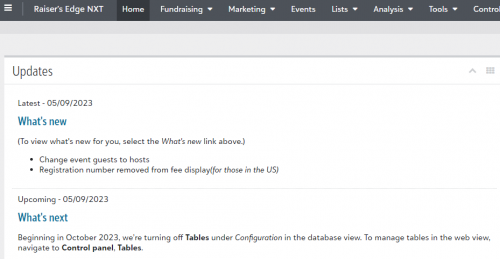
There's a note about it sort-of on the front of RE in the Updates section.
I feel like I was looking for Address System ID for something recently, but I don't think I managed to find it either in the end.1 -
@Noel Freitas
I'm with you on this. Webview just isn't as easy to navigate as database view, and I was very disappointed to read that they are starting to turn off functionality in database view (I presume because otherwise it may cause webview issues, but they haven't explained why)8 -
@JoAnn Strommen I have been using Tables in WebView and it is mostly OK. I did submit a ticket because the System Record ID in “View Uses” was not matching the Constituent. Here is the response that I got from Support:
The ID number you are seeing in "View Uses" within the tables in RENXT is the "System Record ID" of the actual table entry and not the one from the constituent. Unfortunately, at this time it is not possible to change the mapping for this to display the "System Record ID" of the constituents where the table entry is assigned. Instead, this can be used more as a reference to indicate the number of records that contain this table entry.
If needing to know which constituent have the specific table entry assigned or on their record, then we would recommend to either create a query in RE database view or a List within RE NXT webview.3 -
@Noel Freitas I agree. They should make sure how well it works before turning features off.
1 -
@Rachel Cavalier really? I did a chat support last week on this and the person said he didn't know if we could be able to still export tables/fields when we do our annual audit of tables. I pointed out the KB article still says to export all, you need to do it in db view.
0 -
@Austen Brown what is this tool called and where is it in web vdiw. I don't see anywhere to click “export” all tables and fields in webview. All I see is New donor table, a table drop down and “fin int he list.”
0 -
@Austen Brown OK, you said “clean up” and I do see that. But I'm concerned there is no ability to print all tables and fields which many of us do annually for cleanup review. How can we export in webview? I contacted chat and the person didn't know.
0 -
@Noel Freitas, dismaying, to say the least! I guess we all knew that eventually this day was coming, but right now webview is still anemic and we still do all our major processes in database view. Would be nice to have more than just a month advance notice to something like this! Thanks for posting this, as it had escaped my attention as well.
My one major concern with webview - minor glitches aside – is the ability to control our own data and export it fully. The trend I've been seeing is that it is not being built to be fully “ownable” by users. For example, webview attachments (and other webview-only features) cannot be searched, grouped, backed up, or exported.
One of the things I have loved about Blackbaud is the ability to fully manage our own data. I've worked with other smaller database companies where you had to ask the company to output certain data sets for you because the database was incapable of exporting it on the user end. It was like the data was hostage, in a way. I hope that BB builds its webview system out so that we can fully “own” our data. That is probably the one point that could be a dealbreaker for us down the road.
18 -
@Rose Dixon - According to a comment shared by someone else on this thread, it will be possible to pull the table report in DBV > Scroll to the bottom to view the response to the blog.
4 -
Recent blog with helpful info on why this change is happening, plus additional resources:
3 -
Every time I see a post about removing functionality and see the responses, I sigh a bit. While disappointing, this is the imminent future we have in front of us. I am not sure about how we need to go about getting our concerns heard and managed, but it is noteworthy to mention that the early adopter program has been testing this for some time. While I don't know how broad the breadth of organization types they have in this program, I would like to take this time to implore people to try to join these programs or inquire when BB reps are looking for volunteers for testing new functionality.
Blackbaud can do a much better job of communicating these changes and listening to their customers. I had no idea that this change was upcoming, or I had forgotten somewhere. That said, I can't say I'm surprised.
11 -
@Noel Freitas Late to the party here, but when this was first released I happened to have a free moment, or I was procrastinating, but I tried this out and found some issues around the system record id as noted by others (ie. it is not queryable) and when I chatted with support after proving to the rep that the information they were giving me was wrong, was finally told by them
“Thank you for bringing this to my attention, to be honest we weren't really given a proper heads up about this feature so i am just now getting familiar with it”. - this was on August 9th
To be fair, I think this has a lot of promise, but only if we are given a useable system record id for cleanup, etc. I know they would like to have this rolled out for #bbcon, but please make sure it is useful first.
6 -
@Rose Dixon this functionality will still be available in database view. When you go to Config > Tables, you will see a message in the right pane directing you to web view BUT you will still be able to go to File > Print/Preview > Code Tables Report in the database view toolbar to create printable report. We will look at adding this to web view bur for now, it will stay available in database view.
3 -
@Noel Freitas Late to the party here, but when this was first released I happened to have a free moment, or I was procrastinating, but I tried this out and found some issues around the system record id as noted by others (ie. it is not queryable) and when I chatted with support after proving to the rep that the information they were giving me was wrong, was finally told by them
Just a quick note that system record ID is queryable. It is not helpful, but it is queryable!
Karen
1 -
@Karen Diener I should have been a bit more careful with my statement. System Record ID for a constituent record is accessible in query, but the System record ID of say a specific addressee/salutation is not and those are the ids you are given in the table area. I would be very happy to be proven wrong, but that was my issue. Thanks for pointing it out.
5 -
@Karen Diener I should have been a bit more careful with my statement. System Record ID for a constituent record is accessible in query, but the System record ID of say a specific addressee/salutation is not and those are the ids you are given in the table area. I would be very happy to be proven wrong, but that was my issue. Thanks for pointing it out.
Gotcha! Yes, this was definitely a strange decision on Blackbaud's part. The System Record ID is of so little use that they might as well not have even included the “View Usage” option.
Karen
6 -
@Karen Diener Thought webview with use would be great to help with clean up. Very, very limited as several tables I've tried to query on in db view do not have the system record ID. So still unable to find the hidden uses.
0 -
@Faith Murray I wish I could like this post more than once!!
This is the biggest issue with NXT (webview) by far. I would love to be able to both take more ownership and control flows of data (preferably using business rules…) like we can do in dbview.
6 -
@Faith Murray Oh my gosh, I love your description of Anemic, that gave me a much needed laugh this morning!
0 -
@Noel Freitas Since being alerted to this post I've been exploring how I would update tables in webview. We use the Volunteer module to track our board and committees. The table for Job Assignment is nowhere to be found in the tables list. Nor is the volunteer detail available in webview anywhere near complete or even functional beyond two abbreviated entries. Does anyone else use Volunteer and can you provide some guidance?
0 -
@Deb Dressely, Job Assigments do not exist as a table, per se, and so they are not pulled into the webview “Tables” list. (At least in my system, webview tables seem to be corresponding to database view tables in terms of which ones are listed.)
Oddly, job assignments in the db-view Volunteer tab actually link to specific job creations under an event record. So to manage your job assignments, you must create a corresponding event. Which is odd, because volunteers don't just help out at events…..? Anyhow see below.
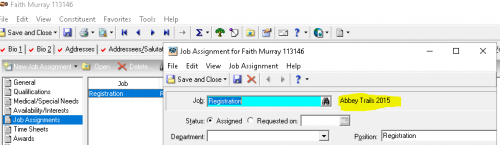
Note the event name to the right of the job. Now, if I look under that event record:
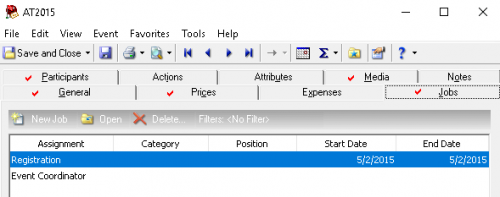
Basically, I think Volunteer jobs are an unrelated part of RE from the upcoming table migration, and BB probably isn't ready to debut their webview Volunteer section fully yet.
1 -
@Faith Murray Oh my! Thank you for this information. Unfortunately, job assignments in our records do not correspond to an event! There is no event name listed as in your example. I'll keep digging. When I add new entries I use F7 and edit the table as necessary.
0 -
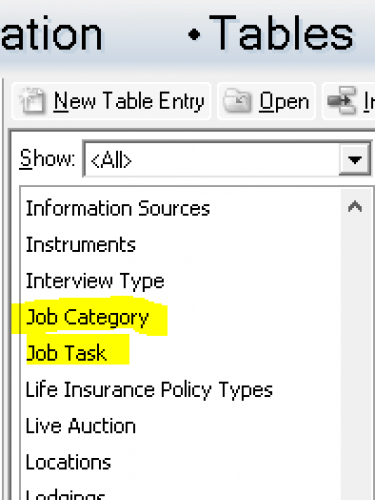
@Deb Dressely, I've never edited the fields from the F7 search menu - interesting. I dug into the Knowledgebase for more info and this is what I found (KB 38738).
To locate the Job Position and Job Assignment Position tables:
1. Go go Config > Tables
2. Make sure Show: is set to <All.
3. The tables appear as Job Position and Job Assignment Position
NOTE: These fields are not listed when Show: is set to Volunteer as they are not true Volunteer tables. While they take on table characteristics when Lookup is marked in Config > Fields, they are not considered Volunteer tables in the backend of the database. They are user-defined tables.Despite what the KB article says, I have no table showing on my Config, even when set to Show: All. I may check in with Support, because my curiosity has gotten the better of me.
 0
0 -
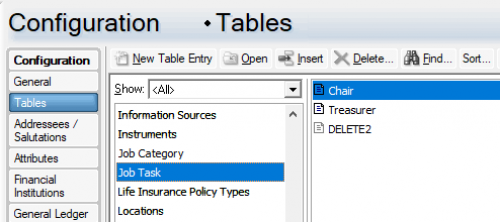
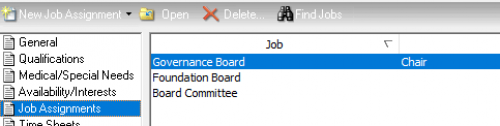
@Faith Murray We are like minded souls. I did the same yesterday and followed the same link to these tables but they don't show our Job Assignments. I'm sure there is a very easy way to get to this information but I don't have the right journey path. I spent more time searching Knowledgebase than I care to admit.
0































Categories
- All Categories
- 6 Blackbaud Community Help
- 213 bbcon®
- 1.4K Blackbaud Altru®
- 403 Blackbaud Award Management™ and Blackbaud Stewardship Management™
- 1.1K Blackbaud CRM™ and Blackbaud Internet Solutions™
- 15 donorCentrics®
- 360 Blackbaud eTapestry®
- 2.6K Blackbaud Financial Edge NXT®
- 656 Blackbaud Grantmaking™
- 577 Blackbaud Education Management Solutions for Higher Education
- 3.2K Blackbaud Education Management Solutions for K-12 Schools
- 939 Blackbaud Luminate Online® and Blackbaud TeamRaiser®
- 84 JustGiving® from Blackbaud®
- 6.6K Blackbaud Raiser's Edge NXT®
- 3.7K SKY Developer
- 249 ResearchPoint™
- 119 Blackbaud Tuition Management™
- 165 Organizational Best Practices
- 241 Member Lounge (Just for Fun)
- 34 Blackbaud Community Challenges
- 37 PowerUp Challenges
- 3 (Open) PowerUp Challenge: Grid View Batch
- 3 (Closed) PowerUp Challenge: Chat for Blackbaud AI
- 3 (Closed) PowerUp Challenge: Data Health
- 3 (Closed) Raiser's Edge NXT PowerUp Challenge: Product Update Briefing
- 3 (Closed) Raiser's Edge NXT PowerUp Challenge: Standard Reports+
- 3 (Closed) Raiser's Edge NXT PowerUp Challenge: Email Marketing
- 3 (Closed) Raiser's Edge NXT PowerUp Challenge: Gift Management
- 4 (Closed) Raiser's Edge NXT PowerUp Challenge: Event Management
- 3 (Closed) Raiser's Edge NXT PowerUp Challenge: Home Page
- 4 (Closed) Raiser's Edge NXT PowerUp Challenge: Standard Reports
- 4 (Closed) Raiser's Edge NXT PowerUp Challenge: Query
- 794 Community News
- 3K Jobs Board
- 54 Blackbaud SKY® Reporting Announcements
- 47 Blackbaud CRM Higher Ed Product Advisory Group (HE PAG)
- 19 Blackbaud CRM Product Advisory Group (BBCRM PAG)