If/Then statement in Power Query





I'm pulling a gift query and creating a dashboard for a campaign that we're running. One of the issues encountered is Planned Gifts. I know how to account for them (or in other words, I know which gifts to count) and could most certainly do this step manually, but I'd rather automate it. Here's the scenario…
If the Planned Gift (PG) has been marked as ‘Realized’ (Realized = Yes), then delete the PG from the data…this is because we would have received all of the PG Payouts for that PG. - this part I have…it's the next part I don't, and where I'm thinking the ‘If/Then’ clause could help.
If the Planned Gift ID (PGID) of a gift (a planned gift payout) = System Record ID (SysID) of another gift (the planned gift), then delete the payout record.
Example:
- PG of $2.5M has a SysID = 12345
- PG Payout of $1M received and the PGID = 12345
- PG Payout of $500K received and the PGID = 12345
Since the PG of $2.5M has not yet been fully realized (Realized = null), then I still want to count the PG but I DON'T want to count the payouts (or I would be overstating the gift amount). So if the PGID = SysID, then delete that payout record (only the payouts would have a PGID).
Basically, since the only time a PGID would be in the SysID column is when the PG has not yet been realized - if it's been realized (Realized = Yes), I'm deleting that PG in an earlier step. So when (If) the PGID is in SysID, ‘Then’ delete payout record. - Hope this makes sense and I appreciate any help and insight.
Comments
-
@Nilsen Septon
find it very hard to explain in word. so here's sample:This is original sample data:
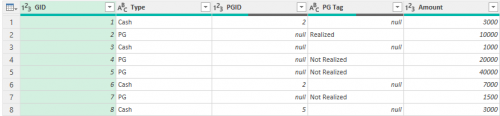
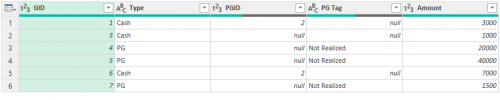
GID Type PGID PG Tag Amount 1 Cash 2 3000 2 PG Realized 10000 3 Cash 1000 4 PG Not Realized 20000 5 PG Not Realized 40000 6 Cash 2 7000 7 PG Not Realized 1500 8 Cash 5 3000 From this, I think you want the rows that are highlighted yellow. Filtering out GID 2 (Realized) and GID 8 (linked to PGID 5 and PGID 5 is not Realized).
Here's the code:
let
Source = Excel.Workbook(File.Contents("……………………..\\Desktop\\Book2.xlsx"), null, true),
Table1_Table = Source{[Item="Table1",Kind="Table"]}[Data],
#"Changed Type" = Table.TransformColumnTypes(Table1_Table,{{"GID", Int64.Type}, {"Type", type text}, {"PGID", Int64.Type}, {"PG Tag", type text}, {"Amount", Int64.Type}}),
#"Filtered PGTag Realized" = Table.SelectRows(#"Changed Type", each ([PG Tag] <> "Realized")),
#"Merged Self Remove" = Table.NestedJoin(#"Filtered PGTag Realized", {"PGID"}, #"Filtered PGTag Realized", {"GID"}, "Filtered Rows", JoinKind.LeftAnti),
#"Removed Columns Table From Merge" = Table.RemoveColumns(#"Merged Self Remove",{"Filtered Rows"})
in
#"Removed Columns Table From Merge"0 -
Before Power Query
After Power Query
 0
0 -
@Alex Wong - Yes, that is what I am looking to do. Thanks for your help on this!!
0 -
@Alex Wong - - being that I'm still a newbie with Power Query and ‘M’ (though I've used SQL for years….), in running a test on my dataset (updating what you provided to fit my dataset) the part that I didn't understand (again, being a newbie) is the line "Table1_Table = Source{[Item="Table1",Kind="Table"]}[Data]," - that threw an error - The key didn't match any rows in the table.
Additionally, since I'm already in the file making changes (have already changed some types, replaced some values and added a custom column and filtered some rows (in which one of the filtered rows is if Realized = ‘Yes’, then I'm filtering that out. It's just the last step then that I'm working on and that's when the PGID is in the SysID column, then delete those rows.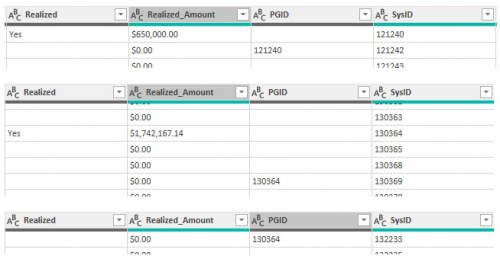
Since PGID 121240 is in SysID, then delete row that PGID is on
Since PGID 130364 is in SysID, then delete ‘rows’ that PGID is on
I'm thinking that only part the code you provided would be used??
Again, thanks in advance.
0 -
@Nilsen Septon
not all of the code is needed, i'm just showing you the M-code I have for the “whole” process.Source = Excel.Workbook(File.Contents("……………………..\\Desktop\\Book2.xlsx"), null, true),
Table1_Table = Source{[Item="Table1",Kind="Table"]}[Data],Not needed for you - open the excel file on my desktop and open the table “Table1” that has the data.
#"Changed Type" = Table.TransformColumnTypes(Table1_Table,{{"GID", Int64.Type}, {"Type", type text}, {"PGID", Int64.Type}, {"PG Tag", type text}, {"Amount", Int64.Type}}),
Not needed for you - change the data type of the columns
#"Filtered PGTag Realized" = Table.SelectRows(#"Changed Type", each ([PG Tag] <> "Realized")),
Not needed for you - you already have filter for removing the Realized PG gift
#"Merged Self Remove" = Table.NestedJoin(#"Filtered PGTag Realized", {"PGID"}, #"Filtered PGTag Realized", {"GID"}, "Filtered Rows", JoinKind.LeftAnti),
This is the important code you need, you don't need to do code editing, you can do this using the Power Query interface. This is running a Merge using the LeftAnti option, where you merge with the “same self” gift table, on the top (left table), you will select PGID column to match to the bottom (right table), you will select the GID column. (use your own column names)
#"Removed Columns Table From Merge" = Table.RemoveColumns(#"Merged Self Remove",{"Filtered Rows"})
This is just going to delete the column that has the “merged table” which is not needed anymore.
0 -
@Alex Wong - this is helpful, thanks. This is what I had expected…just wanted to make sure I was headed in the right direction. I'll play with this and will come back if I have any additional questions. Thanks again!!
0




Categories
- All Categories
- 6 Blackbaud Community Help
- 213 bbcon®
- 1.4K Blackbaud Altru®
- 400 Blackbaud Award Management™ and Blackbaud Stewardship Management™
- 1.1K Blackbaud CRM™ and Blackbaud Internet Solutions™
- 15 donorCentrics®
- 360 Blackbaud eTapestry®
- 2.6K Blackbaud Financial Edge NXT®
- 655 Blackbaud Grantmaking™
- 576 Blackbaud Education Management Solutions for Higher Education
- 3.2K Blackbaud Education Management Solutions for K-12 Schools
- 939 Blackbaud Luminate Online® and Blackbaud TeamRaiser®
- 84 JustGiving® from Blackbaud®
- 6.6K Blackbaud Raiser's Edge NXT®
- 3.7K SKY Developer
- 248 ResearchPoint™
- 119 Blackbaud Tuition Management™
- 165 Organizational Best Practices
- 241 Member Lounge (Just for Fun)
- 34 Blackbaud Community Challenges
- 34 PowerUp Challenges
- 3 (Open) PowerUp Challenge: Chat for Blackbaud AI
- 3 (Closed) PowerUp Challenge: Data Health
- 3 (Closed) Raiser's Edge NXT PowerUp Challenge: Product Update Briefing
- 3 (Closed) Raiser's Edge NXT PowerUp Challenge: Standard Reports+
- 3 (Closed) Raiser's Edge NXT PowerUp Challenge: Email Marketing
- 3 (Closed) Raiser's Edge NXT PowerUp Challenge: Gift Management
- 4 (Closed) Raiser's Edge NXT PowerUp Challenge: Event Management
- 3 (Closed) Raiser's Edge NXT PowerUp Challenge: Home Page
- 4 (Closed) Raiser's Edge NXT PowerUp Challenge: Standard Reports
- 4 (Closed) Raiser's Edge NXT PowerUp Challenge: Query
- 790 Community News
- 2.9K Jobs Board
- 53 Blackbaud SKY® Reporting Announcements
- 47 Blackbaud CRM Higher Ed Product Advisory Group (HE PAG)
- 19 Blackbaud CRM Product Advisory Group (BBCRM PAG)