Anyone encountered change in ability for user to add actions?





Our university president is having issues adding actions. As system admin I have made no changes to his user rights.
He reports that the “Add Action” button is gone from the constituent record page. He needed to click the link to the existing actions to get an “Add Action” option. When he entered the action (Category - Mail) including all the required fields and goes to save he is getting this error message.
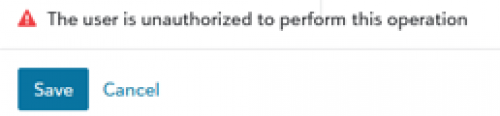
I looked in KB but this specific error is not listed. He has added actions before. I do not know what is different this time. Can a user be restricted from choosing a certain type of action from the dropdown list?
I've asked him to try adding actions on other records with different types but do not have a response yet. Told him to restart computer
Seems odd that the option to ‘add action’ is no longer on the main record page.
Any ideas? Not looking forward to lengthy session with support as president is in another building and I don't want to tie him up for a long time if I can avoid it.
Comments
-
@JoAnn Strommen - Check in on their permissions specifically for access to actions with a specific type. Here's a KB Article that explains more:
0 -
@Austen Brown Thanks @Austen Brown. I had looked at the group privilege described in that KB. It only seems to pertain to view and edit actions by type. Doesn't seem to restrict adding by type. Nothing on adding as it's a security one. No boxes are checked to restrict view or edit and the Action Security by Type box is not checked either.
Open to anything else I can check.
0 -
@JoAnn Strommen how frustrating! Are other users experiencing the same thing? Particularly other users who are in the same security group? I know that may be very unlikely, but you never know.
Honestly, I wouldn't be surprised if this was a temporary glitch and is now resolved. I sure hope it is anyway because I can't think of anything it could be!
Karen
0 -
@Karen Diener No other users have reported a problem. The university president is in his own user group.
Will reach out to him today and see when he won't need his computer so I can go sit at his desk and contact support.
 1
1 -
@JoAnn Strommen I'd check his RE security group for actions along with his RE NXT role settings. If you have multiple administrators, someone could have inadvertently changed one of these. Whenever we encounter (I assume you're hosted by Blackbaud?) an issue, we always clear our browser caches and log out and back in to see if the issue is resolved. If this doesn't help, I would contact Support. Best of luck with this. Annette
0 -
@Annette Rurka Thanks. I am the only admin and have made no changes to his security/roles. I'm heading to his office in a half hour for a call with support. Yes, last resort may be to clear his caches but I hate to wipe that out on someone else's computer. LOL
0










Categories
- All Categories
- 6 Blackbaud Community Help
- 211 bbcon®
- 1.4K Blackbaud Altru®
- 402 Blackbaud Award Management™ and Blackbaud Stewardship Management™
- 1.1K Blackbaud CRM™ and Blackbaud Internet Solutions™
- 15 donorCentrics®
- 360 Blackbaud eTapestry®
- 2.6K Blackbaud Financial Edge NXT®
- 657 Blackbaud Grantmaking™
- 577 Blackbaud Education Management Solutions for Higher Education
- 3.2K Blackbaud Education Management Solutions for K-12 Schools
- 941 Blackbaud Luminate Online® and Blackbaud TeamRaiser®
- 84 JustGiving® from Blackbaud®
- 6.7K Blackbaud Raiser's Edge NXT®
- 3.7K SKY Developer
- 248 ResearchPoint™
- 120 Blackbaud Tuition Management™
- 165 Organizational Best Practices
- 240 Member Lounge (Just for Fun)
- 34 Blackbaud Community Challenges
- 37 PowerUp Challenges
- 3 (Open) PowerUp Challenge: Grid View Batch
- 3 (Closed) PowerUp Challenge: Chat for Blackbaud AI
- 3 (Closed) PowerUp Challenge: Data Health
- 3 (Closed) Raiser's Edge NXT PowerUp Challenge: Product Update Briefing
- 3 (Closed) Raiser's Edge NXT PowerUp Challenge: Standard Reports+
- 3 (Closed) Raiser's Edge NXT PowerUp Challenge: Email Marketing
- 3 (Closed) Raiser's Edge NXT PowerUp Challenge: Gift Management
- 4 (Closed) Raiser's Edge NXT PowerUp Challenge: Event Management
- 3 (Closed) Raiser's Edge NXT PowerUp Challenge: Home Page
- 4 (Closed) Raiser's Edge NXT PowerUp Challenge: Standard Reports
- 4 (Closed) Raiser's Edge NXT PowerUp Challenge: Query
- 796 Community News
- 3K Jobs Board
- 54 Blackbaud SKY® Reporting Announcements
- 47 Blackbaud CRM Higher Ed Product Advisory Group (HE PAG)
- 19 Blackbaud CRM Product Advisory Group (BBCRM PAG)