Report Cards





Currently our teachers type up their report card comments/narratives in Google and cut/paste to BB. This is mainly so they can have spelling/grammer checks. Is there an add-on / plug-in available that we could install to check spelling/grammer? How does your school handle comments/narratives on report cards?
Comments
-
We highly recommend that all faculty and staff that need to record comments, install Grammarly. This works very well when writing comments. We use the free version without any issues.
0 -
@Susan Ross - Our teachers write long comments for each student twice a years (2+ paragraphs in the fall, and 1+ paragraph in the spring).
We urge teachers to type in Google Docs and then copy/paste.
- There's less chance of losing work due to a procedural mistake, because Google auto-saves.
- The proofreading tools are better.
- The comment editing window on the Grading page is small, so writing the longer comments is harder there.
- The Google doc makes it easier to refer to the comment from last year when a student asks a former teacher to write a college recommendation letter.
- The Google doc makes it easier to recycle language from previous years into the current batch of comments.
Teachers proofread these long comments for each other. We require them to do the copy/paste process and then print the Section Grades by school year report to verify that the correct comment was pasted into each student's row in the Grading page.
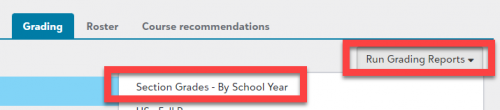
Teachers may also write report card comments at other times of the year for any student. Teachers can do that however they want - in a Google Doc first or directly into the LMS. These comments are usually a sentence or two, so many teachers choose to type directly into the Grading page.
2 -
@Brian Gray Thank you!
0 -
@Jeff Gaudet Thank you!
0





Categories
- All Categories
- 6 Blackbaud Community Help
- 211 bbcon®
- 1.4K Blackbaud Altru®
- 402 Blackbaud Award Management™ and Blackbaud Stewardship Management™
- 1.1K Blackbaud CRM™ and Blackbaud Internet Solutions™
- 15 donorCentrics®
- 360 Blackbaud eTapestry®
- 2.6K Blackbaud Financial Edge NXT®
- 655 Blackbaud Grantmaking™
- 576 Blackbaud Education Management Solutions for Higher Education
- 3.2K Blackbaud Education Management Solutions for K-12 Schools
- 941 Blackbaud Luminate Online® and Blackbaud TeamRaiser®
- 84 JustGiving® from Blackbaud®
- 6.7K Blackbaud Raiser's Edge NXT®
- 3.7K SKY Developer
- 248 ResearchPoint™
- 120 Blackbaud Tuition Management™
- 165 Organizational Best Practices
- 240 Member Lounge (Just for Fun)
- 34 Blackbaud Community Challenges
- 37 PowerUp Challenges
- 3 (Open) PowerUp Challenge: Grid View Batch
- 3 (Closed) PowerUp Challenge: Chat for Blackbaud AI
- 3 (Closed) PowerUp Challenge: Data Health
- 3 (Closed) Raiser's Edge NXT PowerUp Challenge: Product Update Briefing
- 3 (Closed) Raiser's Edge NXT PowerUp Challenge: Standard Reports+
- 3 (Closed) Raiser's Edge NXT PowerUp Challenge: Email Marketing
- 3 (Closed) Raiser's Edge NXT PowerUp Challenge: Gift Management
- 4 (Closed) Raiser's Edge NXT PowerUp Challenge: Event Management
- 3 (Closed) Raiser's Edge NXT PowerUp Challenge: Home Page
- 4 (Closed) Raiser's Edge NXT PowerUp Challenge: Standard Reports
- 4 (Closed) Raiser's Edge NXT PowerUp Challenge: Query
- 796 Community News
- 3K Jobs Board
- 54 Blackbaud SKY® Reporting Announcements
- 47 Blackbaud CRM Higher Ed Product Advisory Group (HE PAG)
- 19 Blackbaud CRM Product Advisory Group (BBCRM PAG)