Adding Non-Donor Category Tables





I apologize in advance if this is contains a glaring oversight on my part but I wanted to see if other folks have the same issue and/or different work-arounds:
We use attributes (custom fields) extensively at my organization and have consistently had to fight with RE's insistence on creating all tables as donor category tables. The problem with it doing so is that it then requires each entry on the table to have a unique minimum dollar amount assigned to it. We've used the workaround of creating the table through the attributes section of DBV which will create the table without forcing it to be a donor category table and thus does not include the minimum amount field.
It is disconcerting to see that this issue of only being able to create donor category tables has been carried over to WV and I am concerned that we may lose the functionality our workaround when they turn off tables in DBV. I have expressed concern to our customer success manager who has not, despite her best efforts, been able to get anything substantial back from her sources. That being the case, I figured I would reach out to the community to see if you all had any thoughts or ideas on getting around being forced to create tables as donor category tables.
Lastly, I do have an idea out on the idea bank (our customer success rep was kind enough to put it up on my behalf while trying to chase down info) outlining the issue and urging Blackbaud to ensure that we won't lose the ability to add non-donor category tables via the attributes section before turning them off in DBV. Thank you for any insight you all can provide!
Comments
-
@Noah Wilson Not quite sure what you are asking, you might want to explain it better, but I can tell you, nothing is being turned off in database view, that is just sales people talking, they know S************T. RE NXT is pretty much useless in that it cannot do even ⅓ of what the database view does. I mean RE NXT has been around how long now and so very little can be done in it. Database view is not going away anytime soon, if ever. Still unbelievable that Blackbaud created an product that was not even close to being complete.
1 -
@Noah Wilson what do you mean by
We use attributes (custom fields) extensively at my organization and have consistently had to fight with RE's insistence on creating all tables as donor category tables
1 -
@Noah Wilson - With the change of moving tables to Web View, you will need to continue to create attribute tables via Database View > Configuration > Attributes > New row, [Add New Table]. After that, you can table entries via Web View > Control Panel > Tables.
0 -
@Noah Wilson When creating a custom field/attribute in RE start with the attribute, then you can select “Table” and under the Table name create the table - for all our attributes we make the table name start with ATTRIB as shown below, this allows you to create a table that is NOT a donor category table.
 2
2 -
@Joe Moretti @JoAnn Strommen @Austen Brown @Elaine Tucker First off, apologies for the rambling post (it seems I was trying to process too much information in addition to being insufficiently caffeinated). Thank you for taking the time to reply and ask questions.
As an attempt at a better explanation: In the tables section of DBV, when you start to add a new table you are presented only with the option to add a New Donor Category Table.
Since you can only create a Donor Category Table, any entries that you create on that table have to include a unique Minimum Amount in addition to the Name.
The fallout is that your table ends up having junk data attached to it in the Minimum amount field because you get an error if the amount isn't unique for each table entry.
I did find out at the RE town hall this morning that the ability to add tables through attributes is not changing so my question is largely moot. It sounds like we will continue adding new tables using the workaround that Austen and Elaine described to avoid the Minimum Amount field.
As a final note of clarification, my reason for looking into this is the announcement that Blackbaud put up a while back in their What's Next section of WV:
0 -
@Noah Wilson I really hope that Blackbaud will fix the “donor category table” as the default option. That is not intuitive at all!
1 -
As an attempt at a better explanation: In the tables section of DBV, when you start to add a new table you are presented only with the option to add a New Donor Category Table.
I've been watching this thread and have become very confused.
The only way to add a completely new table is by adding an Attribute first. You select which type of attribute - constituent, gift, action, event, and so on. The Description that you enter will be the Attribute Category, then you pick the data type. IF you pick “table” as the data type, you provide the table a name.
Is it possible that this is an issue with your security settings? In security, users can be granted access to specific tables. Might you have access only to Donor Category Tables? I've never worked in an environment where users had access to some tables but not others so I'm not really sure how this would play out. But because you keep specifically mentioning Donor Category Table AND database view, I'm inclined to think this is an issue with security.
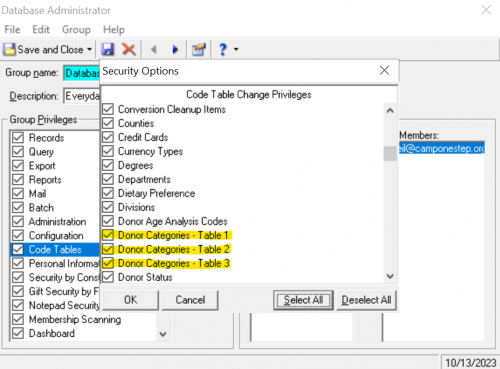
In the meantime, I will say that it is VERY confusing that Blackbaud used “Donor Table” and “Donor Category Table” in the webview version. I think it is really adding a lot of extra noise and causing unnecessary confusion.
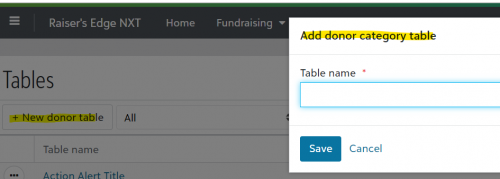
Check in to security and see if that might be the issue!
Karen
2 -
There was a great slide shared at the RE NXT Townhall yesterday that better explains what is moving to Web View for tables, and what is not:
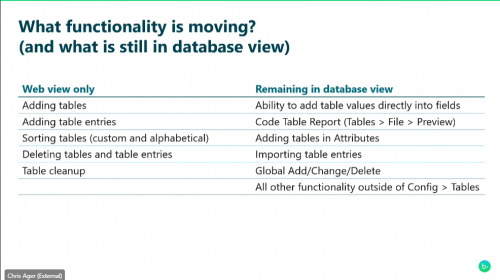 2
2 -
@Austen Brown Thanks for sharing this slide! Unfortunately, I missed the Town Hall (I hope they share a recording!).
1 -
@Joe Moretti Sigh. So true.
0 -
@Noah Wilson Are you adding a new table for your attributes from table view? You should be adding a table for a new attribute from the attributes page in config, not from table view. When you add a new table from the attributes, it gives you an option to create a data type and if you select table, it gives you the option to use an existing table or add a new one. (option at the very bottom of the list) and it is not a donor category table! Also note Austen Brown's response… They are not yet moving over adding a table from attributes to RE NXT. Feel free to message me if you have questions about this

thanks,
Melody
0 -
@Karen Diener
Thank you for the suggestion. I took a look and did not see anything there which would indicate that security settings were barring me from creating certain types of tables.You can create tables by going to Config > Tables and then right-clicking in the section where the tables are listed to get the below menu to pop up (there is no “New Table” button in DBV):
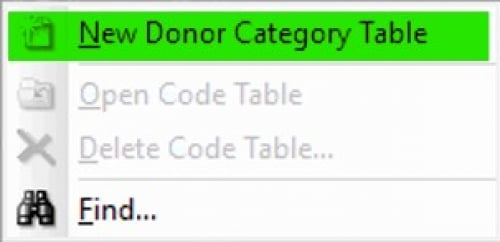
This is where it only says New Donor Category Table (I believe this is where the button that is at the top of the tables section in WV comes from; hence why it only says Donor Table or New Donor Category Table).
If a person wants to create a table that is not specifically a Donor Category Table, they have to do so via the Attributes section as you described. Fortunately, this does not seem to be going anywhere when they turn off the ability to access Tables in DBV.
I hope that helps to alleviate your confusion. (Or perhaps at least explains my own!).
0 -
@Melody Penner
Thank you for the clarification! My main concern was if they were unintentionally taking that option away with the Tables update, but it sounds like things will be fine there.0 -
@Karen Diener
Thank you for the suggestion. I took a look and did not see anything there which would indicate that security settings were barring me from creating certain types of tables.You can create tables by going to Config > Tables and then right-clicking in the section where the tables are listed to get the below menu to pop up (there is no “New Table” button in DBV):
This is where it only says New Donor Category Table (I believe this is where the button that is at the top of the tables section in WV comes from; hence why it only says Donor Table or New Donor Category Table).
If a person wants to create a table that is not specifically a Donor Category Table, they have to do so via the Attributes section as you described. Fortunately, this does not seem to be going anywhere when they turn off the ability to access Tables in DBV.
I hope that helps to alleviate your confusion. (Or perhaps at least explains my own!).
I think you've just completely explained the issue.
A table is a field type. When we create fields in databases, we first name the field and then decide what kind of data should exist in that field. You cannot create a field in Raiser's Edge EXCEPT by using an Attribute. So you're wanting to create values for a field that does not exist.
But you also said you use Attributes extensively. So if you are trying to add a new table for the Attribute you have created, you do that when setting up the Attribute. Set up the Description and the Data Type, and in the Table Name column, scroll all the way to the bottom and select "[Add New Table]. When you do that, the Attribute Description will default as the Table Name.
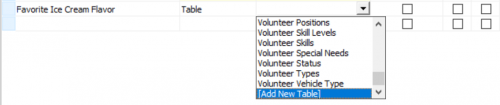
NOW go to Config and Tables, find the table named "Favorite Ice Cream Flavor" and add values to it.
Is that the missing piece?
Karen
1 -
@Karen Diener
Thank you for the further explanation! I think it all just clicked! Just to tidy up some curiosity, do you know of a reason why the “[Add New Table]” option could not theoretically replace the “New Donor Category Table” option in the Tables section?0 -
@Karen Diener
Thank you for the further explanation! I think it all just clicked! Just to tidy up some curiosity, do you know of a reason why the “[Add New Table]” option could not theoretically replace the “New Donor Category Table” option in the Tables section?Yay! I'm glad it seems to have been resolved!
I think the biggest issue is that the field needs to be created first. IF the new field - which in RE can only be an Attribute - is a table, then you would create the table.
It may help to think of situations where fields are NOT tables. For instance, if you want a field to capture a monetary value, you will need a field, a label for the field (so people know what to enter), and a structure for the field. The field and the label for the field need to exist before you indicate what KIND of data will be added to the field. It may be a date, text, yes/no, drop-down, currency, checkbox, radio button, single select, multi-select, etc. Note that those are not all available in RE, but are different types of fields.
The Donor Category Field is unique to RE. You won't see that too often out in the wild.
Hopefully that clarifies a bit more!
Karen
0 -
@Karen Diener
Thank you very much for taking the time to further explain the underlying situation! I think I get why it is set up so that Attributes are the only fields that can be created. Then the issues with the Tables section make more sense, effectively being consequences of the limitations on creating a new field.1


















Categories
- All Categories
- 6 Blackbaud Community Help
- 213 bbcon®
- 1.4K Blackbaud Altru®
- 403 Blackbaud Award Management™ and Blackbaud Stewardship Management™
- 1.2K Blackbaud CRM™ and Blackbaud Internet Solutions™
- 15 donorCentrics®
- 360 Blackbaud eTapestry®
- 2.6K Blackbaud Financial Edge NXT®
- 656 Blackbaud Grantmaking™
- 577 Blackbaud Education Management Solutions for Higher Education
- 3.2K Blackbaud Education Management Solutions for K-12 Schools
- 940 Blackbaud Luminate Online® and Blackbaud TeamRaiser®
- 84 JustGiving® from Blackbaud®
- 6.7K Blackbaud Raiser's Edge NXT®
- 3.7K SKY Developer
- 249 ResearchPoint™
- 119 Blackbaud Tuition Management™
- 165 Organizational Best Practices
- 241 Member Lounge (Just for Fun)
- 34 Blackbaud Community Challenges
- 37 PowerUp Challenges
- 3 (Open) PowerUp Challenge: Grid View Batch
- 3 (Closed) PowerUp Challenge: Chat for Blackbaud AI
- 3 (Closed) PowerUp Challenge: Data Health
- 3 (Closed) Raiser's Edge NXT PowerUp Challenge: Product Update Briefing
- 3 (Closed) Raiser's Edge NXT PowerUp Challenge: Standard Reports+
- 3 (Closed) Raiser's Edge NXT PowerUp Challenge: Email Marketing
- 3 (Closed) Raiser's Edge NXT PowerUp Challenge: Gift Management
- 4 (Closed) Raiser's Edge NXT PowerUp Challenge: Event Management
- 3 (Closed) Raiser's Edge NXT PowerUp Challenge: Home Page
- 4 (Closed) Raiser's Edge NXT PowerUp Challenge: Standard Reports
- 4 (Closed) Raiser's Edge NXT PowerUp Challenge: Query
- 796 Community News
- 3K Jobs Board
- 54 Blackbaud SKY® Reporting Announcements
- 47 Blackbaud CRM Higher Ed Product Advisory Group (HE PAG)
- 19 Blackbaud CRM Product Advisory Group (BBCRM PAG)