Updating User Information




Hello all,
I am working with the API's through Power Automate and have successfully read data out of Education Management. I am now hoping to update some information within student records and want to make sure I am doing it properly without potentially messing up the system. The documentation for User update does not have any request parameters like other update API's seem to. I am assuming that the “id” field is the parameter that “User update” uses to determine which record to update, and that if I send something like:
{
"id": 1,
"student_id": "New ID"
}
then the student with userid = 1 will have the student_id field updated to “New ID”. Without having a way to test it outside of the live system, I am hesitant to try it. Any feedback would be appreciated.
Thanks,
-Scott
Comments
-
@Scott Minkoff
You have it right. That is how you identify the user for this particular endpoint.0 -
Thanks!
I tried it and got an error message indicating that patch was not supported: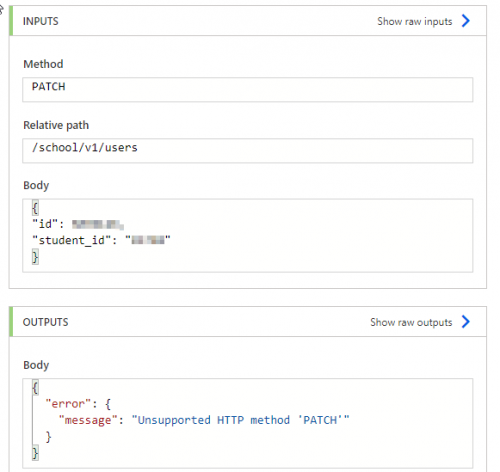
Is there something obvious that I am doing wrong?
0 -
@Scott Minkoff
Not sure about why you are getting that. When I try it in the Try it Console for User Update, I get a 200 and the field updates as expected. The Try it button on the right opens the console. Let me know if you can't get that to work.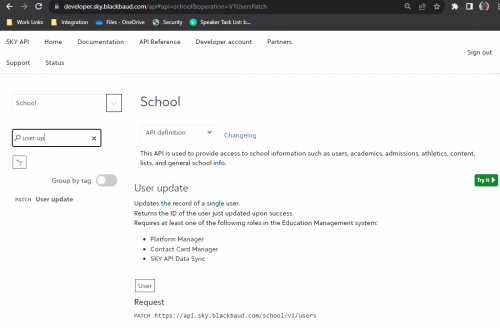 0
0 -
@Scott Minkoff
BTW - in order to use the Try It Console.Select the Try It button to the right of the page.
Choose “authorization_code” from the dropdown. Select to authorize on the pop-up.
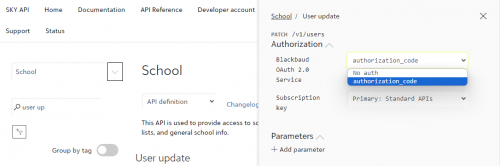
Change the Request Body to the id and student_id that you want.
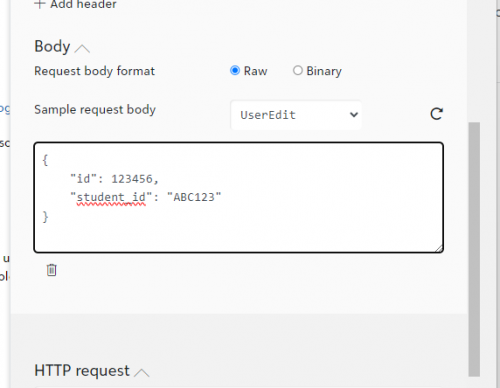
Then scroll down and hit Send.
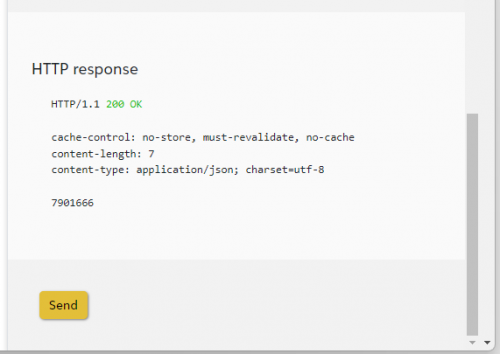
The results should show up on the General Info tile of the Contact Card.
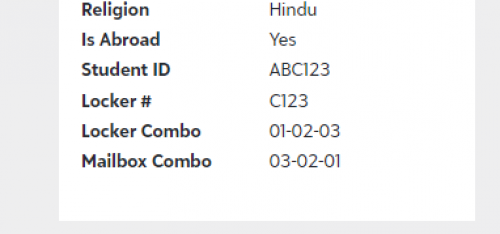 0
0 -
It worked there. Thanks! I guess the issue might be on the Power Automate end. Once I figure that out, I will repost in case someone else comes across the same thing.
0 -
Hello again,
I am still having issues with the update call in Power Automate and now in postman (which was a suggestion to try by Microsoft support). Before I keep working on this, has anyone been able to make the update call outside of the “Try It” section of the reference page, API Reference - SKY API (blackbaud.com)?
Thanks!
0




Categories
- All Categories
- 6 Blackbaud Community Help
- 213 bbcon®
- 1.4K Blackbaud Altru®
- 401 Blackbaud Award Management™ and Blackbaud Stewardship Management™
- 1.1K Blackbaud CRM™ and Blackbaud Internet Solutions™
- 15 donorCentrics®
- 360 Blackbaud eTapestry®
- 2.6K Blackbaud Financial Edge NXT®
- 655 Blackbaud Grantmaking™
- 576 Blackbaud Education Management Solutions for Higher Education
- 3.2K Blackbaud Education Management Solutions for K-12 Schools
- 939 Blackbaud Luminate Online® and Blackbaud TeamRaiser®
- 84 JustGiving® from Blackbaud®
- 6.6K Blackbaud Raiser's Edge NXT®
- 3.7K SKY Developer
- 248 ResearchPoint™
- 119 Blackbaud Tuition Management™
- 165 Organizational Best Practices
- 241 Member Lounge (Just for Fun)
- 34 Blackbaud Community Challenges
- 34 PowerUp Challenges
- 3 (Open) PowerUp Challenge: Chat for Blackbaud AI
- 3 (Closed) PowerUp Challenge: Data Health
- 3 (Closed) Raiser's Edge NXT PowerUp Challenge: Product Update Briefing
- 3 (Closed) Raiser's Edge NXT PowerUp Challenge: Standard Reports+
- 3 (Closed) Raiser's Edge NXT PowerUp Challenge: Email Marketing
- 3 (Closed) Raiser's Edge NXT PowerUp Challenge: Gift Management
- 4 (Closed) Raiser's Edge NXT PowerUp Challenge: Event Management
- 3 (Closed) Raiser's Edge NXT PowerUp Challenge: Home Page
- 4 (Closed) Raiser's Edge NXT PowerUp Challenge: Standard Reports
- 4 (Closed) Raiser's Edge NXT PowerUp Challenge: Query
- 791 Community News
- 2.9K Jobs Board
- 53 Blackbaud SKY® Reporting Announcements
- 47 Blackbaud CRM Higher Ed Product Advisory Group (HE PAG)
- 19 Blackbaud CRM Product Advisory Group (BBCRM PAG)