From Quarters to Trimesters - Transcripts





This year (our 2nd year with BB), our school changed from quarters to trimesters. We now have an issue with getting our grades from the quarter-based grade plans
Part of the problem is now we named things. For last year, we called our grade plan for Final Grades, “Quarter Grades”. So this year, we ended up creating a new grade plan called “Trimester Grades” - not thinking about how this would effect transcripts. We had the transcripts set up to display the Quarter Grades, which was great - until now, when we need to also get Trimester Grades on them.
Support recommend the following - rename the grade plan group to something like “Letter Grades - Single Term”, and then change this year's trimester courses to that grade plan group.
On paper, that makes sense. I just worry about the grades that have already been recorded for Trimester 1. If we tinker with the grade plan group.. what happens to those grades?
Just curious if anyone else out there has run into this kind of thing..
Thanks in advance for any insights!
Comments
-
@Derek Porter
I'm keenly interested to see what people post here. Currently, at my school, we are still using the old report card builder in 2 of our 4 divisions, and in our Lower School, for an assessment report card. This assessment card was set up in 2010, 6 years before I was the admin/registrar for Education Management. I have used this existing report card, grade plans, etc. without issue. But it's a clunky setup, i.e. 19 separate grade plans, and using only 1 term for the whole year. The all year-1-term thing (grading is actually on trimesters, so I've just been setting up 3 marking periods within 1 all-year term) is a real problem for the new report card, so I'll be moving to 3-trimester terms next year. As I'm now experimenting with the new report card builder, I've unearthed a lot of issues that were baked into the original setup. Mismatched description names in the three trimester marking periods=grades don't show on the report card, one of the translation tables doesn't work, etc. I've been working with support and some of the issues are stumping them. Again, hoping to see what kind of advice people share!0 -
@Derek Porter
In order to display grades beneath the same column using the new builders, the Grade Plans all need to be identical, and the Grade Plan Grades also need to be identical. I usually give the Grade Plan a very generic name, like “Grades”: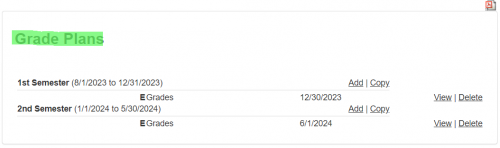
Grade Plan These can be changed individually for each grade plan, or you can use the “Clean up entries” option available via Academics > Grade Plans > Clean Up Entries to change “Quarter 1” and “Trimester 1” to just “Grades” for current and all prior years.
The Grade Plan Grades also need to be identical in order to display beneath the same column. If you display Final Grades on your transcript, you'll want to make sure that you're using the same Grade Plan Grade of “Final Grade” in current year and prior years.
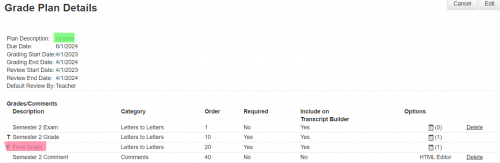
Grade Plan Grades When you add a grade column to the transcript, you're prompted to select the Grade Plan Grade that you'd like to display. If the Grade Plan Grade you selected exists in multiple Grade Plans, you are going to be prompted to select only ONE Grade Plan:
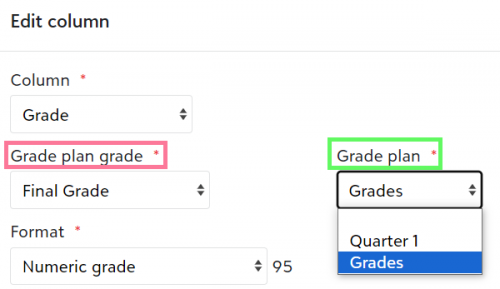
Once you've gone through and made sure that all of your Grade Plans have a generic name, you'll no longer be prompted to have to select a Grade Plan. Thus, allowing you to display Final Grades for your current Trimester setup, as well as Final Grades for prior year Quarters
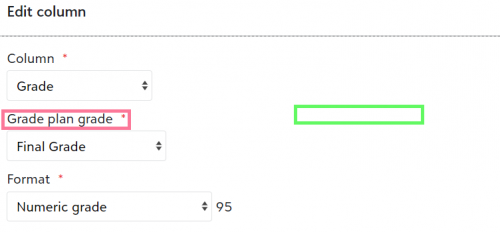
It's a bit tricky to explain but I am hoping my visual might help a bit!
I'm not sure I am following why the Grade Plan Group needs to be changed.
Lastly, changing the naming convention of grade plans and grade plan grades should not impact any grades that have been recorded. Worst case scenario, everything can always be set back to your original name conventions if you decide not to proceed. If you do make these changes, I recommend going into all of your report cards/transcripts and edit each grade column, to make sure that the appropriate grade is still selected after having changed naming conventions.
1 -
@Kim Ashcraft
The issue with grades not displaying for certain grade translation tables is very likely a combination of these two settings;- Format. When you're adding a grade to the report card/transcript, you have to select a format as follows:
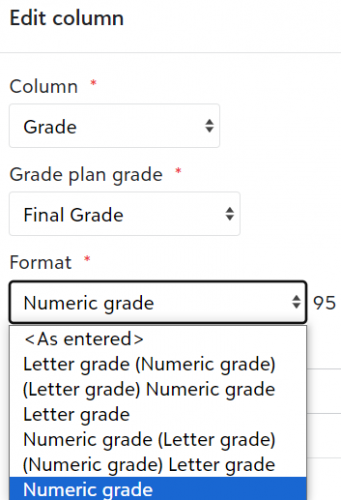
- Grade Translation table value to use when translate on output is set:
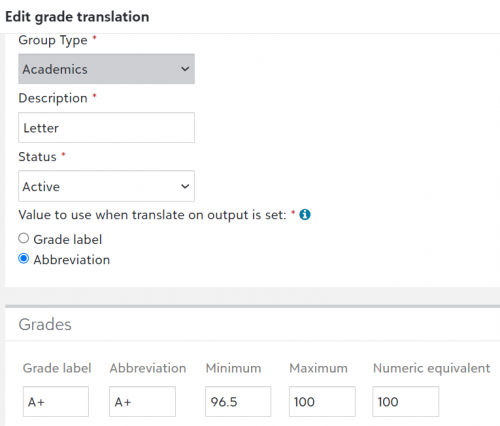
It's a bit complicated to explain and also requires some review of the grade categories as well, so I would recommend just mentioning the above to support as an area to troubleshoot.
1 -
Hey @Kristen Duval! Hope all is well..
Thanks so much for this detailed response. Going over it with our academic folks but I will post back when we make the changes.
1 -
@Kim Ashcraft
I moved our Lower School to the new report card, using Assessments. I also found a way to add numeric and/or alpha grades for our 5th graders in during the 2018-19 school here. Here are the directions I put together. Maybe this will help you. Lower School Grading & Report Card SetUp New Report Cards.pdf1 -
@Josceline Reardon
Thank you! I will read through your directions and find some good tips and solutions! I did subsequently find out that the new report card, if using assessment and not hybrid, will only pull from one grade translation, if I am using subheaders on the report card. Subheaders were a feature my director really wanted, so trying to work around that… maybe by using a hybrid card.0








Categories
- All Categories
- 6 Blackbaud Community Help
- 213 bbcon®
- 1.4K Blackbaud Altru®
- 403 Blackbaud Award Management™ and Blackbaud Stewardship Management™
- 1.2K Blackbaud CRM™ and Blackbaud Internet Solutions™
- 15 donorCentrics®
- 360 Blackbaud eTapestry®
- 2.6K Blackbaud Financial Edge NXT®
- 656 Blackbaud Grantmaking™
- 577 Blackbaud Education Management Solutions for Higher Education
- 3.2K Blackbaud Education Management Solutions for K-12 Schools
- 940 Blackbaud Luminate Online® and Blackbaud TeamRaiser®
- 84 JustGiving® from Blackbaud®
- 6.7K Blackbaud Raiser's Edge NXT®
- 3.7K SKY Developer
- 249 ResearchPoint™
- 119 Blackbaud Tuition Management™
- 165 Organizational Best Practices
- 241 Member Lounge (Just for Fun)
- 34 Blackbaud Community Challenges
- 37 PowerUp Challenges
- 3 (Open) PowerUp Challenge: Grid View Batch
- 3 (Closed) PowerUp Challenge: Chat for Blackbaud AI
- 3 (Closed) PowerUp Challenge: Data Health
- 3 (Closed) Raiser's Edge NXT PowerUp Challenge: Product Update Briefing
- 3 (Closed) Raiser's Edge NXT PowerUp Challenge: Standard Reports+
- 3 (Closed) Raiser's Edge NXT PowerUp Challenge: Email Marketing
- 3 (Closed) Raiser's Edge NXT PowerUp Challenge: Gift Management
- 4 (Closed) Raiser's Edge NXT PowerUp Challenge: Event Management
- 3 (Closed) Raiser's Edge NXT PowerUp Challenge: Home Page
- 4 (Closed) Raiser's Edge NXT PowerUp Challenge: Standard Reports
- 4 (Closed) Raiser's Edge NXT PowerUp Challenge: Query
- 796 Community News
- 3K Jobs Board
- 54 Blackbaud SKY® Reporting Announcements
- 47 Blackbaud CRM Higher Ed Product Advisory Group (HE PAG)
- 19 Blackbaud CRM Product Advisory Group (BBCRM PAG)