SPLIT PLEDGE HELP





Hi there!
I'm looking for help with applying a single gift to two different pledges. When I use the split gift tab, it won't let me divert part of the gift to one pledge and the other half to the other.
How can I do this?
Thanks!
Comments
-
@Alex Blackwill Can you be more precise. You say Split Pledge, but then you say single pledge. Which is it and what are you trying to do, because it is not clear.
0 -
@Alex Blackwill - I'll echo @Joe Moretti a bit here and say that a bit more detail would be helpful as we try to determine what exactly you need.
That said, if you have one payment, it can be applied to two pledges, but it would not be done on the split gift tab (you would distinguish split Campaign/Fund/Appeals there). When you apply the pledge, you can opt to link to more than one pledge.1 -
@Alex Blackwill As posted a little more clarification might be beneficial. Are the pledges on the same record as the individual making the payment? Are you working in db view?
My interpretation reading between the lines. You have a payment to apply to 2 pledges. So in batch or on record, enter the payment amount and choose the option to apply it to a pledge. If pledges are on that record they will be listed and you check the box in ‘Pay?’ column and enter the amount in ‘amount applied’ column for each fund.
If not on that constituent's record you will need to ‘load pledge from.' Apply the appropriate amount to pledge # 1. Be sure to put the $ in the amount applied field. Then go to ‘load pledge from' again and bring in the second pledge. Same process, enter amount to apply.
You do not use the split gift tab to apply payments to pledges.
2 -
@Alex Blackwill
JoAnn gave you the info on how to apply a single payment to multiple pledges. So follow that instruction.However, you might need to do split gift if the pledges you are paying is different campaign fund appeal package (CFAP).
If Payment is $1000, paying Pledge A $100 and Pledge B $900, where Pledge A and Pledge B have different CFAP. You will want to go into the Split Gift tab and enter 1 split that is same as Pledge A's CFAP for $100 and another split for Pledge B's CFAP for $900
0 -
@Alex Wong @Joe Moretti @Christine Robertson @JoAnn Strommen Thanks all for your replies. I'm in database view and trying to apply one gift to two pledges. When I choose the option to apply to a pledge only one of the pledges appears. The pledges have different campaigns, funds, and appeals. Why isn't the second pledge appearing?
0 -
@Alex Blackwill
screenshot of what you see will help us understand what your issue is.Why pledge not show up:
pledge paid off won't show
pledge that's not “active” won't show
pledge from another donor record won't show until “load from” is used (JoAnn instruction)
0 -

@Alex Wong
Above are the two pledges and the gift. Below is what happens when I try to apply the gift to the pledges. Only one pledge appears.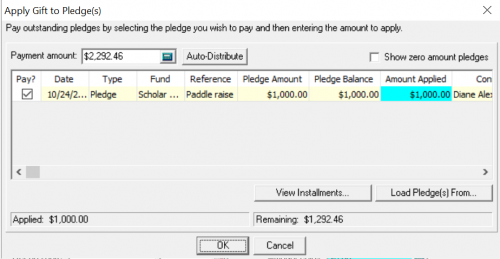 0
0 -
@Alex Blackwill I think it looks like they are the same fund. That is likely the issue. Even though campaign/appeal are different - fund is the key.
You may not be able to do in one payment record. RE gets picky. I found that I could not have two MG from different donors to the same fund on a large MG from company. Had to put one total amount.
You could try to load pledge from and enter the donor's name but I think you may have hit a roadblock.
0 -
@Alex Blackwill
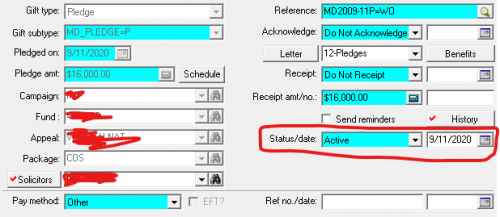
Same fund doesn't matter, as all “eligible” pledge of the same constituent record would show up in the window, RE systematically doesn't know if you are going to choose which pledge to pay (meaning it doesn't know you are going to choose 2 pledges with same fund to begin with)Open the pledge that does not show up, check to make sure the Status is Active.
 3
3 -
@Alex Blackwill Are both pledges hard credited on the same donor's account (check to see if one is on a spouse, etc.)? Since you are looking at pledges with two different funds, did you split the fund on the payment to see if that would enable you to pull both?
0 -
@Christine Robertson
in Alex B's screenshot of the constituent record's gift tab, it shows both pledges (though very blur, can i make it out somewhat). the pledge also does not look to be soft credited from another record and it shows there is still a $10K balance. So unlikely the reason.1 -
@Alex Wong
That was it! The status was set on “Held,” no idea why. Thank you Alex!!0














Categories
- All Categories
- 6 Blackbaud Community Help
- 211 bbcon®
- 1.4K Blackbaud Altru®
- 402 Blackbaud Award Management™ and Blackbaud Stewardship Management™
- 1.1K Blackbaud CRM™ and Blackbaud Internet Solutions™
- 15 donorCentrics®
- 360 Blackbaud eTapestry®
- 2.6K Blackbaud Financial Edge NXT®
- 655 Blackbaud Grantmaking™
- 576 Blackbaud Education Management Solutions for Higher Education
- 3.2K Blackbaud Education Management Solutions for K-12 Schools
- 941 Blackbaud Luminate Online® and Blackbaud TeamRaiser®
- 84 JustGiving® from Blackbaud®
- 6.7K Blackbaud Raiser's Edge NXT®
- 3.7K SKY Developer
- 248 ResearchPoint™
- 120 Blackbaud Tuition Management™
- 165 Organizational Best Practices
- 240 Member Lounge (Just for Fun)
- 34 Blackbaud Community Challenges
- 37 PowerUp Challenges
- 3 (Open) PowerUp Challenge: Grid View Batch
- 3 (Closed) PowerUp Challenge: Chat for Blackbaud AI
- 3 (Closed) PowerUp Challenge: Data Health
- 3 (Closed) Raiser's Edge NXT PowerUp Challenge: Product Update Briefing
- 3 (Closed) Raiser's Edge NXT PowerUp Challenge: Standard Reports+
- 3 (Closed) Raiser's Edge NXT PowerUp Challenge: Email Marketing
- 3 (Closed) Raiser's Edge NXT PowerUp Challenge: Gift Management
- 4 (Closed) Raiser's Edge NXT PowerUp Challenge: Event Management
- 3 (Closed) Raiser's Edge NXT PowerUp Challenge: Home Page
- 4 (Closed) Raiser's Edge NXT PowerUp Challenge: Standard Reports
- 4 (Closed) Raiser's Edge NXT PowerUp Challenge: Query
- 796 Community News
- 3K Jobs Board
- 54 Blackbaud SKY® Reporting Announcements
- 47 Blackbaud CRM Higher Ed Product Advisory Group (HE PAG)
- 19 Blackbaud CRM Product Advisory Group (BBCRM PAG)