Report Cards





We are ready to print and send report cards, however the second pages (and third pages) of a report card - the class description is being changed and does not match the class - please advise
Comments
-
Hi @Kathy Norek
This type of report behavior is often a result of a display issue that stems from ActiveReports which Blackbaud isn't able to address directly. The problem deals with a field that allows rich text, in this case Course Description, and manifests due to some unknown combination of location on the page and information around it.
To workaround this issue with ActiveReports, modifications are needed to the template setup to see if those changes resolve the issue. Most often just changing or adding to the sorting/groupings of the data will resolve this issue, however it may reappear on another student's report with more data present. Preview a few student report cards after making any modifications to confirm the descriptions all match up.
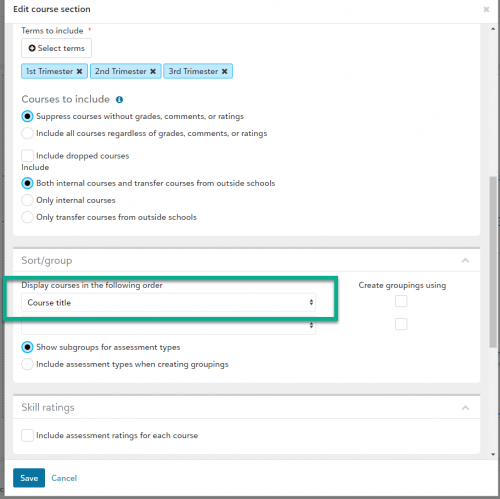
I recommend to first try editing into the larger area of the report template which encompasses the course title, course description, grade, teacher, etc. columns and adding a sort/group setting as shown here for example with sorting by ‘Course title’. Then preview the report to confirm if the descriptions match up with each of the courses. Additional sorting/grouping may be needed in some cases. If you need additional help, you can access the knowledgebase guide HERE to contact our product support Team.
 2
2


Categories
- All Categories
- 6 Blackbaud Community Help
- 211 bbcon®
- 1.4K Blackbaud Altru®
- 402 Blackbaud Award Management™ and Blackbaud Stewardship Management™
- 1.1K Blackbaud CRM™ and Blackbaud Internet Solutions™
- 15 donorCentrics®
- 360 Blackbaud eTapestry®
- 2.6K Blackbaud Financial Edge NXT®
- 655 Blackbaud Grantmaking™
- 576 Blackbaud Education Management Solutions for Higher Education
- 3.2K Blackbaud Education Management Solutions for K-12 Schools
- 941 Blackbaud Luminate Online® and Blackbaud TeamRaiser®
- 84 JustGiving® from Blackbaud®
- 6.7K Blackbaud Raiser's Edge NXT®
- 3.7K SKY Developer
- 248 ResearchPoint™
- 120 Blackbaud Tuition Management™
- 165 Organizational Best Practices
- 240 Member Lounge (Just for Fun)
- 34 Blackbaud Community Challenges
- 37 PowerUp Challenges
- 3 (Open) PowerUp Challenge: Grid View Batch
- 3 (Closed) PowerUp Challenge: Chat for Blackbaud AI
- 3 (Closed) PowerUp Challenge: Data Health
- 3 (Closed) Raiser's Edge NXT PowerUp Challenge: Product Update Briefing
- 3 (Closed) Raiser's Edge NXT PowerUp Challenge: Standard Reports+
- 3 (Closed) Raiser's Edge NXT PowerUp Challenge: Email Marketing
- 3 (Closed) Raiser's Edge NXT PowerUp Challenge: Gift Management
- 4 (Closed) Raiser's Edge NXT PowerUp Challenge: Event Management
- 3 (Closed) Raiser's Edge NXT PowerUp Challenge: Home Page
- 4 (Closed) Raiser's Edge NXT PowerUp Challenge: Standard Reports
- 4 (Closed) Raiser's Edge NXT PowerUp Challenge: Query
- 796 Community News
- 3K Jobs Board
- 54 Blackbaud SKY® Reporting Announcements
- 47 Blackbaud CRM Higher Ed Product Advisory Group (HE PAG)
- 19 Blackbaud CRM Product Advisory Group (BBCRM PAG)