Bank Reconciliations after FENXT implementation





Hello,
Has anyone successfully started doing bank reconciliations in FENXT long after implementing the program? We walked into quite a mess, left by the previous accounting team, and they never used the bank reconciliation feature. We'd like to use the feature, but don't want to have to reconcile back two or more years. We've been doing it manually with Excel for the time being. I know we can enter a GL starting balance, but none of the transactions have ever been marked “cleared” and are still “outstanding” in the system. Has anyone gotten around that, and if so, how?
Comments
-
@Laura Vazquez
Sounds similar to when doing a new implementation, so hopefully, this will work for you.Using your last reconciliation report (manually done). Start a reconciliation in NXT for the reconciliation report you are using. Select all items and then unselect the items are are outstanding on your report. If they correctly reconciled the bank account manually, this should work for you.
Best of luck!
2 -
@Laura Vazquez
Hi Laura, Have you been able to use this function with FENXT?0 -
@Accounts Payable The bank reconciliation function? No, we have not started using it because the previous team did not use it for two full years, and I'm not sure how to implement it without having to reconcile two years' worth of transactions. I would like to use it without it pulling two years of “outstanding” transactions into it. For instance, is it possible to begin at the start of our fiscal year without pulling previous years into the reconciliation?
0 -
@Laura Vazquez
Hi Laura, You will need to deal with the past 2 years which isn't hard if they have been doing the bank reconciliation the whole time. Start with the last manually completed bank reconciliation. Start the bank rec process in NXT using the date of the ending date fo the bank you are working with. Say it is October 31 2023. Enter Oct 31 as the ending date and enter the bank balance from the bank statement. You will get a screen full of the past 2 years' worth of items. Now select all the items in the list. You will be out of balance. Now search for the outstanding items as listed on the manual bank reconciliation and unselect these items. This should get you to a zero out of balance near the bottom of the screen. Once you get to that point click on the next button and you can review the bank rec. If all is well, click “reconcile now” and then you have the past 2 years all caught up, and you can then start with the next month that you want to reconcile.0 -
@Sylvia Cook The manual bank recs for the last two years are a complete mess. We were able to close out the fiscal year, so it has only been in balance since 6/30/23.
0 -
@Sylvia Cook We are in a similar situation having done manual bank reconciliations for YEARS and are now trying to do them in FENXT. I followed the advice you gave @Laura_Vazquez and was only able to get to a zero balance on one of our six bank accounts. Back in August I attended training specific to bank reconciliations and was so hopeful, but failed right out of the gate once on my own. I've read FE knowledge base articles, and read through community forum postings, and still canNOT figure out bank reconciliations. I feel like such a loser. To be honest, I'm not sure the various bank account settings are correct to even begin the reconciliation process. Some of our bank accounts have been in existence for many, many years, but I don't always see years and years of activity when attempting to reconcile. I just completed all six manual bank reconciliations for November and thought it would be a good time to recreate them in FENXT. I attempted to Chat this morning, but it's impossible to get a live agent.
1 -
@Shari Gibbs Andrus That is awesome that one of the bank accounts did work! It is no small task to get this working after years of manual bank recs. So don't beat yourself up. Your persistence will pay off.
I suspect that over the years there were entries posted to the GL that did not have the “created post bank adjustments”. You can make a “do not post” bank adjustment to get the bank register in sync with the GL, but be certain your GL bank rec is correct.
Now that you have all the old stuff checked off and have just what really are the outstanding items unchecked, you can make an adjustment in the bank register. You will need to create a bank adjustment before going back into the reconciliation.
In Treasury, click on the bank to get to the bank account's info page. There is a tile called adjustment categories. Click on the add button and you will get something like below. I labeled mine below “Do Not Post Deposit”. The most important thing is to set the Post Status field to Do Not Post. I had also made a “Do Not Payments” adjustment depending on which way I needed the adjustment to go. You will have to know if the adjust needed is a deposit or a payment.
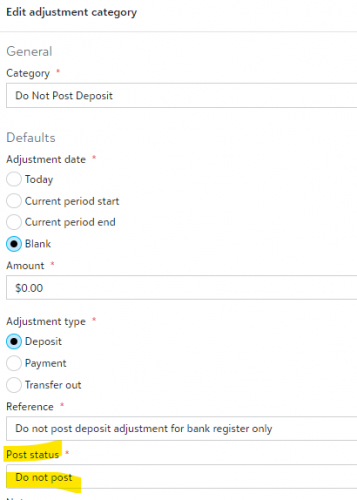
What this will do is let you make an adjustment to the bank register and it will NOT POST TO THE GL. Be very mindful of that because normally you want adjustments to post the GL. So use this with caution.
Now you can go into your bank reconciliation and you can add an adjustment by selecting this adjustment category for the amount you are left out of balance with. In the perfect world you should never have to do this again.
The bank reconciliation feature is a great tool to get bank recs done but is not without its complexities at times. If you can get your way through this hurdle you will be so glad you did.
Best of luck. It is really hard to explain some things without showing you so I hope what I said makes sense and hopefully I haven't also ticked off Support people either. This is just how I figured stuff out. In the end if you still are not sure, contact support. It is possible to get to a live person.
1 -
@Sylvia Cook
HI Sylvia, I set up the adjustment in FENXT with a do not post. When I go into the database to do my reconciliation do I have to open back up those months in order to continue with the bank rec?Also, there is no drop down for the post status. The only option there is not yet posted.
Can you help me navigate through this process?
Thank you,
Debbie Schmied
0 -
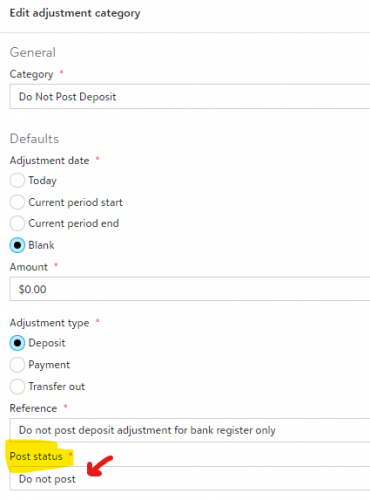
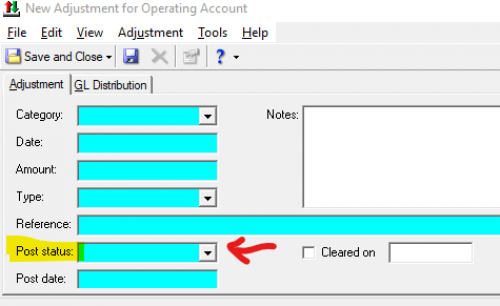
I do this all in NXT so this is how I see it. Below is the Database view for adding an adjustment, and the drop down should have the “do not post" option.
 0
0 -
@Sylvia Cook Thank you for your detailed response…I appreciate it. I will give this a try very soon and will let you know how it works.?
0





Categories
- All Categories
- 6 Blackbaud Community Help
- 211 bbcon®
- 1.4K Blackbaud Altru®
- 402 Blackbaud Award Management™ and Blackbaud Stewardship Management™
- 1.1K Blackbaud CRM™ and Blackbaud Internet Solutions™
- 15 donorCentrics®
- 360 Blackbaud eTapestry®
- 2.6K Blackbaud Financial Edge NXT®
- 655 Blackbaud Grantmaking™
- 576 Blackbaud Education Management Solutions for Higher Education
- 3.2K Blackbaud Education Management Solutions for K-12 Schools
- 941 Blackbaud Luminate Online® and Blackbaud TeamRaiser®
- 84 JustGiving® from Blackbaud®
- 6.7K Blackbaud Raiser's Edge NXT®
- 3.7K SKY Developer
- 248 ResearchPoint™
- 120 Blackbaud Tuition Management™
- 165 Organizational Best Practices
- 240 Member Lounge (Just for Fun)
- 34 Blackbaud Community Challenges
- 37 PowerUp Challenges
- 3 (Open) PowerUp Challenge: Grid View Batch
- 3 (Closed) PowerUp Challenge: Chat for Blackbaud AI
- 3 (Closed) PowerUp Challenge: Data Health
- 3 (Closed) Raiser's Edge NXT PowerUp Challenge: Product Update Briefing
- 3 (Closed) Raiser's Edge NXT PowerUp Challenge: Standard Reports+
- 3 (Closed) Raiser's Edge NXT PowerUp Challenge: Email Marketing
- 3 (Closed) Raiser's Edge NXT PowerUp Challenge: Gift Management
- 4 (Closed) Raiser's Edge NXT PowerUp Challenge: Event Management
- 3 (Closed) Raiser's Edge NXT PowerUp Challenge: Home Page
- 4 (Closed) Raiser's Edge NXT PowerUp Challenge: Standard Reports
- 4 (Closed) Raiser's Edge NXT PowerUp Challenge: Query
- 796 Community News
- 3K Jobs Board
- 54 Blackbaud SKY® Reporting Announcements
- 47 Blackbaud CRM Higher Ed Product Advisory Group (HE PAG)
- 19 Blackbaud CRM Product Advisory Group (BBCRM PAG)