RE NXT Manual Recurring Gift: Next Transaction Date





I am using RE NXT to send data from our system to RE. I have a question regarding the information displayed on the page when viewing the details of the monthly recurring gift.
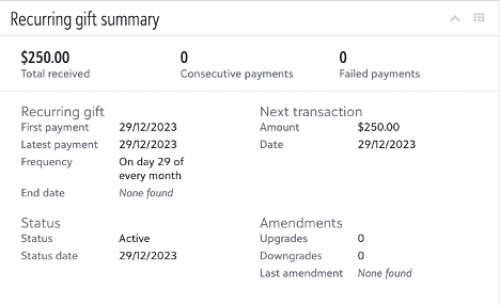
The recurring gift was created on December 29th and the first recurring gift payment was processed on the same day, but the 'Next transaction' date still appears as December 29th.
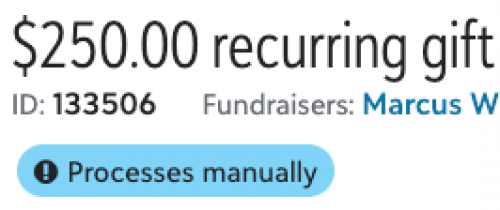
The recurring gift is processed manually (is_manual = true).
Is this the expected behavior as it is a recurring gift processed manually?
Or is there a way to change the 'Next transaction' date so that it is updated every month? For example, I want to know if it is possible that today appears in 'Next transaction' as January 29, and once the recurring gift payment of January 29 is processed, the 'Next transaction' date appears as February 29, and so on...
NOTE: I'm just declaring 'start_date' and 'frequency' in the 'recurring_gift_schedule' section of the recurring gift.
Thanks.

Comments
-
@Giovanni Trejo Abasolo
I think it should update when the actual payment gift is committed/approved?1 -
@Rachel Cavalier
Thank you for taking the time to respond to my post. I also thought it would be updated once the recurring gift payment was approved, but it remains the same.0 -
This might be something for Blackbaud Support to help with - since the gift is approved and attached to the recurring gift but not updating it as expected.
0 -
@Giovanni Trejo Abasolo To make sure that I understand, you are not seeing the next payment date update after the payments are entered into RE and linked to the Recurring Gift?
1 -
@Christine Robertson That's right, that's the case.
0 -
@Giovanni Trejo Abasolo How are you entering the payments? (Import, webview batch, database view batch, etc.)?
The screenshot in your original post shows 0 consecutive payments. I'm a bit concerned about the linking as I would expect it to reflect at least 1 there once a payment has been applied.0 -
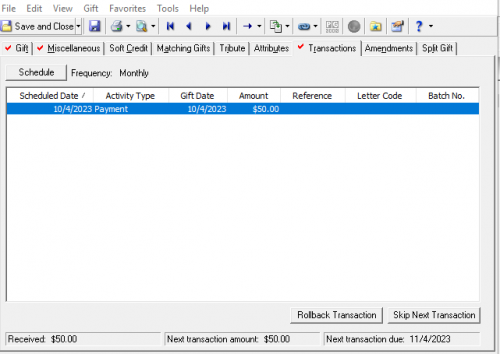
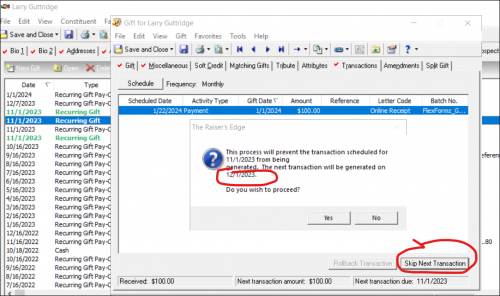
@Giovanni Trejo Abasolo What do you see on the Transactions tab of the Recurring gift in database view? (This is sample data.)
0 -
Payments were entered using webview batch.
In the database view I can see this (the info is from a recurring gift from anoteranother constituent with the same issue):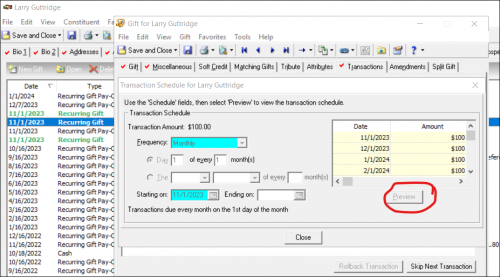
 0
0 -
@Giovanni Trejo Abasolo Is there a particular reason you're using a webview batch? Does this same issue occur if entering a gift in DB view? This looks like a feature that isn't fully baked in NXT, as they as still working through some bugs. There may be something in the idea bank.
0 -
@Giovanni Trejo Abasolo I can see two recurring gifts in your screenshot both dated for 11.1.23, but it does not appear that you have two payments for each month. Is it possible that these payments have been split and some applied to one and some to the other?
0 -
@Christine Robertson
Recurring gift payments are linked correctly to their respective recurring gift, the problem is that the date of the next transaction is not updated, and furthermore, the ‘Consecutive payments’ counter does not change either, it remains at zero.0 -
@Giovanni Trejo Abasolo Have you been able to connect with support about this?
0 -
@Christine Robertson
Thank you for the support, we have contacted support but without a satisfactory response, support recommended us to use the Blackbaud community to ask about our issue.
Thank you.
I'll let you know if I find a solution.1 -
@Giovanni Trejo Abasolo - Reach out to your Customer Success Manager and include a link to this post along with your case number.
1 -
@Dariel Dixon
There is no particular reason to use the webview batch, the same thing happens to us with the database view. I also think that it is a feature that Blackbaud has not yet implemented, unfortunately, we contacted support and they could not help us, they recommended us to ask here in the Blackbaud community.
Thank you.0 -
@Giovanni Trejo Abasolo I have never seen the next transaction date field not work when payments are applied correctly so it seems rather odd to me that support is directing you to the community. I think reaching out to your Customer Sucess Manager (as @Austen Brown mentioned) would be a good next step forward.
1














Categories
- All Categories
- 6 Blackbaud Community Help
- 211 bbcon®
- 1.4K Blackbaud Altru®
- 402 Blackbaud Award Management™ and Blackbaud Stewardship Management™
- 1.1K Blackbaud CRM™ and Blackbaud Internet Solutions™
- 15 donorCentrics®
- 360 Blackbaud eTapestry®
- 2.6K Blackbaud Financial Edge NXT®
- 656 Blackbaud Grantmaking™
- 577 Blackbaud Education Management Solutions for Higher Education
- 3.2K Blackbaud Education Management Solutions for K-12 Schools
- 941 Blackbaud Luminate Online® and Blackbaud TeamRaiser®
- 84 JustGiving® from Blackbaud®
- 6.7K Blackbaud Raiser's Edge NXT®
- 3.7K SKY Developer
- 248 ResearchPoint™
- 120 Blackbaud Tuition Management™
- 165 Organizational Best Practices
- 240 Member Lounge (Just for Fun)
- 34 Blackbaud Community Challenges
- 37 PowerUp Challenges
- 3 (Open) PowerUp Challenge: Grid View Batch
- 3 (Closed) PowerUp Challenge: Chat for Blackbaud AI
- 3 (Closed) PowerUp Challenge: Data Health
- 3 (Closed) Raiser's Edge NXT PowerUp Challenge: Product Update Briefing
- 3 (Closed) Raiser's Edge NXT PowerUp Challenge: Standard Reports+
- 3 (Closed) Raiser's Edge NXT PowerUp Challenge: Email Marketing
- 3 (Closed) Raiser's Edge NXT PowerUp Challenge: Gift Management
- 4 (Closed) Raiser's Edge NXT PowerUp Challenge: Event Management
- 3 (Closed) Raiser's Edge NXT PowerUp Challenge: Home Page
- 4 (Closed) Raiser's Edge NXT PowerUp Challenge: Standard Reports
- 4 (Closed) Raiser's Edge NXT PowerUp Challenge: Query
- 796 Community News
- 3K Jobs Board
- 54 Blackbaud SKY® Reporting Announcements
- 47 Blackbaud CRM Higher Ed Product Advisory Group (HE PAG)
- 19 Blackbaud CRM Product Advisory Group (BBCRM PAG)