User Files and Folders, Naming Conventions




We are creating User Files in Core so that certain users can upload student files we wish to keep on record. For our school, these would be in-house files that we would have kept in a student's paper file back in the day.
Does anyone have suggestions and/or examples for file naming conventions? Is there information you always include in the naming style, such as date?
Thanks.
Comments
-
@Stacey Jansen we have uploaded designed a complete digital student record. We have created several folders - “Previous School Records” which has files for Transcripts; Immunization (if not in Enrollment management); Report Cards; Community Service Hours; and Misc. - “Counsellor Confidential Files” which has files for sensitive reports from Physicians, court records, etc. - “PSAT Reports” which has files with the academic year, these files only, parents and student can see. We also post "Annual Reenrollment Information" which has academic years for parents to view what their tuition, FA & deposit will be for the reenrollment year. We are continuous enrollment school and this was a perfect way to post parent responsible tuition information. Many more folders "Attendance," “Old EE (Education Edge) Files,” “EE Alumni Transcripts,” to name a few more.
I do want to caution you – we tried to pull a report or try and see who had files in “Attendance” and there isn't a way to see who makes up the # that you see next to the folder/file name. Support said the only way to see is to do bulk uploads, which keeps the upload file. This would work for us because most of our uploading is by single student. So it is literally a file cabinet, you don't know what's in the students folder until you go to files & forms - lol. Our administration was totally fine with not being able to pull reports to see who had Attendance files.
Hope this helps
0 -
@Kathy Hannon
Do you create these under year folders, such as 2023-2024?0 -
1
-
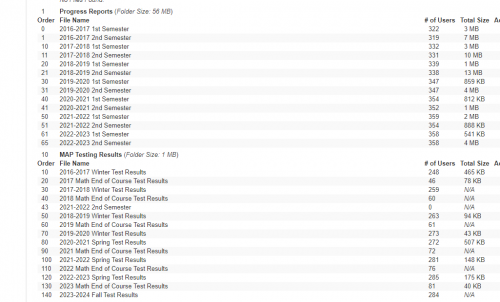
@Stacey Jansen We only do this for a few items, like academic comments (written on a different system) and the ERB's CTP 4/5 reports - we should do it for more, but use shared network folders instead for the “internal file." Naming is similar to Katherine's, although one thing we do is reverse the numbering (sort order) so the newest documents appear on the top. Starting at 999 was a bit overkill … but you never know. ?
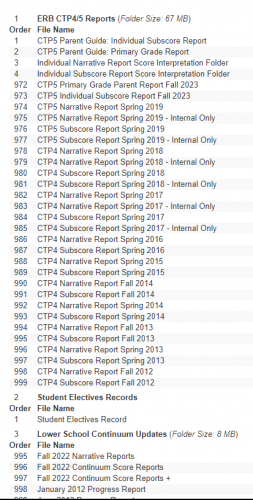 1
1 -
@David Gillespie This is really useful to me. Thank you!
It's becoming clear to me that organization by year is not the way to go.
0










Categories
- All Categories
- 6 Blackbaud Community Help
- 213 bbcon®
- 1.4K Blackbaud Altru®
- 403 Blackbaud Award Management™ and Blackbaud Stewardship Management™
- 1.1K Blackbaud CRM™ and Blackbaud Internet Solutions™
- 15 donorCentrics®
- 360 Blackbaud eTapestry®
- 2.6K Blackbaud Financial Edge NXT®
- 656 Blackbaud Grantmaking™
- 577 Blackbaud Education Management Solutions for Higher Education
- 3.2K Blackbaud Education Management Solutions for K-12 Schools
- 939 Blackbaud Luminate Online® and Blackbaud TeamRaiser®
- 84 JustGiving® from Blackbaud®
- 6.6K Blackbaud Raiser's Edge NXT®
- 3.7K SKY Developer
- 249 ResearchPoint™
- 119 Blackbaud Tuition Management™
- 165 Organizational Best Practices
- 241 Member Lounge (Just for Fun)
- 34 Blackbaud Community Challenges
- 37 PowerUp Challenges
- 3 (Open) PowerUp Challenge: Grid View Batch
- 3 (Closed) PowerUp Challenge: Chat for Blackbaud AI
- 3 (Closed) PowerUp Challenge: Data Health
- 3 (Closed) Raiser's Edge NXT PowerUp Challenge: Product Update Briefing
- 3 (Closed) Raiser's Edge NXT PowerUp Challenge: Standard Reports+
- 3 (Closed) Raiser's Edge NXT PowerUp Challenge: Email Marketing
- 3 (Closed) Raiser's Edge NXT PowerUp Challenge: Gift Management
- 4 (Closed) Raiser's Edge NXT PowerUp Challenge: Event Management
- 3 (Closed) Raiser's Edge NXT PowerUp Challenge: Home Page
- 4 (Closed) Raiser's Edge NXT PowerUp Challenge: Standard Reports
- 4 (Closed) Raiser's Edge NXT PowerUp Challenge: Query
- 794 Community News
- 3K Jobs Board
- 54 Blackbaud SKY® Reporting Announcements
- 47 Blackbaud CRM Higher Ed Product Advisory Group (HE PAG)
- 19 Blackbaud CRM Product Advisory Group (BBCRM PAG)