January Challenge: What's your favorite product tip/trick?
Comments
-
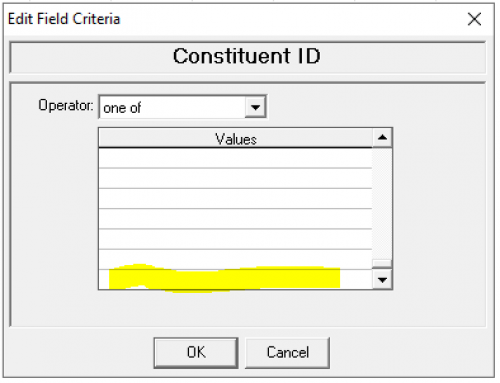
@Crystal Bruce For anyone who manually enters IDs into a ‘One of’ query to pull specific records, did you know you can copy (CNTL C) and paste (CNTL V) those numbers from a list into the query by scrolling down to the bottom of the Values and paste into the very last field? When you execute the query your list of records will generate. [max 500 IDs at a time]. Remember to select output fields to see results. This is something I use all of the time when importing mass clean-ups of specific records that have been edited in Excel, and many other uses.
 10
10 -
@Christine Robertson YES! I added so many fields to my Favorites in Query. I learned the hard way that I had to add them for the different types of queries, though. So helpful since I used to build a lot of queries.
2 -
@Crystal Bruce one that comes to mind is Aliases. At my prior organization, many times we would get tributes “in memory of Sr. such-and-such.” That proved tricky since many sisters changed their names and we have their given names in RE. So I added aliases for any alternate names so people could look up Sr. Marlene and see that it was actually Sr. Rachel now and find the actual record - instead of creating a duplicate. Some sisters had two or three because of name variations.
4 -
@Miki Martin - Yes - thank you for the added bit about different Query types. That's so important when you are working with more than just Constituent data!!
1 -
@Anuradha Parihar Welcome!! This community is a great place to learn.
0 -
@Lindy Kingins
the copy and paste one-of is a great tip.I do want to add that you don't need to scroll to the bottom. Once you clicked on the first row (for the typing cursor to show up), you can just click on the scroll bar down once, and you can Ctrl-V to paste)
4 -
@Lindy Kingins One of my favorite plugins to use for this is SMARTPaste. It's free and allows you to paste more than the 500 value limit. You can find it on the SMARTThings developer page.
7 -
@Dariel Dixon Thanks for the tip!
0 -
@Alex Wong I tried what you suggested but it didn't work for me. Maybe because it's RE7.
0 -
@Lindy Kingins
we are on RE NXT, azure hosted, RE database view version is v7.96.6404.33 not sure if this has to do with if the trick works.0 -
@Crystal Bruce
It might be obvious, but a recommendation I have as someone who frequently is asked to pull lists and data from database view and create reports is to not forget about the reports that are included in NXT! I feel like a lot of my coworkers don't realize we have basic reports on retention, campaigns, etc. that they can use for immediate self-service.5 -
@Lindy Kingins Hi, Warren from SmartTHING here - SmartPASTE definitely works with RENXT Database View too. Hope you manage to get it sorted. Any issues just contact our support guys support at smartthing.org. Cheers. Warren
2 -
@Crystal Bruce - in Query in database view, I love being able to copy and paste blocks of data (generally a group of Constituent IDs) from an Excel spreadsheet using “one of” and scrolling to the bottom of the dialogue box before pasting. Even with being limited to 500 records at a time it is probably my favorite trick that I use all the time.
8 -
@Amy Barker another variation is when you're adding info with a date in the current month, just type the DD and once you enter it'll autocomplete the MM and YY.
4 -
@Crystal Bruce
Despite their reputation ? I love creating lists for basic repetitive queries requested but staff. My favorite is the Gift Batch List. I had a DoD that would request a gift Detail & Summary report multiple times a day to see what had come in that day (she could barely even log in to dbv and trying to show her reports was painful no matter how easy I made it-even saving the reports to her home page). So I created a gift list for her in NXT with all pertinent info and the filters that she could understand and use (gift batch number, date added). She was so happy with it that I took it one step further and showed her how to click and open the donor record so she could send them an email and save the action;5 -
@Stephanie Veatch this is my favorite time saver and I wish I had learned about it far earlier than I did!
0 -
@Crystal Bruce for those with the Event module in database view one thing I discovered last year was for non constituents that you set up a participant record for you can add biographical information and when you export it will include that (for emails it is especially helpful). Previous to discovering this I set up a participant attribute for email to store that information but so much easier and cleaner to put it on the bio screen. This is the screen you get to by clicking on the three dots next to the participants name within their individual participant record.
0 -
@Crystal Bruce
Using shortcuts like F2 and F3 have made creating constituents and updating information so much easier! Before I knew that the shortcuts existed, I would spend so much of my time adding every line of data in Addressee/Salutations in RE database view or updating the date fields on various tabs. Now, it is just a click of a button and I can move on!0 -
@Whitney Shelton, lots of great tips (and reminders)!
1 -
@Don Burrhus, that's a great idea!
0 -
@Crystal Bruce, we have found that AddressFinder includes commas (usually for an apartment number), which causes some issues with our mail vendor. So, I created a query to check on any new addresses that contain commas, thus making it easy to correct those records as needed.
1 -
@Crystal Bruce a recent simple, but effective one I implemented is a workflow based on a newly added recurring gifts. When someone signs up for a recurring gift, an action is assigned to our Annual Giving Officer so they can followup and thank them in a timely manner.
1 -
@Spring Velazquez
This is by far my favorite and biggest time saver!1 -
@Erica Guernsey Along this same idea…. I was fumbling around yesterday and found the spot to configure the types of gifts that Web View will pull in reports for the “Committed revenue,” “Received revenue,” and “Recognition” filters.
Control panel → Settings → Giving Analysis0 -
@Whitney Shelton Woah, that's awesome! I didn't know you could customize those!
0 -
@Crystal Bruce, I know it may seem small, but I recently took a Blackbaud University Virtual Training session and learned that entering the day (the number, like 26) in any calendar text box and then tabbing out of it auto-populates the current month and year (so, 26 would change into January 26, 2024). I use it all the time now, and I think it's great.
3 -
@Jordyn Kieft
How do you move a block/tab?0 -
@Pat Phillips you just have to click and drag the tab that you want to move!
0 -
@Jordyn Kieft Didn't work. I mainly work in DB view, so I am not familiar with NXT. Will try another day.
0 -
@Sara Niemiec @Crystal Bruce That is a cool trick which works for me in db view but is not working for my colleagues. Any ideas why the date would autofill for some but not others?
0








































Categories
- All Categories
- 6 Blackbaud Community Help
- 213 bbcon®
- 1.4K Blackbaud Altru®
- 400 Blackbaud Award Management™ and Blackbaud Stewardship Management™
- 1.1K Blackbaud CRM™ and Blackbaud Internet Solutions™
- 15 donorCentrics®
- 360 Blackbaud eTapestry®
- 2.6K Blackbaud Financial Edge NXT®
- 655 Blackbaud Grantmaking™
- 576 Blackbaud Education Management Solutions for Higher Education
- 3.2K Blackbaud Education Management Solutions for K-12 Schools
- 939 Blackbaud Luminate Online® and Blackbaud TeamRaiser®
- 84 JustGiving® from Blackbaud®
- 6.6K Blackbaud Raiser's Edge NXT®
- 3.7K SKY Developer
- 248 ResearchPoint™
- 119 Blackbaud Tuition Management™
- 165 Organizational Best Practices
- 241 Member Lounge (Just for Fun)
- 34 Blackbaud Community Challenges
- 34 PowerUp Challenges
- 3 (Open) PowerUp Challenge: Chat for Blackbaud AI
- 3 (Closed) PowerUp Challenge: Data Health
- 3 (Closed) Raiser's Edge NXT PowerUp Challenge: Product Update Briefing
- 3 (Closed) Raiser's Edge NXT PowerUp Challenge: Standard Reports+
- 3 (Closed) Raiser's Edge NXT PowerUp Challenge: Email Marketing
- 3 (Closed) Raiser's Edge NXT PowerUp Challenge: Gift Management
- 4 (Closed) Raiser's Edge NXT PowerUp Challenge: Event Management
- 3 (Closed) Raiser's Edge NXT PowerUp Challenge: Home Page
- 4 (Closed) Raiser's Edge NXT PowerUp Challenge: Standard Reports
- 4 (Closed) Raiser's Edge NXT PowerUp Challenge: Query
- 790 Community News
- 2.9K Jobs Board
- 53 Blackbaud SKY® Reporting Announcements
- 47 Blackbaud CRM Higher Ed Product Advisory Group (HE PAG)
- 19 Blackbaud CRM Product Advisory Group (BBCRM PAG)