Import Constituents IDs to an Appeal





Hi folks, just going through my very first appeal. Everything's out at the printers, hitting mailboxes etc… now on the RE end of it, we've made the Appeal, but how do I then put in the list of people that we actually sent the mail piece out to?
I have a spreadsheet of the people and their Constituent IDs (it's not the same as the Query / Export I pulled as the mailing folks cleaned up that list), so how do I bring that into RE?
I can put in just the numbers so reports can give me the % response; but some of our other staff will want to know if they're reaching out to donors if they'd received/been sent a request ("oh you may have seen our recent letter…").
Thanks
Comments
-
@Ryan Moore You can actually add the Appeal to the Constituent record three ways.
- Import - using the Constituent ID, you can create an import file and add the Appeal (and a Package if needed) to the Constituents.
- Global Add - Using a Query of the Constituents (you can use the “One of” on the Constituent ID field), you can add the same Appeal, date, etc. to all of the Constituents
- Mail - Using the Quick Letter function, you can link to a Query of these Constituents and assign Appeals/Packages. You can also do this with the Appeal Card function in Mail.
2 -
@Christine Robertson
thanks christine, I'm assuming using #1 option… just the ‘actually how'. been drilled in me to be cautious as there's no ‘undo’ if I mess something up (I'm used to a bunch of different crms but this feels so… alien).So in Desktop / Admin / Import … but it's not really intuitive that I'm adding “x” spreadsheet file, take “A” column for the constituent ID to add “Z” appeal to their record.
So unintuitive.
0 -
@Ryan Moore You can do Option 2 of Christine IF you do not have 1000's of Constituent ID since you can can Copy the ID from Excel by doing click Ctrl C after highlighting the ID's in the spreadsheet, going to the query and doing “of of” and moving to the last row of the
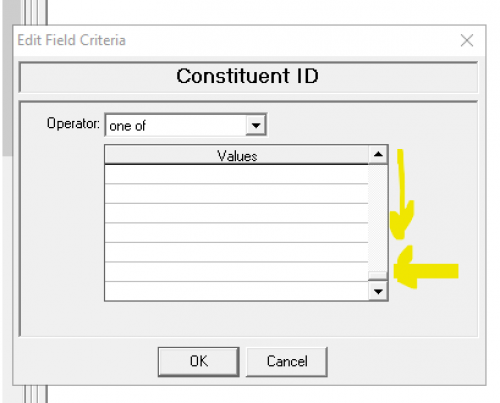
The clicking Ctrl V and you will see the ID's once you move back to the top of that. But as I said this only works for a set number of 500.
Save that query and attach it to the Global Add.
0 -
@Joe Moretti
it's about 8000 IDs0 -
@Ryan Moore So that will leave that option out, so your choice is the Import. The original query would be great to use, but since your team seemed to have removed records from it, that leaves that out of using the original query.
0 -
@Ryan Moore
using option 1 import isn't all that hard and this import idea exist across any platform.idea of import is really:
- there are different fields in the database
- when creating “new” record, you need to understand what record you are creating and which field you want to populate with what data.
- with RE, there are many, 1 to many relationship type of data (1 constituent multiple assigned appeal, 1 constituent multiple gift, 1 gift multiple soft credit, etc), and making clear of these relationship is your key to better understand the platform
- when importing, you need to an excel of data, 1 row per “record” you are creating, with columns going into each property of the record.
- then you have to either use “platform defined” column name so “auto matching” of the column to the property of the record happen, OR you use any column name, and then do the mapping yourselves.
I strongly recommend you take some RE import classes.
So, sound like all you want to do is add an appeal to a bunch of constituent. All you need is 2 columns: Constituent ID and Appeal ID
then go into the import for constituent appeal.. select import new record and select Constituent ID as identifier (instead of Constituent Import ID), then just go map the column correctly.
i suggest you create a file that has only 2 rows of data, as test to make sure you did it right before importing all others.
2 -
Congratulations @Ryan Moore! This is a great step for you. I recently did the same thing with an appeal. I just @Christine Robertson's option #2. I also use @SmartTHING Developers SmartPASTE, which allows you to get around the one of limit. It's a free plugin and a total time saver. I use smartpaste to copy my IDs and create a static query. I then use the query as the basis for my Global Add. It's easier than an import as there's no other fields to enter. All of the appeal options are set in the global add. It's worth noting that with the global add, all of the appeal information is uniform, so if you have different send dates or other variables, you might want to use import.
2 -
@Dariel Dixon
Thanks Alex.We have the Appeal already created “CARDIAC2024”
Going into the Constituent Appeal import
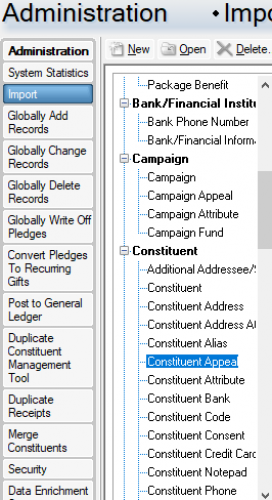
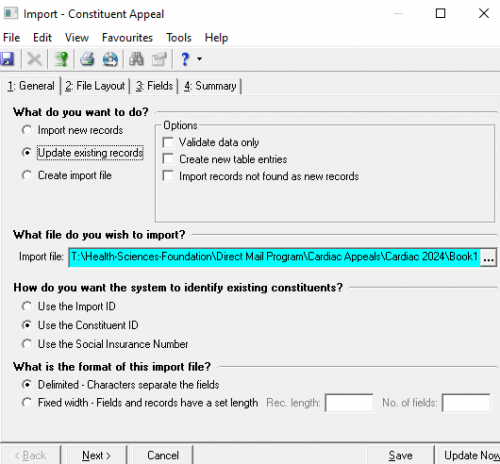
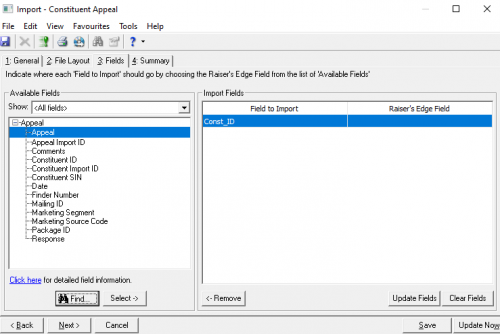
I can see where to import the file (I extracted just the Constituent IDs of our list), now where in the import procedure do i ‘connect’ those IDs with CARDIAC2024?
 0
0 -
@Ryan Moore
As I mention, you need the csv file to have 2 columns: Constituent ID and the Appeal ID.First issue, you are not “Updating existing records”. You are doing a “Constituent Appeal” import, which is importing constituent appeal record, you are not updating constituent record. Select option to “Import new records”
It looks like you only have 1 column (Const_ID) only. you need the 2nd column filled with the Appeal ID you want to add.
Const_ID Appeal ID 111111 CARDIAC2024 222222 CARDIAC2024 When mapping, you will map Const_ID to Constituent ID and the appeal column to Appeal.
5 -
@Dariel Dixon Cheers for the mention, Dariel. SmartPASTE is a freebie on our website; just Google for it, and it should pop up.
0 -
@Alex Wong
Man, thank you so much! I'm really piecemealing this training thing here as the newbie and normally I'm pretty good at tech/digital.0
















Categories
- All Categories
- 6 Blackbaud Community Help
- 213 bbcon®
- 1.4K Blackbaud Altru®
- 403 Blackbaud Award Management™ and Blackbaud Stewardship Management™
- 1.1K Blackbaud CRM™ and Blackbaud Internet Solutions™
- 15 donorCentrics®
- 360 Blackbaud eTapestry®
- 2.6K Blackbaud Financial Edge NXT®
- 656 Blackbaud Grantmaking™
- 576 Blackbaud Education Management Solutions for Higher Education
- 3.2K Blackbaud Education Management Solutions for K-12 Schools
- 939 Blackbaud Luminate Online® and Blackbaud TeamRaiser®
- 84 JustGiving® from Blackbaud®
- 6.6K Blackbaud Raiser's Edge NXT®
- 3.7K SKY Developer
- 248 ResearchPoint™
- 119 Blackbaud Tuition Management™
- 165 Organizational Best Practices
- 241 Member Lounge (Just for Fun)
- 34 Blackbaud Community Challenges
- 34 PowerUp Challenges
- 3 (Open) PowerUp Challenge: Chat for Blackbaud AI
- 3 (Closed) PowerUp Challenge: Data Health
- 3 (Closed) Raiser's Edge NXT PowerUp Challenge: Product Update Briefing
- 3 (Closed) Raiser's Edge NXT PowerUp Challenge: Standard Reports+
- 3 (Closed) Raiser's Edge NXT PowerUp Challenge: Email Marketing
- 3 (Closed) Raiser's Edge NXT PowerUp Challenge: Gift Management
- 4 (Closed) Raiser's Edge NXT PowerUp Challenge: Event Management
- 3 (Closed) Raiser's Edge NXT PowerUp Challenge: Home Page
- 4 (Closed) Raiser's Edge NXT PowerUp Challenge: Standard Reports
- 4 (Closed) Raiser's Edge NXT PowerUp Challenge: Query
- 794 Community News
- 2.9K Jobs Board
- 54 Blackbaud SKY® Reporting Announcements
- 47 Blackbaud CRM Higher Ed Product Advisory Group (HE PAG)
- 19 Blackbaud CRM Product Advisory Group (BBCRM PAG)