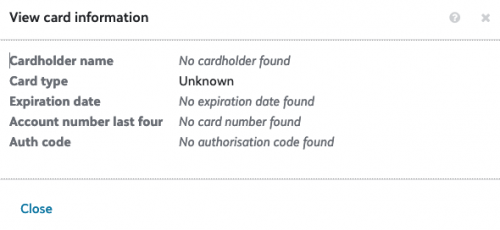
Missing Credit card info when using blackbaud checkout





Hi everyone
We are using the blackbaud checkout api and the payment api to take donations online.
Everything works fine Payment is taken, donor details including fund details are all added to BB fine.
However credit card details do not show up. Any idea why this could be
Comments
-
@Qamar Ramzan just to confirm, is this a screenshot of the tile in RE NXT? And are using the RENXT Gift API to record the Gift in RE NXT? If not how are you recording within RE NXT?
0 -
@Heather Templeton
Hi Heather,That is correct. We are using RE NXT and the gift api
0 -
@Qamar Ramzan Thanks! you need to make sure you are sending in these fields when creating the Gift via the API. bbps_transaction_id and the checkout_transaction_id, and if recurring, the account_token. These properties are on the PaymentAdd model.
The tile you are showing fetches information from Payments when it is displayed.
Let me know if this works for you.
0 -
@Heather Templeton
Hi Heather,Thanks for this. Just to further clarify we are also using BB Checkout.
Can you point me to any documentation that details this part of the process. I don't see any reference to bbps_transaction_id!
Edited:
Thank you found the information… Linked below for anyone else who may need it
0 -
@Heather Templeton
Hi Heather,Sorry, Still not clear where I grab the bbps_transaction_id value?
Are the bbps_transaction_id and the checkout_transaction_id both the the same.
I.e are they the same id you get back from a successful checkout transaction?
so would my code look something like this
$payments[] = [
'payment_method' => 'CreditCard',
'checkout_transaction_id' => $checkout_transaction_id,
'bbs_transaction_id' => $checkout_transaction_id,
];0 -
Hey Qamar,
Since you are only using checkout, then just set the checkout transaction id. This will be enough to pull back information within RE NXT for the Payments Tile.
0 -
@Heather Templeton
So we have set up correctly but we are not getting the cc details saved to the tile.Is there anything else that we need to do?
0 -
@Qamar Ramzan when you save the Gift via the Gift API, then you also need to save the checkout transaction ID via the PaymentsAdd off the Gift.
The checkout object should give you checkout transaction Id.
You also need to make sure you set PaymentMethod as CreditCard or DirectDebit.
These two fields should be enough for the Tile to populate with the other data.
0 -
@Heather Templeton
Yep, that is exactly what we are doing.this is our code…
$payments = array();
$payments[] = [
'payment_method' => 'CreditCard',
'checkout_transaction_id' => $checkout_transaction_id,
];
0 -
Thanks @Qamar Ramzan! I confirmed that test transactions should also get a checkout transaction ID, so it looks like everything should be working correctly. Can you file an issue with support and provide some checkout transaction IDs that aren't working? I will pick up the issue and research on our side then correspond via the support ticket. - Heather
0 -
@Heather Templeton
Thank you heather,
I'll do that?0 -
SOLVED
So with @Heather Templeton help this worked.
$payments[] = [
'payment_method' => 'CreditCard',
'checkout_transaction_id' => $checkout_transaction_id, // the authorization_token
'bbps_transaction_id' => $bbps_transaction_id, // the bbps_transaction_id
];0



Categories
- All Categories
- 6 Blackbaud Community Help
- 213 bbcon®
- 1.4K Blackbaud Altru®
- 401 Blackbaud Award Management™ and Blackbaud Stewardship Management™
- 1.1K Blackbaud CRM™ and Blackbaud Internet Solutions™
- 15 donorCentrics®
- 360 Blackbaud eTapestry®
- 2.6K Blackbaud Financial Edge NXT®
- 655 Blackbaud Grantmaking™
- 576 Blackbaud Education Management Solutions for Higher Education
- 3.2K Blackbaud Education Management Solutions for K-12 Schools
- 939 Blackbaud Luminate Online® and Blackbaud TeamRaiser®
- 84 JustGiving® from Blackbaud®
- 6.6K Blackbaud Raiser's Edge NXT®
- 3.7K SKY Developer
- 248 ResearchPoint™
- 119 Blackbaud Tuition Management™
- 165 Organizational Best Practices
- 241 Member Lounge (Just for Fun)
- 34 Blackbaud Community Challenges
- 34 PowerUp Challenges
- 3 (Open) PowerUp Challenge: Chat for Blackbaud AI
- 3 (Closed) PowerUp Challenge: Data Health
- 3 (Closed) Raiser's Edge NXT PowerUp Challenge: Product Update Briefing
- 3 (Closed) Raiser's Edge NXT PowerUp Challenge: Standard Reports+
- 3 (Closed) Raiser's Edge NXT PowerUp Challenge: Email Marketing
- 3 (Closed) Raiser's Edge NXT PowerUp Challenge: Gift Management
- 4 (Closed) Raiser's Edge NXT PowerUp Challenge: Event Management
- 3 (Closed) Raiser's Edge NXT PowerUp Challenge: Home Page
- 4 (Closed) Raiser's Edge NXT PowerUp Challenge: Standard Reports
- 4 (Closed) Raiser's Edge NXT PowerUp Challenge: Query
- 791 Community News
- 2.9K Jobs Board
- 53 Blackbaud SKY® Reporting Announcements
- 47 Blackbaud CRM Higher Ed Product Advisory Group (HE PAG)
- 19 Blackbaud CRM Product Advisory Group (BBCRM PAG)