Sharing my Power Automate Template: Daily Gift Error Checking (Missing Campaign or Appeal)





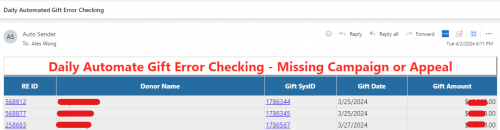
- Description: Flow will check daily for gifts entered since beginning of yesterday for gifts that has missing Campaign or missing Appeal, which is a problem in webview gift batching where these 2 fields can be omitted ignoring database view requirement. If any errors are found, an email will be sent with the details.
- Required connections: Blackbaud RE NXT Gifts, Blackbaud RE NXT Constituents, and Office 365 Outlook
- Suggested skill level required to use this template: Beginner
- Configuration details:
- Download the zip file and import into your flow environment
- Edit flow as per instructions below, DO NOT USE New Designer of flow
- Category: Automation and Data Management
- Instructions:
- (Optional) Edit Trigger to run at different time of day
- Edit Compose Notification Email Receiver action to have email address(es) of those that should get the error checking email. If multiple, separate by semi-colon
(Optional) Edit Filter Array of Splits Blank Campaign or Appeal
- current value is @or(empty(item()?['campaign_id']), empty(item()?['appeal_id'])) which is to check for blank campaign or blank appeal
- you can change to @empty(item()?['campaign_id']) for checking only for blank campaign or @empty(item()?['appeal_id']) for checking only for blank appeal
(Optional) Create a new action just before Compose Error Handling for Sending Email or Sending Team Chat message, go to edit HTML code of the new action and copy and paste the Inputs in the Compose Error Handling action into the body of the send email/chat message. Delete the Compose Error Handling action. Click on the 3-dots for the send email/chat message action and select Configure run after and check off ONLY has failed.
- If you do not want to deal with error handling, you can just delete the Compose Error Handling action
Comments
-
This is what the email would look likt
 1
1 -
Thanks, @Alex Wong! That's awesome!
0 -
@Alex Wong Thank you. I am new to Power Automate and I was able to get this working. I am curious to know if it can be altered to also look at Gift Code/Source and check for blanks. I tried to alter the Filter Array step to include Gift Code but when the test ran, it showed gifts that were not missing any of the three values - Campaign, Appeal or Gift Source.
Any thoughts on how I can add the Gift Source/Code to the flow?
0 -
which field are you talking about (a screenshot of the field would help)
0 -
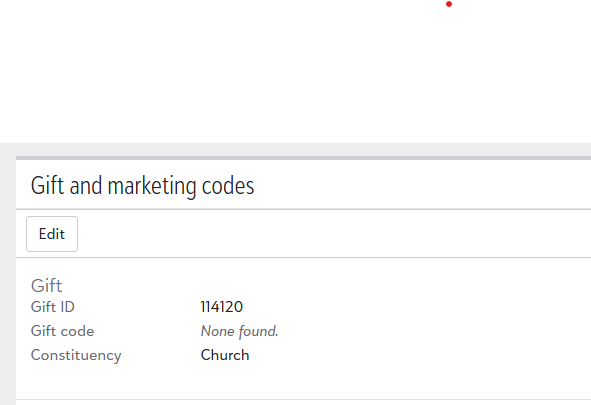
We use Gift Code, see below for NXT. In DBV it's on the Miscellaneous tab.
 0
0 -
Gift Code does come back from the list gift api call
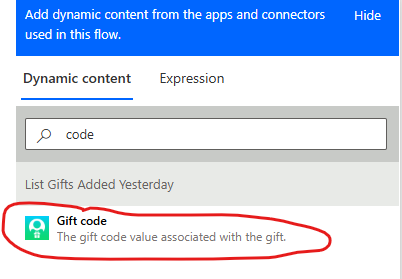
Since gift code is only 1 per gift (unlike gift split's campaign/appeal, that there can be more than one split per gift), you do not need to add this to the Filter Array of Splits Blank Campaign or Appeal action. You can simply add to the Condition on Blank Campaign or Appeal action.
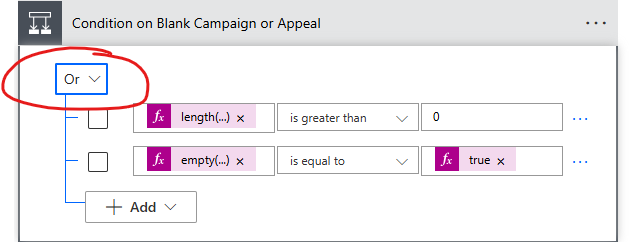
Add a row of condition, change the operator to Or.
empty(items('For_Each_Gift')?['gift_code'])is equal to
true1 -
@Alex Wong Thank you! I got it to work.
0








Categories
- All Categories
- 6 Blackbaud Community Help
- 211 bbcon®
- 1.4K Blackbaud Altru®
- 403 Blackbaud Award Management™ and Blackbaud Stewardship Management™
- 1.2K Blackbaud CRM™ and Blackbaud Internet Solutions™
- 15 donorCentrics®
- 360 Blackbaud eTapestry®
- 2.6K Blackbaud Financial Edge NXT®
- 659 Blackbaud Grantmaking™
- 579 Blackbaud Education Management Solutions for Higher Education
- 3.2K Blackbaud Education Management Solutions for K-12 Schools
- 943 Blackbaud Luminate Online® and Blackbaud TeamRaiser®
- 84 JustGiving® from Blackbaud®
- 6.7K Blackbaud Raiser's Edge NXT®
- 3.8K SKY Developer
- 250 ResearchPoint™
- 120 Blackbaud Tuition Management™
- 165 Organizational Best Practices
- 241 Member Lounge (Just for Fun)
- 36 Blackbaud Community Challenges
- 37 PowerUp Challenges
- 3 (Open) PowerUp Challenge: Grid View Batch
- 3 (Closed) PowerUp Challenge: Chat for Blackbaud AI
- 3 (Closed) PowerUp Challenge: Data Health
- 3 (Closed) Raiser's Edge NXT PowerUp Challenge: Product Update Briefing
- 3 (Closed) Raiser's Edge NXT PowerUp Challenge: Standard Reports+
- 3 (Closed) Raiser's Edge NXT PowerUp Challenge: Email Marketing
- 3 (Closed) Raiser's Edge NXT PowerUp Challenge: Gift Management
- 4 (Closed) Raiser's Edge NXT PowerUp Challenge: Event Management
- 3 (Closed) Raiser's Edge NXT PowerUp Challenge: Home Page
- 4 (Closed) Raiser's Edge NXT PowerUp Challenge: Standard Reports
- 4 (Closed) Raiser's Edge NXT PowerUp Challenge: Query
- 798 Community News
- 3K Jobs Board
- 56 Blackbaud SKY® Reporting Announcements
- 47 Blackbaud CRM Higher Ed Product Advisory Group (HE PAG)
- 19 Blackbaud CRM Product Advisory Group (BBCRM PAG)