Power Automate Save Draft and Version History





I was made aware that MS introduced new feature for saving flow as draft and having version history.
https://learn.microsoft.com/en-us/power-automate/drafts-versioning
It does require the flows to be in a Solution though. All my data warehouse syncing flows are in my Data Warehouse Solution. However, I don't have the option for Save Draft or Version History. Does anyone else experience and have this available in their environment?
The unfortunate situation is, only the “New Designer” has the option for save draft and version history. There are still bug in the new designer that I would not do any real editing of my flow in.
https://community.blackbaud.com/forums/viewtopic/426/65912
SIGH!
Comments
-
@Alex Wong
I'm using the new designer and my flows are in solutions, but I don't have draft or version history functionality yet either. Should be a huge help once we do get it!0 -
@Alex Wong
I've started to see save draft/publish in the new designer though not 100% of the time yet0 -
@Jordan Yarr
I am very hestitate to use the New Designer as it still have bugs that will break my flow.I documented some of the ones I found here:
Some of them have been fixed, though, I need to make some edits to the post.
@Heather McLean @Erik Leaver I know BB works closely with MS, do you know if there is an area/page where list of bugs are tracked that user can see? I always report new bug I found on new designer using their survey but would like to not have to retest every now and then to see if it is fixed.
0 -
@Alex Wong
Known Issues: Power Automate: use search in Support.
Idea Bank: Power Automate1 -
@Alex Wong - I opened the Large Gift Notification Flow and received an error message. Looks like it's due to the version I have installed. I recall you mentioning at BBDEVDAYS about using the older version - can you give me let me know which one you have found to work best?
0 -
@Meghan Dinges
which version did you download and import into your environment and what error are you receiving.0 -
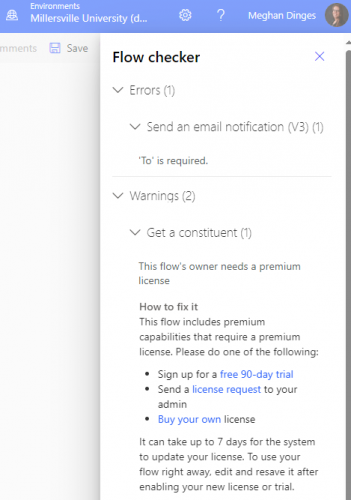
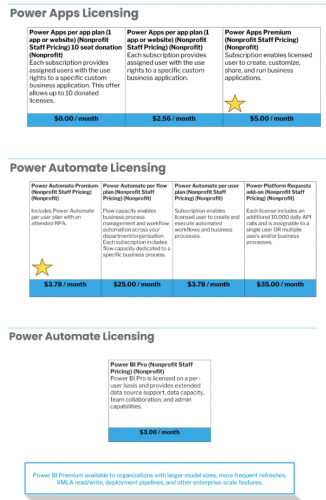
@Alex Wong - the error appears to do with my licensing requirements. I have already provided my IT Team with some resources provided at one of the sessions and hope to have the proper access soon. I just had a note about trying to obtain the same version you are using so I didn't run into any bugs. I will wait until we get the licensing and go from there. I am unsure how to check my versions. Thanks for all you do for the community.
 0
0 -
@Meghan Dinges
you will need your IT team to get you a per user license for power automate to startif you are just starting out with power bi, then you don't need a license yet, until you build something and want to put it on power bi service (on the cloud allowing others to see what you build)
as for the “version”, I think you are referring to the “new designer” vs “old designer”.
power automate is accessed by going to make.powerautomate.com, which has no “version” (not to us user). it is when you start to edit a flow, that you have the option to use New Designer (by default, MS will make you go into New Designer mode first, you will need to toggle away from New Designer).
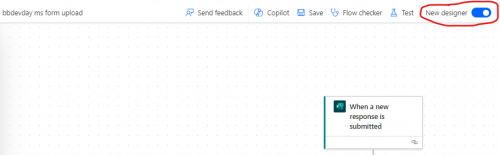
New Designer look and feel 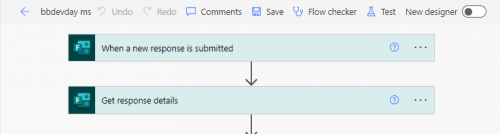
Old Deisnger look and feel 1 -
@Alex Wong - thank you this is very helpful to know.
0











Categories
- All Categories
- 6 Blackbaud Community Help
- 211 bbcon®
- 1.4K Blackbaud Altru®
- 402 Blackbaud Award Management™ and Blackbaud Stewardship Management™
- 1.1K Blackbaud CRM™ and Blackbaud Internet Solutions™
- 15 donorCentrics®
- 360 Blackbaud eTapestry®
- 2.6K Blackbaud Financial Edge NXT®
- 655 Blackbaud Grantmaking™
- 576 Blackbaud Education Management Solutions for Higher Education
- 3.2K Blackbaud Education Management Solutions for K-12 Schools
- 941 Blackbaud Luminate Online® and Blackbaud TeamRaiser®
- 84 JustGiving® from Blackbaud®
- 6.7K Blackbaud Raiser's Edge NXT®
- 3.7K SKY Developer
- 248 ResearchPoint™
- 120 Blackbaud Tuition Management™
- 165 Organizational Best Practices
- 240 Member Lounge (Just for Fun)
- 34 Blackbaud Community Challenges
- 37 PowerUp Challenges
- 3 (Open) PowerUp Challenge: Grid View Batch
- 3 (Closed) PowerUp Challenge: Chat for Blackbaud AI
- 3 (Closed) PowerUp Challenge: Data Health
- 3 (Closed) Raiser's Edge NXT PowerUp Challenge: Product Update Briefing
- 3 (Closed) Raiser's Edge NXT PowerUp Challenge: Standard Reports+
- 3 (Closed) Raiser's Edge NXT PowerUp Challenge: Email Marketing
- 3 (Closed) Raiser's Edge NXT PowerUp Challenge: Gift Management
- 4 (Closed) Raiser's Edge NXT PowerUp Challenge: Event Management
- 3 (Closed) Raiser's Edge NXT PowerUp Challenge: Home Page
- 4 (Closed) Raiser's Edge NXT PowerUp Challenge: Standard Reports
- 4 (Closed) Raiser's Edge NXT PowerUp Challenge: Query
- 796 Community News
- 3K Jobs Board
- 54 Blackbaud SKY® Reporting Announcements
- 47 Blackbaud CRM Higher Ed Product Advisory Group (HE PAG)
- 19 Blackbaud CRM Product Advisory Group (BBCRM PAG)