How Can Faculty Easily See Everyone Absent During Any Given Class?





Our faculty take the attendance of record during our Morning Announcements. However, we also take attendance during each class to just account for anyone.
Is there a way for faculty to very quickly see who from their class is absent each day?
The instructions in the knowledge base involve 6 steps to check each student individually. We need to respond quickly when students don't show up to class and faculty don't have time to open each one.
Comments
-
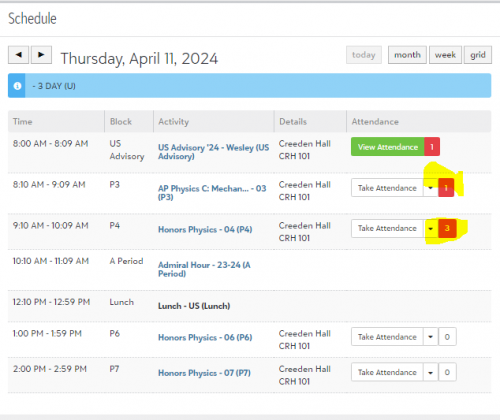
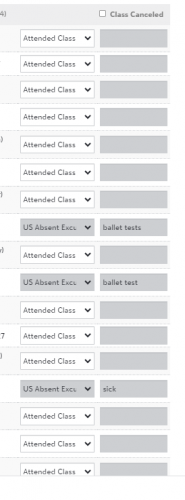
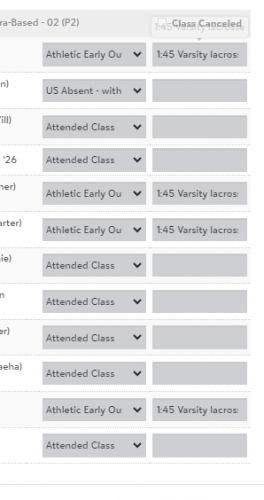
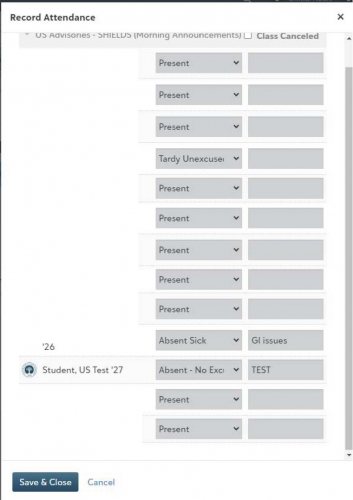
@Jennifer Miller In our Upper School, we have an attendance manager who reviews Advisory attendance (our “attendance of record”), our sign-in/sign-out sheet, and emails & calls from parents and marks the attendance for all classes in the day for students as appropriate. This includes athletic early outs. That way when the teacher opens up their attendance each period, it will show. You can see below that this teacher already knows 1 student has an attendance entry from P3 and 3 students have attendance entries for P4 today. It's a HUGE job keeping up with it all, but worth it. The attendance manager also goes back and updates the attendance or record (Advisory attendance for us) if a student comes in late, etc. as needed.
 1
1 -
@Nancy Kierstead
Thank you for this and the screenshots.I did a test this morning and added a test student to a faculty member's advisory, as we all take attendance by advisory. Then, I added that test student to that faculty member's study hall. The Study Hall currently says ‘Take Attendance’. When I click the button, it does not show my test student as already marked absent.
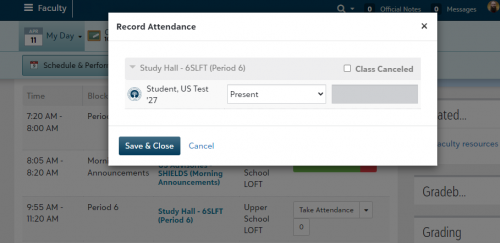
Any idea what I'm missing or doing wrong?
0 -
@Jennifer Miller Hi again. When our Attendance manager enters attendance for a student who is going to be out all day or for one or more classes, she does it through Attendance>Home>Tasks> Add attendance for a single student. She then clicks “All day” if the student will be out all day, or chooses “Specific classes” or “Specific times” if that makes more sense (eg a student is leaving for the day.
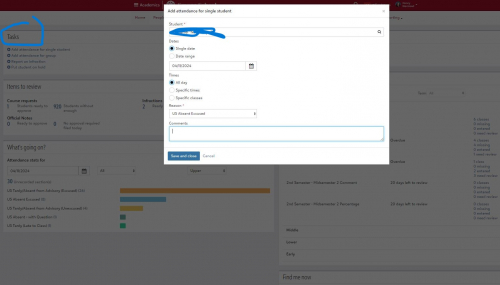
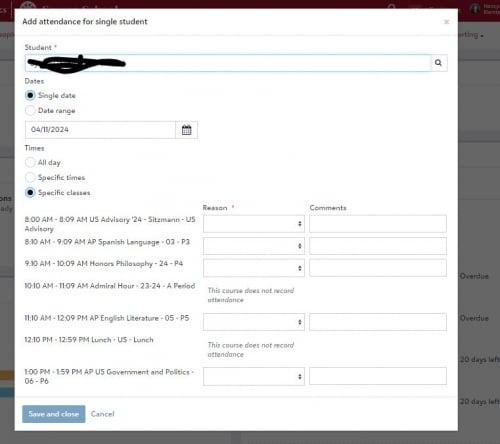
Not sure if this is how you were entering attendance for the whole day?
0 -
@Nancy Kierstead
We are still implementing BB, but are training our faculty now. The plan was for them to take the daily attendance of record first thing in the morning, and our division secretary would adjust throughout the day, as needed. However, if they are not able to see during each class who was already marked absent for the day, we may have to rethink our approach.Thanks for your help.
0 -
@Jennifer Miller If you just want teachers to be able to see recorded absences from an earlier period, the only other option I can think of is to give them access to a report. You wouldn't be able to limit that report to just the students in that teachers class, but could give teachers access to an absence report for the day. You can grant teachers access to a canned report, or a basic or advanced list that you build. You could also create a clone of the attendance manager role for teachers that would allow them to access the attendance worklist or sky lists.
They would have to run the report and then refer to it when taking attendance which is a nuisance, but unless you have someone record the absences as Nancy suggested, I don't think there is a way to have them appear when the teacher is actually taking attendance.
1





Categories
- All Categories
- 6 Blackbaud Community Help
- 213 bbcon®
- 1.4K Blackbaud Altru®
- 403 Blackbaud Award Management™ and Blackbaud Stewardship Management™
- 1.2K Blackbaud CRM™ and Blackbaud Internet Solutions™
- 15 donorCentrics®
- 360 Blackbaud eTapestry®
- 2.6K Blackbaud Financial Edge NXT®
- 656 Blackbaud Grantmaking™
- 577 Blackbaud Education Management Solutions for Higher Education
- 3.2K Blackbaud Education Management Solutions for K-12 Schools
- 940 Blackbaud Luminate Online® and Blackbaud TeamRaiser®
- 84 JustGiving® from Blackbaud®
- 6.7K Blackbaud Raiser's Edge NXT®
- 3.7K SKY Developer
- 249 ResearchPoint™
- 119 Blackbaud Tuition Management™
- 165 Organizational Best Practices
- 241 Member Lounge (Just for Fun)
- 34 Blackbaud Community Challenges
- 37 PowerUp Challenges
- 3 (Open) PowerUp Challenge: Grid View Batch
- 3 (Closed) PowerUp Challenge: Chat for Blackbaud AI
- 3 (Closed) PowerUp Challenge: Data Health
- 3 (Closed) Raiser's Edge NXT PowerUp Challenge: Product Update Briefing
- 3 (Closed) Raiser's Edge NXT PowerUp Challenge: Standard Reports+
- 3 (Closed) Raiser's Edge NXT PowerUp Challenge: Email Marketing
- 3 (Closed) Raiser's Edge NXT PowerUp Challenge: Gift Management
- 4 (Closed) Raiser's Edge NXT PowerUp Challenge: Event Management
- 3 (Closed) Raiser's Edge NXT PowerUp Challenge: Home Page
- 4 (Closed) Raiser's Edge NXT PowerUp Challenge: Standard Reports
- 4 (Closed) Raiser's Edge NXT PowerUp Challenge: Query
- 796 Community News
- 3K Jobs Board
- 54 Blackbaud SKY® Reporting Announcements
- 47 Blackbaud CRM Higher Ed Product Advisory Group (HE PAG)
- 19 Blackbaud CRM Product Advisory Group (BBCRM PAG)