SKY API using Postman Error Help





Hello,
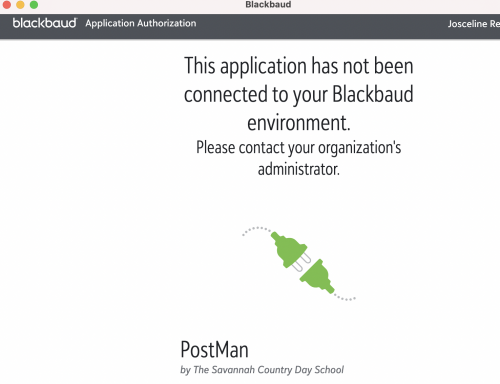
I'm trying to set up my first SKY API. I'm following these directions provided by Blackbaud, but when I request the token and then I get to the login screen and login, but I get this error. I'm not sure what else I need to do at https://developer.blackbaud.com/.
Any suggestions would be greatly appreciated!!
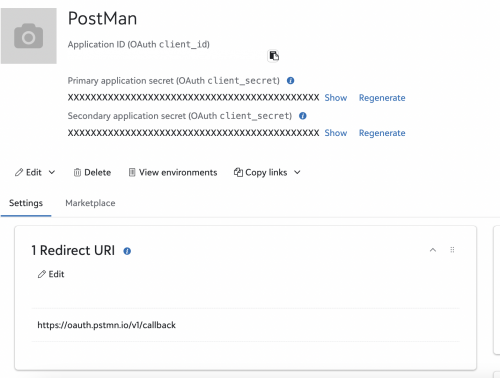
This is what I have in the BB Developer area. I just blurred the App ID.
Comments
-
@Josceline Reardon Hello I am also fairly new to SKY API
When looking at the directions you're following I am curious if you have completed the below step in postman
_______________________________________________________________Create a new collection – call it “SKY API”
With a collection You are able to add OAuth 2.0 authorization details to the main folder and have each endpoint in the folder inherit the credentials from the parent rather than having to enter them each time on each child endpoint.
Click on the newly created collection and click on the authentication tab to add credentials for the whole folder.
Type: OAuth 2.0
Add auth data to Request Headers
Header Prefix: Bearer_____________________________________________________
In my journey I ended up going out to postman because of the difficulty authenticating and just writing my api call in python. below is the code to be able to authenticate through python.
BbApiConnector-Python/resources/bb_auth.py at master · justein230/BbApiConnector-Python · GitHub0 -
@Josceline Reardon Hello,
I have recently managed to setup Sky API on Postman.
The error you are received, indicates that you haven't connect your application to an environment (that's the database you want to connect to).
To connect an application to an environment, you need to be a Marketplace Admin or you can ask a user in your organisation who is an Marketplace Admin to connect the application for you.
Easiest way to connect the application:
- Navigate to your developer account and view your application, where you can see client ID, Secret, etc. (Your screenshot page)
- Underneath the screen keys you should see Edit; View environments; Copy links
- Click ‘Copy links' and ‘Connect application link’ (this will copy the URL)
- Open a new tab on the browser and paste the URL link copied and press enter
- And connect to the environment you wish
A useful link:
Hope that is helpful.
Best,
T
0 -
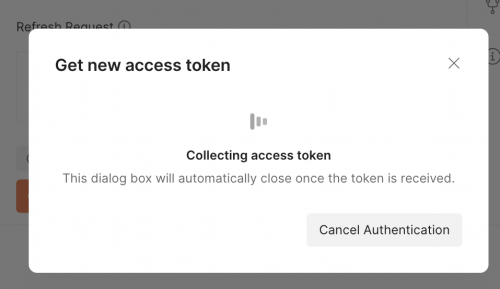
Hi @Thuy LyChambers! Thanks for your reply. I followed your steps and connected the app and now I get to here and authorize, then I go to PostMan and send the request for the Tokens and it gets hung up trying to get tokens.?

 0
0






Categories
- All Categories
- 6 Blackbaud Community Help
- 211 bbcon®
- 1.4K Blackbaud Altru®
- 402 Blackbaud Award Management™ and Blackbaud Stewardship Management™
- 1.1K Blackbaud CRM™ and Blackbaud Internet Solutions™
- 15 donorCentrics®
- 360 Blackbaud eTapestry®
- 2.6K Blackbaud Financial Edge NXT®
- 655 Blackbaud Grantmaking™
- 576 Blackbaud Education Management Solutions for Higher Education
- 3.2K Blackbaud Education Management Solutions for K-12 Schools
- 940 Blackbaud Luminate Online® and Blackbaud TeamRaiser®
- 84 JustGiving® from Blackbaud®
- 6.7K Blackbaud Raiser's Edge NXT®
- 3.7K SKY Developer
- 248 ResearchPoint™
- 120 Blackbaud Tuition Management™
- 165 Organizational Best Practices
- 240 Member Lounge (Just for Fun)
- 34 Blackbaud Community Challenges
- 37 PowerUp Challenges
- 3 (Open) PowerUp Challenge: Grid View Batch
- 3 (Closed) PowerUp Challenge: Chat for Blackbaud AI
- 3 (Closed) PowerUp Challenge: Data Health
- 3 (Closed) Raiser's Edge NXT PowerUp Challenge: Product Update Briefing
- 3 (Closed) Raiser's Edge NXT PowerUp Challenge: Standard Reports+
- 3 (Closed) Raiser's Edge NXT PowerUp Challenge: Email Marketing
- 3 (Closed) Raiser's Edge NXT PowerUp Challenge: Gift Management
- 4 (Closed) Raiser's Edge NXT PowerUp Challenge: Event Management
- 3 (Closed) Raiser's Edge NXT PowerUp Challenge: Home Page
- 4 (Closed) Raiser's Edge NXT PowerUp Challenge: Standard Reports
- 4 (Closed) Raiser's Edge NXT PowerUp Challenge: Query
- 796 Community News
- 3K Jobs Board
- 54 Blackbaud SKY® Reporting Announcements
- 47 Blackbaud CRM Higher Ed Product Advisory Group (HE PAG)
- 19 Blackbaud CRM Product Advisory Group (BBCRM PAG)