Removing Additional Addressees and Salutations from Non-Constituent Relationship Records





We have completely revamped our Addressee and Salutation formats and I have finished applying the new templates to the constituent records. Because the constituent record now includes joint addressees and salutations for spouses, we no longer want any addressees/salutations on the non-constituent spouse records. And in order to delete all the old templates from the Addressee/Salutations section of Config, I need to remove the old templates from non-constituent records. I have not found a way to delete the old ones either globally or through Import/Export. I am also trying to remove the old formats from Individual non-constituent relationships on Organization records. Deleting them all via Query would take me over 40 hours of work. Does anyone have any advice besides paying BB to remove them all?
As for the Primary Addressee and Primary Salutation, is it possible to import a blank format to replace the old templates that were used since we no longer want these on the non-constituent relationship records.
Thanks for any help anyone can give.
Comments
-
Welcome to the community @Theresa Rogers. I believe you may be able to delete these through import using the * character. I'm sure you can have these as blank on non-constituent fields as long as they aren't a required field. Regardless of this, this is still going to be a lengthy process.
1 -
@Theresa Rogers
As Dariel said you can use import to blank out a field, provided the field isn't marked as “required” in configuration.the special character to use is ^ (shief-6)
0 -
@Alex Wong and @David Dixon Thanks to you and Daniel for responding. I did not know about the use of the carat. This should work for the non-constituent records for their Primary Addressee and Primary Salutation. I will try that another day.
But when I tried this for an additional Addressee/Salutation, it did not work. If I say the field is not editable, then it overwrites the current entry with the template I had to choose for the AddSalID. And if I choose editable, then the carat didn't work and I received the error message "Invalid field value: Required Field Missing Salutation. The field I'm working with - Salutation 1 - is not a required field according to the charts in Config. If I succeed eventually in making this work, and enter a blank Salutation 1 field, how do I remove the label Salutation 1 from all the records?
Thanks for any additional advice you are able to provide to me.
0 -
@Theresa Rogers
If you use import to change the “additional addressee/salutation” to some “delete” type, you can use Global Change to delete the “delete” type of additional address/salutation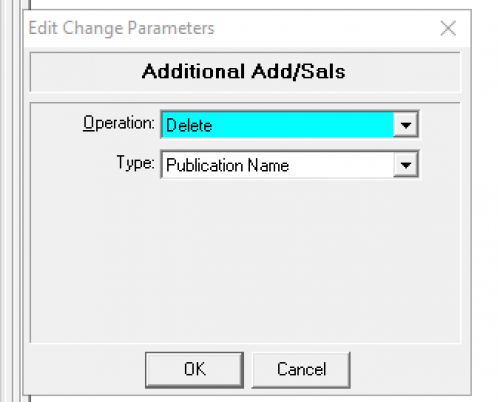 2
2 -
@Alex Wong I see that possibility for constituent records, but when I try to set up a global change for Individual/Contact/Employee Relationships, I only see an Add/Replace for Additional Addressees/Salutations. What am I missing?
0 -
@Theresa Rogers
ops…forgot you were talking about relationship's addressee/salutation.it seems like global change isn't gonna do “delete” unfortunately.
0 -
@Alex Wong Using the carot may be the best thing I've learned in the past year. It's been so helpful when cleaning up fields where folks in the past put things like “Ignore” or “Delete” in email fields! I think overall, Import is an under-utilized function for data clean-up.
1 -
@Alex Wong Do you have any other suggestions on how I may accomplish this? Must I hire a BB consultant to do this for me by writing code?
0 -
@Theresa Rogers
I don't have any other suggestion. Check if Blackbaud offer anything.0 -
@Alex Wong
Thank you for helping me think through this and making sure I tried everything I could do before I reached out for help that might cost my organization additional fees.0 -
@Theresa Rogers I'm sure you'll consider how cost effective it would be to do this cleanup. You might find it easier to develop internal processes to ignore or remove some of these additional addressees/salutations as this would be a lot of work or a considerable amount of money.
1 -
@Dariel Dixon Thank you for the suggestion. The organization has made the decision to eliminate the additional addressee and salutation types. This is probably the first overhaul the addressees/salutations have had since they began working with RE, so probably in almost 30 years. BB is quoting around 8 hours of labor so they must be able to write SQL code or have a back door in to eliminate them. Or if I can enlist others in the organization to help delete the old formats, it will of course be much more efficient and quicker than me doing them solo.
0 -
When I have run into this situation, I have to use database view to fix it.
First step is to run an Addressee/Salutation report by going into Config, addressees and salutations, right click anywhere and then hit preview or print “Addressee/Salutation Report". Then I find the number (sequence) for the formats that I want to remove. The number is listed first, and then the example is shown. Then I build a static query searching for all available Addressee/Salutation with a salutation sequence of that number.
Then I create an Import file for Constituent Additional Addressee/Salutation that includes the addressee/Salutation sequence and export it. Then I open the import file, remove the sequence number from the file but keep the addressee/salutation import id the same, and then import it back in with update records selected.
Hope this helps!
1 -
@Theresa Rogers
Hopefully you have resolved this already, but if not, try turning off the addressee/salutation requirements temporarily and then try again. If that still doesn't work (because I seem to have had this problem with something else) try my suggestion with the import file. Good luck!0 -
@Melissa Anderson Thanks for sharing your process. That works well for constituents but did not for non-constituent records which is what created the issue. We ended up deleting them individually off the non-constituent records.
0













Categories
- All Categories
- 6 Blackbaud Community Help
- 211 bbcon®
- 1.4K Blackbaud Altru®
- 402 Blackbaud Award Management™ and Blackbaud Stewardship Management™
- 1.1K Blackbaud CRM™ and Blackbaud Internet Solutions™
- 15 donorCentrics®
- 360 Blackbaud eTapestry®
- 2.6K Blackbaud Financial Edge NXT®
- 656 Blackbaud Grantmaking™
- 577 Blackbaud Education Management Solutions for Higher Education
- 3.2K Blackbaud Education Management Solutions for K-12 Schools
- 941 Blackbaud Luminate Online® and Blackbaud TeamRaiser®
- 84 JustGiving® from Blackbaud®
- 6.7K Blackbaud Raiser's Edge NXT®
- 3.7K SKY Developer
- 248 ResearchPoint™
- 120 Blackbaud Tuition Management™
- 165 Organizational Best Practices
- 240 Member Lounge (Just for Fun)
- 34 Blackbaud Community Challenges
- 37 PowerUp Challenges
- 3 (Open) PowerUp Challenge: Grid View Batch
- 3 (Closed) PowerUp Challenge: Chat for Blackbaud AI
- 3 (Closed) PowerUp Challenge: Data Health
- 3 (Closed) Raiser's Edge NXT PowerUp Challenge: Product Update Briefing
- 3 (Closed) Raiser's Edge NXT PowerUp Challenge: Standard Reports+
- 3 (Closed) Raiser's Edge NXT PowerUp Challenge: Email Marketing
- 3 (Closed) Raiser's Edge NXT PowerUp Challenge: Gift Management
- 4 (Closed) Raiser's Edge NXT PowerUp Challenge: Event Management
- 3 (Closed) Raiser's Edge NXT PowerUp Challenge: Home Page
- 4 (Closed) Raiser's Edge NXT PowerUp Challenge: Standard Reports
- 4 (Closed) Raiser's Edge NXT PowerUp Challenge: Query
- 796 Community News
- 3K Jobs Board
- 54 Blackbaud SKY® Reporting Announcements
- 47 Blackbaud CRM Higher Ed Product Advisory Group (HE PAG)
- 19 Blackbaud CRM Product Advisory Group (BBCRM PAG)