Beware the new Knowledgebase answer generator.





I searched the Knowledgebase for "where can parents set their notifications", hoping Blackbaud had a pretty set of graphics I could refer a parent to. The auto-generated answer really did not inspire confidence:
Parents can set their notifications in the Enrollment Management section. They can access the notification settings by following these steps: Enrollment Management > Communication > Notifications. From there, parents can customize their notification preferences.
PROBLEM: parents do not have direct access to the Enrollment Management module. It is not an option for them unless they are also an employee.
I'm keeping the generated answers visible, for now, but mostly for their entertainment potential.
Comments
-
@Petra Hall
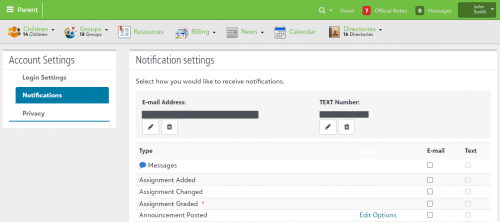
Check out the Help Center.In short, from the app, tell the parent to click their name (top right corner) and then select Settings. Notifications are included in there.
0 -
@Petra Hall @Petra Hall you say you are keeping it visible for the entertainment value…does that mean there is a way to turn it off? IMO it is a truly annoying new “feature” - not once has it provided anything of use. I never even thought of looking to see if it can be deactivated. <<fingers crossed>>
1 -
@Phyllis Armstrong I don't want to turn it off (I find the ways AI programs misinterpret their data sets to be fascinating) but in the top-right, next to the thumbs up/down icons, there's a slider which seems to indicate you can turn it off.

Let me know if that works?
1 -
@Bryna Gleich Thank you for the instructions, but I was hoping Blackbaud had some pretty images because I've found people “read” pictures more than they do text. I made some screenshots. It all worked out.
1 -
Thanks for the feedback. I'll look to add a couple images to these parent/end user help topics mentioned earlier.
In the meantime, these might help:

 1
1 -
@Petra Hall It seems to only work AFTER you've searched for something. Whenever I first open the Knowledgebase, I'm required to type something in the search box and choose a product. Additionally, I must say that having to scroll down to Education Management Solutions without a way to shortcut it or save my preferred product is frustrating.
2 -
@Kim McAmis Agreed!
1 -
This feature has added a layer of clicks that I don't appreciate. I find the information generated to be largely useless. I wish we could turn it off. I see no slider for this option.
0













Categories
- All Categories
- 6 Blackbaud Community Help
- 211 bbcon®
- 1.4K Blackbaud Altru®
- 402 Blackbaud Award Management™ and Blackbaud Stewardship Management™
- 1.1K Blackbaud CRM™ and Blackbaud Internet Solutions™
- 15 donorCentrics®
- 360 Blackbaud eTapestry®
- 2.6K Blackbaud Financial Edge NXT®
- 655 Blackbaud Grantmaking™
- 576 Blackbaud Education Management Solutions for Higher Education
- 3.2K Blackbaud Education Management Solutions for K-12 Schools
- 940 Blackbaud Luminate Online® and Blackbaud TeamRaiser®
- 84 JustGiving® from Blackbaud®
- 6.7K Blackbaud Raiser's Edge NXT®
- 3.7K SKY Developer
- 248 ResearchPoint™
- 120 Blackbaud Tuition Management™
- 165 Organizational Best Practices
- 240 Member Lounge (Just for Fun)
- 34 Blackbaud Community Challenges
- 37 PowerUp Challenges
- 3 (Open) PowerUp Challenge: Grid View Batch
- 3 (Closed) PowerUp Challenge: Chat for Blackbaud AI
- 3 (Closed) PowerUp Challenge: Data Health
- 3 (Closed) Raiser's Edge NXT PowerUp Challenge: Product Update Briefing
- 3 (Closed) Raiser's Edge NXT PowerUp Challenge: Standard Reports+
- 3 (Closed) Raiser's Edge NXT PowerUp Challenge: Email Marketing
- 3 (Closed) Raiser's Edge NXT PowerUp Challenge: Gift Management
- 4 (Closed) Raiser's Edge NXT PowerUp Challenge: Event Management
- 3 (Closed) Raiser's Edge NXT PowerUp Challenge: Home Page
- 4 (Closed) Raiser's Edge NXT PowerUp Challenge: Standard Reports
- 4 (Closed) Raiser's Edge NXT PowerUp Challenge: Query
- 796 Community News
- 3K Jobs Board
- 54 Blackbaud SKY® Reporting Announcements
- 47 Blackbaud CRM Higher Ed Product Advisory Group (HE PAG)
- 19 Blackbaud CRM Product Advisory Group (BBCRM PAG)