Power BI Error (RENXT datasource)




We are working on a previously built Power BI project and trying to reconnect various RENXT data sources. Can anyone please help get us in the right direction? Thanks.
For example, in PowerBI the dataset for ConstituentAll is scripted as = Blackbaud.Contents()
and we get the Expression.Error: The name 'Blackbaud.Contents' wasn't recognized. Make sure it's spelled correctly.
Expression.Error: The import Blackbaud.Contents matches no exports. Did you miss a module reference?
Comments
-
@Chris Bush
By “reconnect” do you mean someone else built the power bi and that you are trying to open and work on it?First you have to make sure your local computer's Power BI Desktop has been setup to use the Blackbaud custom connector that the person who built it has. Easiest thing to do is to ask him/her for the .mez file from his/her computer.
0 -
@Alex Wong
Yes, trying to reconnect previously built Power BI project and have no ability to contact the former developer. From the Power BI user's group meeting, I followed instructions in the video from scratch to build out a new connector from GitHub site, creating an application under my developer account and scoping and connecting to RENXT. However, when I'm in RENXT under Control Panel, I do not have a drop down for “My Applications”. The video mentions something about an environment admin. Not sure how to enable this and when I try to use the connector in Power BI it seems it's not being recognized or authenticated. Any ideas on where we're going wrong? Thanks.0 -
@Chris Bush
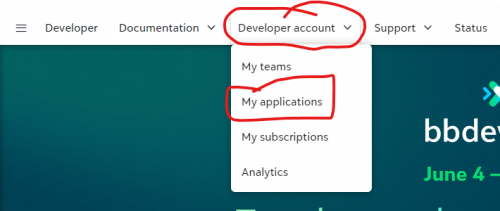
I think you are not following the instruction properly.There is no “My Application” in RE NXT. “My Application” is in developer.blackbaud.com under “Developer account” menu.
 0
0 -
@Alex Wong
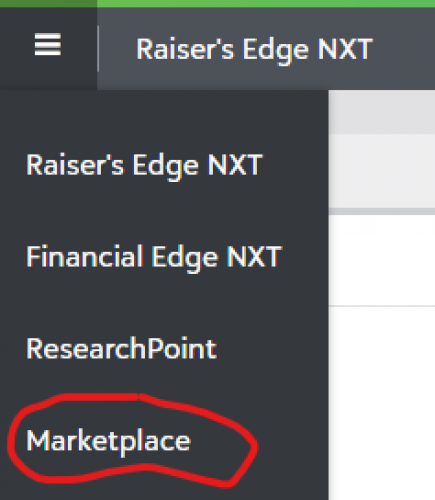
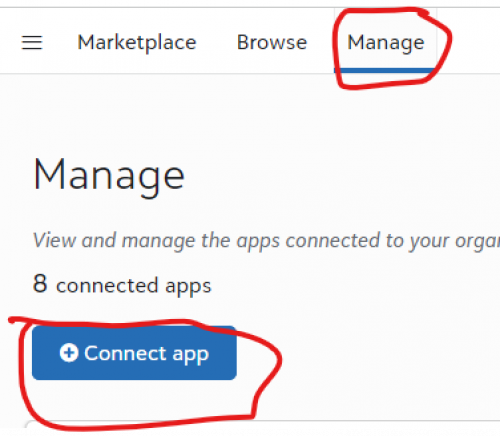
Thanks for the info. The connector is now working fine. I was able to sign in and authenticate it yesterday and pull data into Power BI. If interested, I'm adding a link to the section of the instructional video that seems inaccurate. Around the 7:12 mark, there's mention of accessing My Applications from control panel on the RENXT home page (separately from the one on the Dev Portal) . This I could not find and you confirmed is not available. So I think that moved to either the marketplace or is not longer necessary. (But it remains in that video).0 -
0





Categories
- All Categories
- 6 Blackbaud Community Help
- 211 bbcon®
- 1.4K Blackbaud Altru®
- 402 Blackbaud Award Management™ and Blackbaud Stewardship Management™
- 1.1K Blackbaud CRM™ and Blackbaud Internet Solutions™
- 15 donorCentrics®
- 360 Blackbaud eTapestry®
- 2.6K Blackbaud Financial Edge NXT®
- 656 Blackbaud Grantmaking™
- 577 Blackbaud Education Management Solutions for Higher Education
- 3.2K Blackbaud Education Management Solutions for K-12 Schools
- 941 Blackbaud Luminate Online® and Blackbaud TeamRaiser®
- 84 JustGiving® from Blackbaud®
- 6.7K Blackbaud Raiser's Edge NXT®
- 3.7K SKY Developer
- 248 ResearchPoint™
- 120 Blackbaud Tuition Management™
- 165 Organizational Best Practices
- 240 Member Lounge (Just for Fun)
- 34 Blackbaud Community Challenges
- 37 PowerUp Challenges
- 3 (Open) PowerUp Challenge: Grid View Batch
- 3 (Closed) PowerUp Challenge: Chat for Blackbaud AI
- 3 (Closed) PowerUp Challenge: Data Health
- 3 (Closed) Raiser's Edge NXT PowerUp Challenge: Product Update Briefing
- 3 (Closed) Raiser's Edge NXT PowerUp Challenge: Standard Reports+
- 3 (Closed) Raiser's Edge NXT PowerUp Challenge: Email Marketing
- 3 (Closed) Raiser's Edge NXT PowerUp Challenge: Gift Management
- 4 (Closed) Raiser's Edge NXT PowerUp Challenge: Event Management
- 3 (Closed) Raiser's Edge NXT PowerUp Challenge: Home Page
- 4 (Closed) Raiser's Edge NXT PowerUp Challenge: Standard Reports
- 4 (Closed) Raiser's Edge NXT PowerUp Challenge: Query
- 796 Community News
- 3K Jobs Board
- 54 Blackbaud SKY® Reporting Announcements
- 47 Blackbaud CRM Higher Ed Product Advisory Group (HE PAG)
- 19 Blackbaud CRM Product Advisory Group (BBCRM PAG)