Connecting Power BI to two different FE NXT databases




Greetings.
With the help of Barton Dyson's YouTube video, I've been able to successfully connect my FE NXT database, PFS_DB1, to Power BI using Power Automate and an Azure SQL database. Works great. My issue is I have a second FE NXT database, PFS_DB2 in a different Environment. I can't figure out how to retrieve the data from PFS_DB2. Has anyone had success connecting to two FE NXT databases in different Environments?
Comments
-
@Jim Powers
Which video did you use? Did you create a custom connector?0 -
@Jim Powers
you saidI can't figure out how to retrieve the data from PFS_DB2. Has anyone had success connecting to two FE NXT databases in different Environments?
I assume this means you already got PFS_DB1 having data of environment 1 and PFS_DB2 having data of environment 2.
retrieving data from these database just means connection setting to these database separately. when you setup azure sql server connection in POwer BI, it ask you which database to connect to
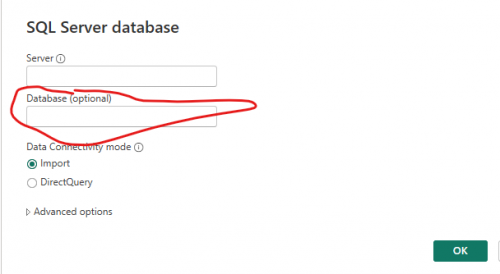 0
0 -
@Ben Regier
This is the video I used. I used the Blackbaud SKY Add-is, Send an HTTP request Action….0 -
@Ben Regier
Sorry…I forgot to add the link. Here is the link to the video.0 -
@Jim Powers
trying to understand what you are having trouble with.You stated that you have successfully did one FE database. So are you having trouble creating the power automate flow that connect to the 2nd FE database using Blackbaud Addin Send HTTP Request and retrieve the data to put onto your 2nd azure SQL database tables?
OR
are you having trouble connecting your power bi to the 2nd azure sql database tabes (that already got the data of the 2nd FE NXT database)?
0 -
@Alex Wong
Thank you for the response. However, I don't think that's it. I don't have data from environment 2 in PFS_DB2. That's my issue, I don't know what makes the SKY Add-in pick one environment over the other. Now that I'm looking through the documentation a bit closer, I think it may have to do with the Application ID for the connected app (PFS_DB2).0 -
@Alex Wong
I just read your second post. Your first example is where my issue is. My Power Automate flow grabs data from the first environment and writes it to the second Azure database table.0 -
@Jim Powers
there is a few prep work you need to do (double of what you did for the first database).You need to create a 2nd Application in your developer account, then go to marketing place and connect the 2nd application to your 2nd environment.
Once you do that, you will need to create a new connection in flow. So you can “copy” the flow that you have already that is pulling data from your first environment, then on the “send http” action, change the connection to “new” and it will let you sign in and select another environment.
as for the azure sql database, it depends on how you config, if you config a separate database and use same table name, then on the sql action, selet a new connection and sign in and select a different database. if you use same database, but use different table name that indicate which fe database, then you don't need a new connection, just need to change the table name in the SQL insert.
0 -
@Alex Wong
I cannot thank you enough for your help! With your assistance, I was able to figure out my FE NXT account for PFS_DB2 didn't have the proper access. I corrected that, resent an invitation, THEN created a new Blackbaud SKY connection, and…just like you said, I was asked to authorize the environment for the second database. It is working perfectly. Thank you again!1








Categories
- All Categories
- 6 Blackbaud Community Help
- 211 bbcon®
- 1.4K Blackbaud Altru®
- 403 Blackbaud Award Management™ and Blackbaud Stewardship Management™
- 1.2K Blackbaud CRM™ and Blackbaud Internet Solutions™
- 15 donorCentrics®
- 360 Blackbaud eTapestry®
- 2.6K Blackbaud Financial Edge NXT®
- 659 Blackbaud Grantmaking™
- 580 Blackbaud Education Management Solutions for Higher Education
- 3.2K Blackbaud Education Management Solutions for K-12 Schools
- 943 Blackbaud Luminate Online® and Blackbaud TeamRaiser®
- 84 JustGiving® from Blackbaud®
- 6.7K Blackbaud Raiser's Edge NXT®
- 3.8K SKY Developer
- 250 ResearchPoint™
- 120 Blackbaud Tuition Management™
- 165 Organizational Best Practices
- 242 Member Lounge (Just for Fun)
- 36 Blackbaud Community Challenges
- 37 PowerUp Challenges
- 3 (Open) PowerUp Challenge: Grid View Batch
- 3 (Closed) PowerUp Challenge: Chat for Blackbaud AI
- 3 (Closed) PowerUp Challenge: Data Health
- 3 (Closed) Raiser's Edge NXT PowerUp Challenge: Product Update Briefing
- 3 (Closed) Raiser's Edge NXT PowerUp Challenge: Standard Reports+
- 3 (Closed) Raiser's Edge NXT PowerUp Challenge: Email Marketing
- 3 (Closed) Raiser's Edge NXT PowerUp Challenge: Gift Management
- 4 (Closed) Raiser's Edge NXT PowerUp Challenge: Event Management
- 3 (Closed) Raiser's Edge NXT PowerUp Challenge: Home Page
- 4 (Closed) Raiser's Edge NXT PowerUp Challenge: Standard Reports
- 4 (Closed) Raiser's Edge NXT PowerUp Challenge: Query
- 799 Community News
- 3K Jobs Board
- 56 Blackbaud SKY® Reporting Announcements
- 47 Blackbaud CRM Higher Ed Product Advisory Group (HE PAG)
- 19 Blackbaud CRM Product Advisory Group (BBCRM PAG)