"Ask in PowerApps"





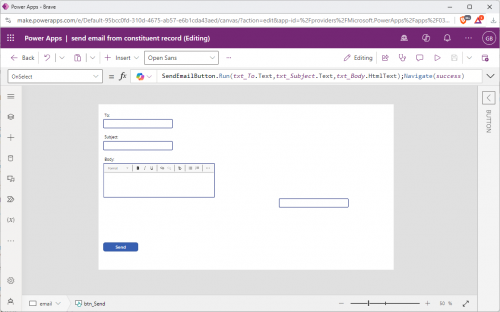
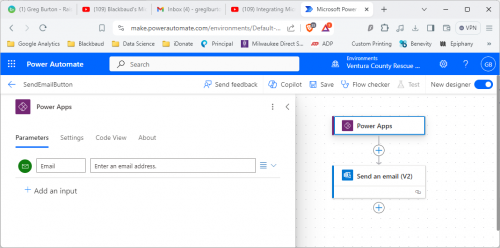
I have a tile on constituent records that will be used to send an email to the constituent. I have a PowerAutomate flow being triggered by a PowerApp button. Since the 2 are connected, the PowerApp add-in tile knows what record it is on & the button is sending info to PowerAutomate I can't figure out why “Ask in PowerApps” is not showing up under dynamic content in the PowerAutomate flow like it does in all of the demo videos I watch. Any suggestions?
Comments
-
- I don't know why you add a tile for sending an email, unless you are just playing around and testing out functionalities.
- In the Power Automate for the button in Power App, change the trigger from Power App to Power App V2, much better control of parameter passing between Power App and Power Automate
0 -
@Alex Wong
Currently fundraisers have to copy the email address, open Outlook, create & send the email then go back into NXT to record the action. I want them to be able to do all of that from this tile.I got the same results from using Power Apps (V2).
0 -
@Greg Burton
If this is a planned production use of Power App, I advise against it.your fundraiser does not need to copy and paste, since you said outlook, if the fundraiser simply click on the email address, it will open outlook with the email already filled in on an outlook new message window.
I would also recommend you look into the Outlook addin:
If you really want to get the PowerApp to work, like I said, use PowerApp V2, but you have to know how to use it, it doesn't magically work.
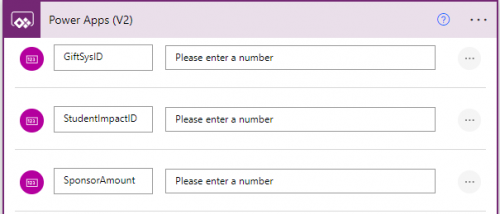
From within the Power App you need to call the Flow and provide the parameter needed by the flow to send email to it.
UpdateContext({FlowResponse:'SMSNXT-AddAssignment'.Run(varSelectedGift.REGiftSysID, 'DataTable-Student_A'.Selected.ImpactId, Int('Input-Amount_A'.Text), varDefaultYear, "Confirmed")});
0 -
@Alex Wong
Thanks for the info, Alex. This is what I was trying to create. I saw this in a BB Sky Developer video from 2 yrs ago. I'll give your “workaround”, the BB Outlook add-in, a try. Looks like it will do the trick.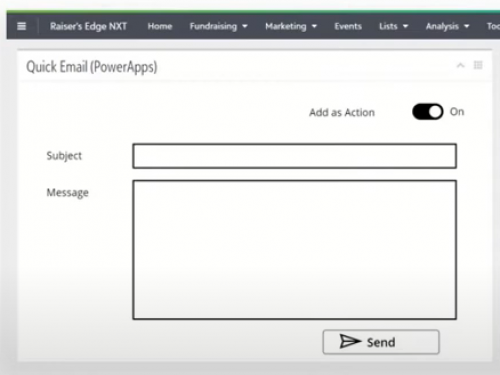 0
0





Categories
- All Categories
- 6 Blackbaud Community Help
- 213 bbcon®
- 1.4K Blackbaud Altru®
- 403 Blackbaud Award Management™ and Blackbaud Stewardship Management™
- 1.1K Blackbaud CRM™ and Blackbaud Internet Solutions™
- 15 donorCentrics®
- 360 Blackbaud eTapestry®
- 2.6K Blackbaud Financial Edge NXT®
- 656 Blackbaud Grantmaking™
- 577 Blackbaud Education Management Solutions for Higher Education
- 3.2K Blackbaud Education Management Solutions for K-12 Schools
- 939 Blackbaud Luminate Online® and Blackbaud TeamRaiser®
- 84 JustGiving® from Blackbaud®
- 6.6K Blackbaud Raiser's Edge NXT®
- 3.7K SKY Developer
- 248 ResearchPoint™
- 119 Blackbaud Tuition Management™
- 165 Organizational Best Practices
- 241 Member Lounge (Just for Fun)
- 34 Blackbaud Community Challenges
- 37 PowerUp Challenges
- 3 (Open) PowerUp Challenge: Grid View Batch
- 3 (Closed) PowerUp Challenge: Chat for Blackbaud AI
- 3 (Closed) PowerUp Challenge: Data Health
- 3 (Closed) Raiser's Edge NXT PowerUp Challenge: Product Update Briefing
- 3 (Closed) Raiser's Edge NXT PowerUp Challenge: Standard Reports+
- 3 (Closed) Raiser's Edge NXT PowerUp Challenge: Email Marketing
- 3 (Closed) Raiser's Edge NXT PowerUp Challenge: Gift Management
- 4 (Closed) Raiser's Edge NXT PowerUp Challenge: Event Management
- 3 (Closed) Raiser's Edge NXT PowerUp Challenge: Home Page
- 4 (Closed) Raiser's Edge NXT PowerUp Challenge: Standard Reports
- 4 (Closed) Raiser's Edge NXT PowerUp Challenge: Query
- 794 Community News
- 2.9K Jobs Board
- 54 Blackbaud SKY® Reporting Announcements
- 47 Blackbaud CRM Higher Ed Product Advisory Group (HE PAG)
- 19 Blackbaud CRM Product Advisory Group (BBCRM PAG)