Create an Exam Schedule for Attendance Purposes




Hi all,
We have an exam week in March, where most upper school students take an exam for one content area for each day. For example, Monday will be all English, Tuesday will be History, etc… We want each teacher to be able to take attendance for their students while they are in the exam room. We are looking for the easiest way to do this. We are thinking we can change the blocks of each course on Friday after school to a special block dedicated to the exam week and then change it back to the original block once the testing is finished. While this is do-able it seems there should be an easier way to do this and less time constricting. Has anyone done something similar before? Does anyone have any good recommendations? Thanks in advance!!!
Comments
-
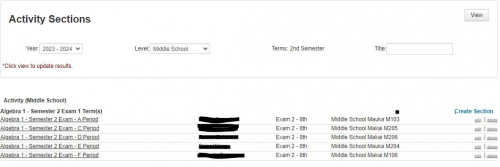
@Veronica Dimberio Our middle school takes exams by department at the end of each semester. To accommodate attendance, we created an activity for each department - English Exam, Math Exam, Science Exam, etc. For each class in the department, we created a section under the activity. It is easy to populate the exam sections using the Enroll Group feature. You can also set exactly where the exam will be administered and who will proctor in these sections. In the scheduling module, we added blocks for each exam Activity and modified the daily schedule with those.
It takes some setup time the first time through, but it makes attendance a breeze.
Hope that helps.
Scott
3 -
@Scott Chrysler - Good afternoon Scott,
Thank you for the advice - I am having issues trying to add the Activity Block to the Daily Schedule Calendar. How did your school handle this? Thank you!
0 -
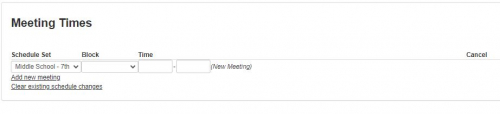
@Sean Aoyagi - Sean, The first thing we did was create a block name for each exam activity - English Exam, Math Exam, etc. When the exam sections are created, we assign them to the corresponding block in the section information box. For example, each English class is a section in the English exam activity. Each one of those sections' information includes the location of the exam and that it will meet in block English Exam. In the Activity Leader box, we enter the proctor's name. We then go into the Daily Schedule Calendar, cancel the appropriate classes, add a new activity meeting, assign the appropriate exam block to the meeting, add the times, and save.
Hope that helps.
Scott
0 -
@Scott Chrysler
Thank you very much Scott. I think I got most of the parts except for adding it to the Daily Schedule Calendar.Did you have to create a special schedule set? Right now, I only have Schedule Sets under Academics.
 0
0 -
@Sean Aoyagi - Sean - In your Schedule outline, you will need to have an activities Schedule set to schedule an activities block. It does not need to be a complicated Schedule set. You can create the schedule set to meet Mon, Tue, Wed, Thu, Fri, set 1 meeting time, and set the Rotation so 1 meeting occurs each day of the week. So long as you have that, you can add multiple activity periods during the day - just specify the meeting times in the Daily Schedule calendar.
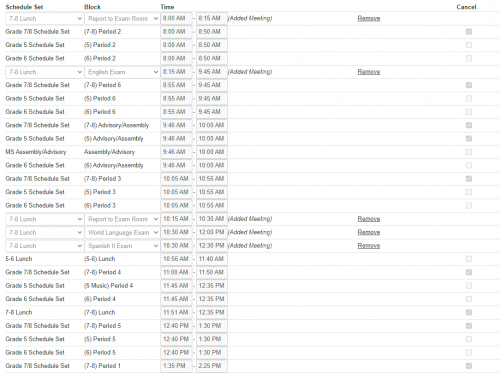
This is a bit convoluted because we have 3 schedule sets in the middle school and only our 7th & 8th grades take exams. But you can see all of the classes for the Grade 7/8 Schedule Set have been canceled. We added 5 new meetings and associated those meetings with the activity schedule set 7-8 Lunch, and then specified the Block for that meeting to be the exam occurring and then set the times as necessary.
I hope that helps.
Scott
0 -
@Veronica Dimberio @Scott Chrysler A related question about scheduling our exams:
Final exams are scheduled so that each grade and department has a designed time for its final, i.e. 9th grade history and 10th science on Wednesday morning. Grade 9 English and grade 11 History on Thursday afternoon.
How do we best set up the schedule each day so we can record attendance?0 -
@Lauren Marcus Eisenberg - I think I would approach this the same way we do our Middle School exams. This method works for us because we have an activity schedule set that meets everyday - Lunch. First, I would create activity blocks for each exam period. Since you have different subjects being offered in the same exam period, I would use generic names like Exam A, Exam B, Exam C, etc. I would then create an Activity, Upper School Exams and check “Record attendance". Under that activity, I would set up sections that correspond to all of the exams offered. So in your example, there would be a section 9th Grade History and another section, 10th Grade Science. These sections would meet during Activity Block Exam A. You then populate the section with the students who will be taking the exam, and the activity leader would be the proctor. If your exam administration is more granular and you don't have all of the 9th grade sitting in the gym at the same time taking their history exam, you can create sections for each room in which an exam is being administered with that room's proctor as the activity leader. You then go into the Daily schedule calendar, cancel all of the blocks that are not meeting that day. I then add a new meeting from Schedule Set “Lunch”, select the Block “Exam A” and enter the start and end times. The added beauty of this method is, that if you make these activities visible, students and proctors can see exactly where they need to be when on their schedule.
Hope that all makes sense. Please let me know if you have any questions.
Scott
1 -
@Scott Chrysler Thank you for sharing. I will suggest this to the HS principal to see if he wants to go this route next year. For now, we did a modified version of this set up: adding the existing grade-level Activity sections to the calendar (which is not as refined as your execution).
0 -
@Lauren Marcus Eisenberg - Let me know if I can be of any more help. Have a peaceful summer.
Scott
0







Categories
- All Categories
- 6 Blackbaud Community Help
- 211 bbcon®
- 1.4K Blackbaud Altru®
- 403 Blackbaud Award Management™ and Blackbaud Stewardship Management™
- 1.2K Blackbaud CRM™ and Blackbaud Internet Solutions™
- 15 donorCentrics®
- 360 Blackbaud eTapestry®
- 2.6K Blackbaud Financial Edge NXT®
- 658 Blackbaud Grantmaking™
- 579 Blackbaud Education Management Solutions for Higher Education
- 3.2K Blackbaud Education Management Solutions for K-12 Schools
- 943 Blackbaud Luminate Online® and Blackbaud TeamRaiser®
- 84 JustGiving® from Blackbaud®
- 6.7K Blackbaud Raiser's Edge NXT®
- 3.8K SKY Developer
- 250 ResearchPoint™
- 120 Blackbaud Tuition Management™
- 165 Organizational Best Practices
- 241 Member Lounge (Just for Fun)
- 36 Blackbaud Community Challenges
- 37 PowerUp Challenges
- 3 (Open) PowerUp Challenge: Grid View Batch
- 3 (Closed) PowerUp Challenge: Chat for Blackbaud AI
- 3 (Closed) PowerUp Challenge: Data Health
- 3 (Closed) Raiser's Edge NXT PowerUp Challenge: Product Update Briefing
- 3 (Closed) Raiser's Edge NXT PowerUp Challenge: Standard Reports+
- 3 (Closed) Raiser's Edge NXT PowerUp Challenge: Email Marketing
- 3 (Closed) Raiser's Edge NXT PowerUp Challenge: Gift Management
- 4 (Closed) Raiser's Edge NXT PowerUp Challenge: Event Management
- 3 (Closed) Raiser's Edge NXT PowerUp Challenge: Home Page
- 4 (Closed) Raiser's Edge NXT PowerUp Challenge: Standard Reports
- 4 (Closed) Raiser's Edge NXT PowerUp Challenge: Query
- 798 Community News
- 3K Jobs Board
- 56 Blackbaud SKY® Reporting Announcements
- 47 Blackbaud CRM Higher Ed Product Advisory Group (HE PAG)
- 19 Blackbaud CRM Product Advisory Group (BBCRM PAG)