Report/data of alumni by location





I've run the Demographic/Statistical Report > Tallies to get the number of alumni living in each state. It was a start.
Development officer wanting to make a case for changes in regional assignments wants more detail such as where are they in the state or where is there a concentration that we are somehow missing. Say northern CA? Mid CA? Southern CA? Oil fields of ND?
I know I can do maps - radius or drawn area but pretty labor intensive. I've considered an export and looking at zip code but again labor intensive. Is there an option out there that I'm not aware of?
Thanks for any suggestions.
Comments
-
@JoAnn Strommen
Power BI will do this very well, but you need to get the data into Power BI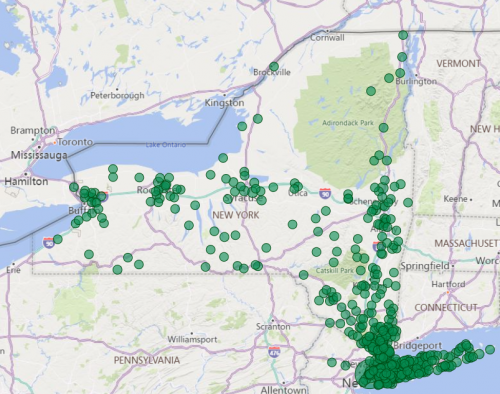 2
2 -
@Alex Wong Yes, that's what we would be looking for.
I was guessing that Power BI might be a solution but am not a user.Any other suggestions out there?
0 -
I've run the Demographic/Statistical Report > Tallies to get the number of alumni living in each state. It was a start.
Development officer wanting to make a case for changes in regional assignments wants more detail such as where are they in the state or where is there a concentration that we are somehow missing. Say northern CA? Mid CA? Southern CA? Oil fields of ND?
I know I can do maps - radius or drawn area but pretty labor intensive. I've considered an export and looking at zip code but again labor intensive. Is there an option out there that I'm not aware of?
Thanks for any suggestions.
In webview, you can map any results from a List. It isn't ideal because you cannot (currently) filter by state, so you will see the entire country - and any international addresses - on the map. You can zoom in and out, but the location search by state doesn't really work well - it still shows the entire map, even though I expected it to only show the results on the location I searched. But at least you could filter the List by Constituent Code, which I'm guessing would allow you to isolate your Alumni.

You could potentially create Queries in database view - they need to be static - for states where you know you have a lot of alumni. You could use those as the basis for a few Lists and maps.
Another option outside of RE would be to export your alumni and their complete address, and then import that into a Google sheet and use the “My Maps" functionality. I've used that for some personal things. I am not sure how it would work on a large scale and cannot remember the filtering options, but it would get you there without too much trouble.PowerBI is a good solution for long term, ongoing needs, but is definitely not the right solution for every organization.
0 -
@Karen Diener Thank you.
I actually had called the DO who asked for the data into my office yesterday and showed her a radius map I had created for the continental US. (We agreed no one on our small staff has knowledge/time needed now to learn BI).
We did zoom in and out looking at a few of the red marker concentrations. Helped answer a few of her questions.Thanks for suggestion of Google maps, may have to consider if more info is needed.
Apparently even looking at the state list was eye-opening for some.
1 -
@JoAnn Strommen I think this can be done in Excel with map chart. The caveat is that you would need to anonymize your data because it gets sent to Bing. Perhaps you could strip out the names and index the constituent IDs and use map chart with city, state, zip? Just a thought. :-)
0









Categories
- All Categories
- 6 Blackbaud Community Help
- 211 bbcon®
- 1.4K Blackbaud Altru®
- 402 Blackbaud Award Management™ and Blackbaud Stewardship Management™
- 1.1K Blackbaud CRM™ and Blackbaud Internet Solutions™
- 15 donorCentrics®
- 360 Blackbaud eTapestry®
- 2.6K Blackbaud Financial Edge NXT®
- 655 Blackbaud Grantmaking™
- 576 Blackbaud Education Management Solutions for Higher Education
- 3.2K Blackbaud Education Management Solutions for K-12 Schools
- 941 Blackbaud Luminate Online® and Blackbaud TeamRaiser®
- 84 JustGiving® from Blackbaud®
- 6.7K Blackbaud Raiser's Edge NXT®
- 3.7K SKY Developer
- 248 ResearchPoint™
- 120 Blackbaud Tuition Management™
- 165 Organizational Best Practices
- 240 Member Lounge (Just for Fun)
- 34 Blackbaud Community Challenges
- 37 PowerUp Challenges
- 3 (Open) PowerUp Challenge: Grid View Batch
- 3 (Closed) PowerUp Challenge: Chat for Blackbaud AI
- 3 (Closed) PowerUp Challenge: Data Health
- 3 (Closed) Raiser's Edge NXT PowerUp Challenge: Product Update Briefing
- 3 (Closed) Raiser's Edge NXT PowerUp Challenge: Standard Reports+
- 3 (Closed) Raiser's Edge NXT PowerUp Challenge: Email Marketing
- 3 (Closed) Raiser's Edge NXT PowerUp Challenge: Gift Management
- 4 (Closed) Raiser's Edge NXT PowerUp Challenge: Event Management
- 3 (Closed) Raiser's Edge NXT PowerUp Challenge: Home Page
- 4 (Closed) Raiser's Edge NXT PowerUp Challenge: Standard Reports
- 4 (Closed) Raiser's Edge NXT PowerUp Challenge: Query
- 796 Community News
- 3K Jobs Board
- 54 Blackbaud SKY® Reporting Announcements
- 47 Blackbaud CRM Higher Ed Product Advisory Group (HE PAG)
- 19 Blackbaud CRM Product Advisory Group (BBCRM PAG)