New grade entry screens missing mark "all" as ready for review





We have been using the new grade entry screens that recently became available. Overall, I will say that they are a huge improvement over the old ones. One function that seems to be missing is the ability to mark “all” students in class as ready for review. This used to exist in the old screens. Are we just missing it?
Comments
-
0
-
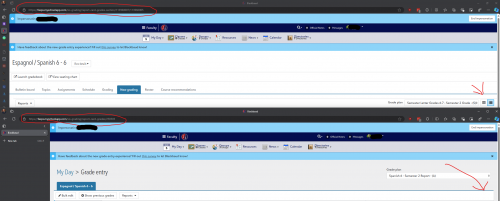
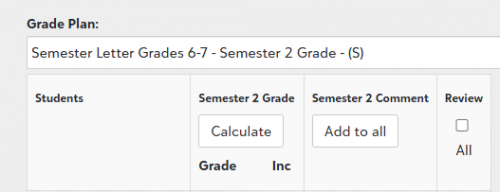
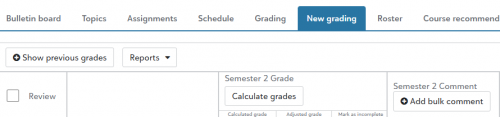
@Brian Hoyt If you use the grid view on new grade entry screens then you have the review all option. However, you can only access the grid view if you access the new grade entry screen via the class not if you access from the my day screen. They go to different URL
0 -
0
-
@Brian Hoyt Support currently denying what I am seeing. In case anyone from dev sees this the problem is the difference between the link with /sis-grading/report-card-grades-section/ and /sis-grading/report-card-grades/. One has the grid view button which allows access to review all function and the other doesn't.
0 -
@Brian Hoyt Another piece of clarification, the problem of the missing grid button only appears on assessments entry screens.
0 -
@Brian Hoyt - We train our teachers to use My Day to access their grading screens. It's more efficient for them to move between their classes from the My Day view.
If they can only see the Mark Ready for Review button on the screen when accessed through grading - teachers are then forced to work inefficiently - adding multiple clicks to their process to close one class and open another. The button should be available in both views.1 -
This response from support is uh interesting:
"Assessment grade plans require the teacher to go into each student's assessments to set their grades, as well as their Ready for Review status.
With assessment grades in most cases, teachers will want to edit each skill on a more individual basis, so the Bulk Edit review all option is not yet available in the New Grading area."Apparently Blackbaud feels the need to force teachers to work through their grades one by one in the new grading entry system. They tell me this is not a bug but a feature.
1 -
Hi @Brian Hoyt -
I just wanted to come in and comment on this really quickly, as I think there is a defect and I'll be following up with Support to kick that process off for us.
First, I want to explain why the Grid/Narrative view toggle appears or disappears. Standard Grade Plan Groups have both, a Grid and Narrative function. Assessment Grade Plan Group, however, do not. We tried to keep the Assessment Grade Plan Group function largely the same in this first iteration, so we excluded it from a new Grid view at this time. That piece of function is intended.
Now, when it comes to bulk marking students as Ready to Review for Assessment Grade Plan Groups, this is where I believe the defect is. With Assessment Grade Plan Groups, we kept the same expectation that teachers would use the Bulk Edit function to mark Ready for Review en masse. It looks like that particular feature isn't populating in the new modal.
Fo the time being, teachers can still access the bulk Review option from the old grading experience located on the Class page while we take a deeper look into why the option isn't populating in the new modal.
If you have any questions, feel free to reach out!
-Mike
0 -
@Michael Morrissette Thank you for agreeing with me rather than arguing with me as support did that this change was made “on purpose” and not a regression.
1





Categories
- All Categories
- 6 Blackbaud Community Help
- 213 bbcon®
- 1.4K Blackbaud Altru®
- 400 Blackbaud Award Management™ and Blackbaud Stewardship Management™
- 1.1K Blackbaud CRM™ and Blackbaud Internet Solutions™
- 15 donorCentrics®
- 360 Blackbaud eTapestry®
- 2.6K Blackbaud Financial Edge NXT®
- 655 Blackbaud Grantmaking™
- 576 Blackbaud Education Management Solutions for Higher Education
- 3.2K Blackbaud Education Management Solutions for K-12 Schools
- 939 Blackbaud Luminate Online® and Blackbaud TeamRaiser®
- 84 JustGiving® from Blackbaud®
- 6.6K Blackbaud Raiser's Edge NXT®
- 3.7K SKY Developer
- 248 ResearchPoint™
- 119 Blackbaud Tuition Management™
- 165 Organizational Best Practices
- 241 Member Lounge (Just for Fun)
- 34 Blackbaud Community Challenges
- 34 PowerUp Challenges
- 3 (Open) PowerUp Challenge: Chat for Blackbaud AI
- 3 (Closed) PowerUp Challenge: Data Health
- 3 (Closed) Raiser's Edge NXT PowerUp Challenge: Product Update Briefing
- 3 (Closed) Raiser's Edge NXT PowerUp Challenge: Standard Reports+
- 3 (Closed) Raiser's Edge NXT PowerUp Challenge: Email Marketing
- 3 (Closed) Raiser's Edge NXT PowerUp Challenge: Gift Management
- 4 (Closed) Raiser's Edge NXT PowerUp Challenge: Event Management
- 3 (Closed) Raiser's Edge NXT PowerUp Challenge: Home Page
- 4 (Closed) Raiser's Edge NXT PowerUp Challenge: Standard Reports
- 4 (Closed) Raiser's Edge NXT PowerUp Challenge: Query
- 790 Community News
- 2.9K Jobs Board
- 53 Blackbaud SKY® Reporting Announcements
- 47 Blackbaud CRM Higher Ed Product Advisory Group (HE PAG)
- 19 Blackbaud CRM Product Advisory Group (BBCRM PAG)