Importing Constituent Actions / Notes





Okay, so maybe this is so simple I'm over thinking it. Seems about my way over the past 6 months of learning all this. No dunning-kruger effect here, hopefully.
I've done assigned appeals as an import before. Simple. ConID & Assigned Appeal ID… done.
But I want to send out a series of messages to clients and instead of one-by-one entering in that action of my reaching out, I was hoping to save time with an import. Lo' and behold it looks like there is a “Import Constituent Action” option.
Now, I just guess I need to figure out how to properly map all the information I want to be put in.
I have a list of all the Constituent IDs I'm going to reach out to by email / phone / mailing.
I've gone through an action and figured out what I need to enter (category / type / date…)
What's stymying me is the ‘notes’. We go to ‘notes’ and make a new ‘notepad’ and describe what the interaction is.
How does that map within the same action with the importing?
Comments
-
@Ryan Moore As you have constituent ID's and can create a query, have you considered a Global Add > Action? I use this a lot. Very quick and easy. It can be done thru import but I'm thinking it's easier.
1 -
? You can also use global add to add an appeal.
1 -
@Ryan Moore When you mention notes, are you talking about an action note that is contained with the action tab or a regular note in the note tab?
You can import an action note at the same time you are importing the actual action.0 -
@JoAnn Strommen
I'm tracking which of these constituents I call and which email and which I send a letter, so I'll track that in a spreadsheet to use the importI did a test with mapping, but I don't see a spot for ‘solicitor’ for the action. Looks like I have the notes right…
but when I did the test with just one constituent, nothing is there.
0 -
@Ryan Moore yes, if you have different solicitors or data you'll want to use import.
Testing is always fun. Do you happen to have the validate data only check box still marked?
1 -
@Ryan Moore I pulled up an old action import that I ran and I don't see solicitor field option either. Hmmmm.
0 -
@Ryan Moore
use global add as others have mentioned IF all the data of the action is exactly the same. Global add allows you to target a queried group of constituent and directly give you the graphical interface as if you are adding an action to a single constituent, put in all the info you want and where you want it, then global add will add that to all the constituent in the query.If you have “varying” details of the action per constituent, then you will want to go the import route, as you can do all the different pieces of info per constituent all in ONE single import.
2 -
I was looking at action type constit action. I see there is a type appeal action solicitor right above. Maybe have to use that? Sorry, I don't have more help.
1 -
@Ryan Moore
There is separate import for Action Notepad and Action Solictor, which requires the Action to already have been created first, and then uses the Import ID of the action to provide the solcitor of the action (using the solicitor's constituent import id), or add a notepad.to make this “easier” you can do the action import by providing a user defined format for the action import id, that way your single csv file already have the action import id for the 2nd and 3rd import. But you need to come up with a naming convention for the action import id so you never duplicate.
Or, you can do the action import, and mark the result to create a static query, then from the static query you can get the action import id of the action that got imported out to a csv export, and use XLOOKUP formula to pull in the action import id into your csv file. XLOOKUP is very powerful and if you don't already know it, I strongly suggest you learn it. Otherwise, the “order” of the static query (if you didn't provide any “sorting”) will be in the same order as your importing csv, so you can just copy and paste over (always double check a few, first, middle, last to ensure order is ok)
3 -
@JoAnn Strommen Yep. So it takes two imports if you are including a fundraiser in your actions.
2 -
@JoAnn Strommen
Problem with a ‘global add’ is that it needs a ‘query’ to be fed into it to apply to all those, and I have a query of those that I WANT to reach out to, doesn't mean I'll be able to (some emails will bounce, some phone numbers are old, etc…). So I'm manually tracking from my export of that list which are ‘done’.Now I also can't see where to ‘map’ in the “Solicitor” of the action… i.e. who did it. I can see the “Note Author”, but not anything for solicitor.
0 -
@Ryan Moore
So found with my test that one I did was an ‘exception’ as it didn't like the date (invalid fuzzy date), not sure how to fix that (tried changing MM/DD/YYYY or DD-MM-YYYY) and it didn't like it0 -
@Ryan Moore maybe for date try mm/dd/yy - I know it displays as YYYY but when entering an action it seems to auto add the other two. Strange, no stupid, that it won't take all four.
As @Mark Guncheon posted too. it takes a second import of action solicitor to have the field available. Go figure.
0 -
@Ryan Moore
https://kb.blackbaud.com/knowledgebase/articles/Article/46457neither the Action Date nor the Completed Date is a Fuzzy Date, it is a real date type in the database schema.
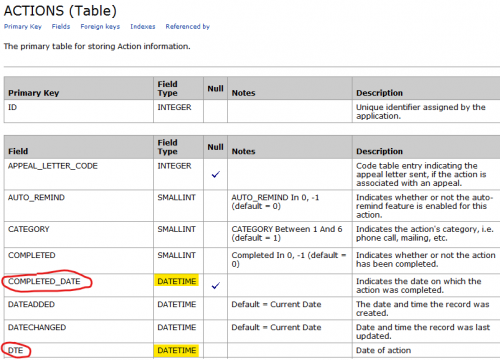
The KB has a sample import file you can play with, but basically the date field should be mm/dd/yyyy
1 -
@Ryan Moore
Do you have ImportOmatic available? It makes these kind of imports much easier than the built-in import tool.0












Categories
- All Categories
- 6 Blackbaud Community Help
- 211 bbcon®
- 1.4K Blackbaud Altru®
- 402 Blackbaud Award Management™ and Blackbaud Stewardship Management™
- 1.1K Blackbaud CRM™ and Blackbaud Internet Solutions™
- 15 donorCentrics®
- 360 Blackbaud eTapestry®
- 2.6K Blackbaud Financial Edge NXT®
- 657 Blackbaud Grantmaking™
- 577 Blackbaud Education Management Solutions for Higher Education
- 3.2K Blackbaud Education Management Solutions for K-12 Schools
- 941 Blackbaud Luminate Online® and Blackbaud TeamRaiser®
- 84 JustGiving® from Blackbaud®
- 6.7K Blackbaud Raiser's Edge NXT®
- 3.7K SKY Developer
- 248 ResearchPoint™
- 120 Blackbaud Tuition Management™
- 165 Organizational Best Practices
- 240 Member Lounge (Just for Fun)
- 34 Blackbaud Community Challenges
- 37 PowerUp Challenges
- 3 (Open) PowerUp Challenge: Grid View Batch
- 3 (Closed) PowerUp Challenge: Chat for Blackbaud AI
- 3 (Closed) PowerUp Challenge: Data Health
- 3 (Closed) Raiser's Edge NXT PowerUp Challenge: Product Update Briefing
- 3 (Closed) Raiser's Edge NXT PowerUp Challenge: Standard Reports+
- 3 (Closed) Raiser's Edge NXT PowerUp Challenge: Email Marketing
- 3 (Closed) Raiser's Edge NXT PowerUp Challenge: Gift Management
- 4 (Closed) Raiser's Edge NXT PowerUp Challenge: Event Management
- 3 (Closed) Raiser's Edge NXT PowerUp Challenge: Home Page
- 4 (Closed) Raiser's Edge NXT PowerUp Challenge: Standard Reports
- 4 (Closed) Raiser's Edge NXT PowerUp Challenge: Query
- 796 Community News
- 3K Jobs Board
- 54 Blackbaud SKY® Reporting Announcements
- 47 Blackbaud CRM Higher Ed Product Advisory Group (HE PAG)
- 19 Blackbaud CRM Product Advisory Group (BBCRM PAG)