Missing users: /users only returns 2 users, /users/extended only returns 3





This is a new one to me…..
For one school, only 2 users are returned by the /users endpoint. Only 3 are returned by /users/extended. One of the returned users is the authenticated user.
The school has more than 3 users. The OneRoster /users endpoint is working as expected.
/users/me shows these roles, among others:
- Platform Manager
- SKY API Data Sync
I've tried base role ID 1 (All School) for /user/extended. I've also tried the base role IDs for students, faculty, and non-teaching staff.
What could cause this?
Comments
-
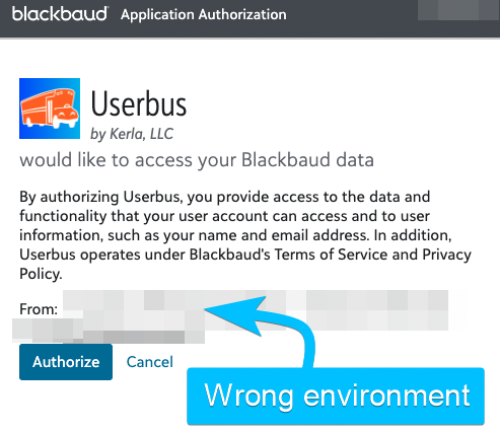
Update: The school in question has multiple environments. One is mostly unused. That's the one that it prompts them to authorize for.
It looks like there isn't an environment dropdown on the authorization screen. Maybe the environment was chosen earlier, when the app was added in Marketplace?
 0
0 -
@Eric Eskildsen my only thought as to why the user wouldn't be seeing the environment option when authorizing the application is perhaps they do not have Solution admin privileges to Marketplace for that particular environment.
0 -
Hey, @Eric Eskildsen. A user will only see an environment dropdown on the authorization page if they have access to multiple* environments* where your application is connected. If the application is connected to only one of this customer's environments or if that user only has access to one of the environments, then they won't be presented with a dropdown.
You can check which customer environments have connected your application by going to your application's detail page within My apps and clicking “View environments” just above the tabs. If all of the expected customer environments are there, then this may be an issue with the user's access--to @Todd DeSchuiteneer's idea. Just a note: “access” in this case doesn't have to be Marketplace admin-level access--any access to the environment will allow the user to authorize the application. Of course, API access will be limited by the user's own permissions.
*Note: Applications can also limit the authorization page to only presenting one environment by using the `environment_id` query string parameter when authorization is requested (docs). This can be useful if the application needs to request renewed authorization for a specific environment. However, I don't believe `environment_id` is being used in your case.
0 -
Thanks Chris and Todd. It turned out they had the wrong environment selected when they originally added the app in Marketplace.
For anyone else facing this issue, their fix was:
- Go to Marketplace (https://app.blackbaud.com/marketplace/)
- Click the user profile icon in the upper right (it may be a gear icon instead [?])
- Click the correct environment in the dropdown menu
- Connect the app for that environment
In the dropdown menu, it should say “(current)” after the currently selected environment.
I'm guessing this already documented somewhere and/or common knowledge….Just sharing in case someone else finds this post.
Thanks again!
0





Categories
- All Categories
- 6 Blackbaud Community Help
- 213 bbcon®
- 1.4K Blackbaud Altru®
- 403 Blackbaud Award Management™ and Blackbaud Stewardship Management™
- 1.2K Blackbaud CRM™ and Blackbaud Internet Solutions™
- 15 donorCentrics®
- 360 Blackbaud eTapestry®
- 2.6K Blackbaud Financial Edge NXT®
- 656 Blackbaud Grantmaking™
- 577 Blackbaud Education Management Solutions for Higher Education
- 3.2K Blackbaud Education Management Solutions for K-12 Schools
- 940 Blackbaud Luminate Online® and Blackbaud TeamRaiser®
- 84 JustGiving® from Blackbaud®
- 6.7K Blackbaud Raiser's Edge NXT®
- 3.7K SKY Developer
- 249 ResearchPoint™
- 119 Blackbaud Tuition Management™
- 165 Organizational Best Practices
- 241 Member Lounge (Just for Fun)
- 34 Blackbaud Community Challenges
- 37 PowerUp Challenges
- 3 (Open) PowerUp Challenge: Grid View Batch
- 3 (Closed) PowerUp Challenge: Chat for Blackbaud AI
- 3 (Closed) PowerUp Challenge: Data Health
- 3 (Closed) Raiser's Edge NXT PowerUp Challenge: Product Update Briefing
- 3 (Closed) Raiser's Edge NXT PowerUp Challenge: Standard Reports+
- 3 (Closed) Raiser's Edge NXT PowerUp Challenge: Email Marketing
- 3 (Closed) Raiser's Edge NXT PowerUp Challenge: Gift Management
- 4 (Closed) Raiser's Edge NXT PowerUp Challenge: Event Management
- 3 (Closed) Raiser's Edge NXT PowerUp Challenge: Home Page
- 4 (Closed) Raiser's Edge NXT PowerUp Challenge: Standard Reports
- 4 (Closed) Raiser's Edge NXT PowerUp Challenge: Query
- 796 Community News
- 3K Jobs Board
- 54 Blackbaud SKY® Reporting Announcements
- 47 Blackbaud CRM Higher Ed Product Advisory Group (HE PAG)
- 19 Blackbaud CRM Product Advisory Group (BBCRM PAG)