Sharing my Power Automate and Power App template: 2022 Vision Award Project, alumni class note automation





- Description: This flow automatically adds select information collected from an online form to matched constituent records in Raiser's Edge.
- Required connections:
- SKY Developer Account
- Blackbaud Raisers Edge NXT Constituents
- Blackbaud Raisers Edge NXT Interactions
- Blackbaud SKY Add-ins
- Microsoft SharePoint
- Microsoft SharePoint Lists
- Microsoft OneDrive
- Microsoft Power Automate
- Microsoft Power Apps
- Microsoft Teams
- Microsoft Planner
- JotForms
- Bing Maps
- Suggested skill level required to use this template: Advanced
- Category: Process Automation, Data Management, Integration
- Instructions: Please use the linked detailed instructions. Ashley Moose and I will present this flow at the 2023 Blackbaud Developers Conference on June 6-8. Join us there to see a live demonstration and ask questions.
- Import Alumni Class Note Instructions.docx
- AlumniClassNoteFormSolutionFinal.zip
- Alvernia University Alumni Update form submission process sample outline.docx
Comments
-
Update & Question: @Ashley Moose
Microsoft sent the announcement below, so I want to update the action to an equivalent Azure Maps action.
Bing is used in the "Process JotForm approved matches" flow to properly format an address addresses approved for import to RENXT if an Alumni submits an address update. However, I can't seem to figure out what connector to use to replace this action with Azure Maps. Has anyone tried to replace Bing Maps with Azure Maps yet? Which connector did you use?
The action used is:
“Get location by address”
Operation ID:
GetLocationByAddressGet the location information associated with an address. If no location is found, an empty result will be returned. (From <https://learn.microsoft.com/en-us/connectors/bingmaps/#get-location-by-address>)
Message from Microsoft ________________________________________
Dear Bing Maps for Enterprise customer,
On May 21, 2024, we shared our vision for a single enterprise mapping platform at Microsoft and that we are unifying our Bing Maps for Enterprise offering under Azure Maps. This means that going forward, Azure Maps will combine the best of Bing Maps for Enterprise and Azure Maps. Today we are announcing that as part of these unification efforts, Bing Maps for Enterprise will be retired. The ability to purchase Bing Maps for Enterprise SKUs and the availability of the Bing Maps for Enterprise services will end according to the following timeline:
- Customers using Bing Maps for Enterprise Basic or Free license will no longer be able to use Bing Maps for Enterprise services beyond June 30, 2025.
(a) Basic / Free Licenses customers who would like to continue using enterprise maps from Microsoft are encouraged to move to Azure Maps before June 30, 2025.
(b) Existing Basic / Free Licenses customers who would like to continue using Bing Maps for Enterprise until the service end date of June 30, 2028, can upgrade to a paid Enterprise License by contacting maplicq@microsoft.com before June 30, 2025. - Bing Maps for Enterprise services will retire, and support will end on June 30, 2028, and customers will no longer be able to use any of the Bing Maps for Enterprise services.
Azure Maps offers much of the same functionality and features as Bing Maps for Enterprise and more. For more product and licensing information, please visit the Enterprise Maps Website. The following resources are available to assist in migrating from Bing Maps for Enterprise to Azure Maps:
- Why you should use Azure Maps
- Migrating to Azure Maps
- Azure Maps Service Agreement and Terms
- Azure Maps Pricing and Licensing
- Azure Resources for Nonprofits
QUESTIONS & INPUT:
For questions, please contact maplicq@microsoft.com.
Thank you for using Microsoft mapping solutions.
Sincerely,
The Bing Maps Team
Microsoft Corporation
-----------------------------------------------------------------------------------0 - Customers using Bing Maps for Enterprise Basic or Free license will no longer be able to use Bing Maps for Enterprise services beyond June 30, 2025.
-
@Hallie Guiseppe
I'm watching this, too. I've been hoping that Azure Maps will release a Power Automate connector before Bing Maps goes dark in 2025, but the fact that it hasn't happened yet makes me wonder if it will.Azure Maps has an API (as does Google Maps), so it should be possible to call those from a flow if you need to, though it would be a lot more work. For now, I'm being lazy and waiting to see if an easier solution will be released.
1 -
@Hallie Guiseppe This is unfortunate news indeed! I looked around and don't see anything similar that would be available for free. Hopefully Azure Maps comes out with a connector soon!
0 -
Bing Maps has been retired, and I have not identified a reliable replacement. To prevent the solution from failing at the address validation step, follow the instructions below to bypass Bing Maps entirely.
How to Update the Flow:
- Open the solution and locate the flow titled “Process JotForm approved matches.”
- Edit the flow, then search for the condition step labeled “Home Address.”
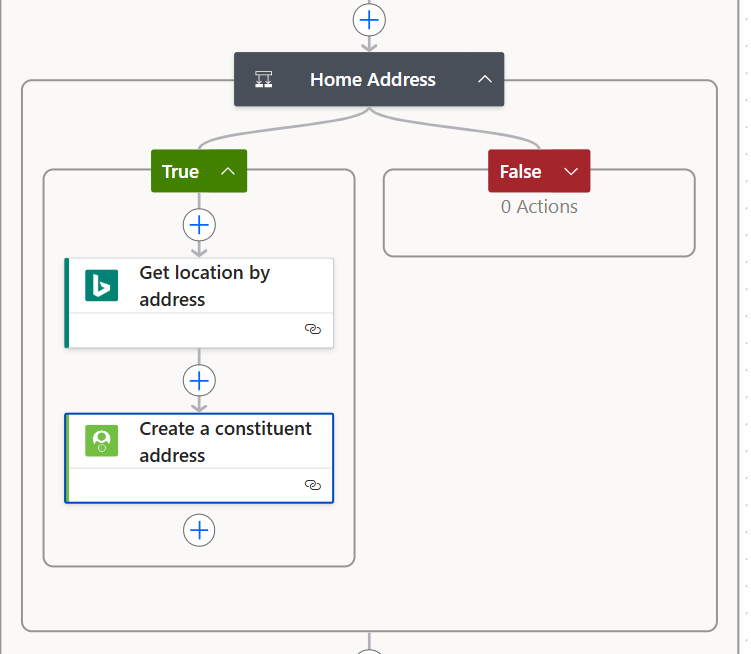
3. In the “True” branch:
- Open the action “Create a constituent address.”
- Replace each address field with the values from your SharePoint list (street, city, state, postal code).
- Pro Tip: You can cut/paste these values directly from the “Get location by address” step before deleting it.
4. Once you’ve updated the address fields, delete the “Get location by address” step.
5. After the “Create a constituent address” action, add a “Send an email (V2)” action.
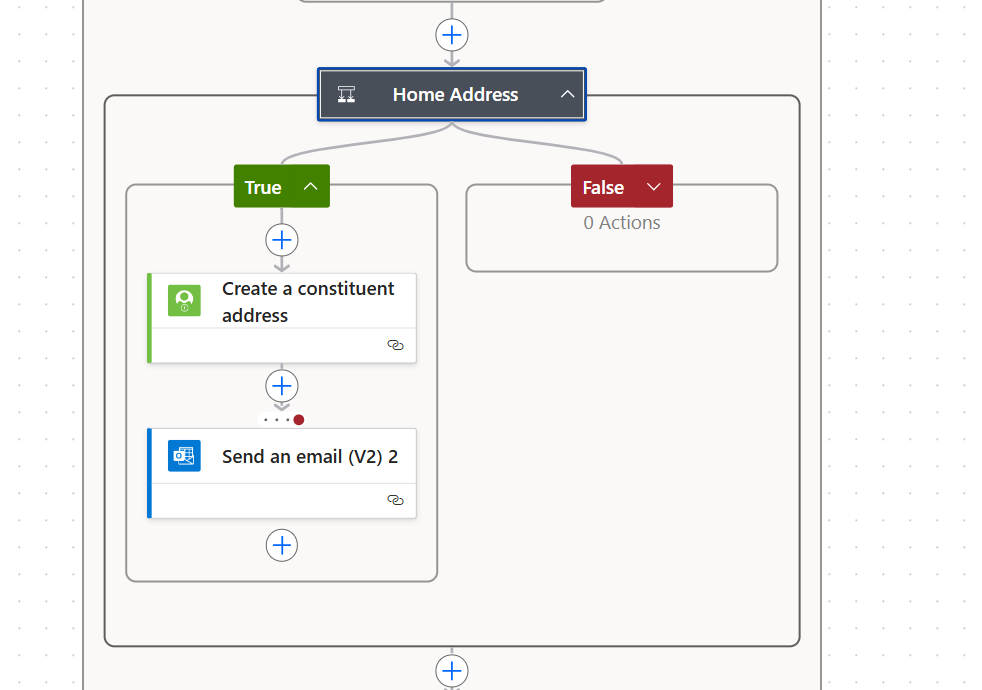
6. Edit the Run After settings on the email action:
- Configure it to run only if the “Create a constituent address” action fails.
- This is helpful if the state value in the submitted form does not match your data table (e.g., “NY” vs “New York”).
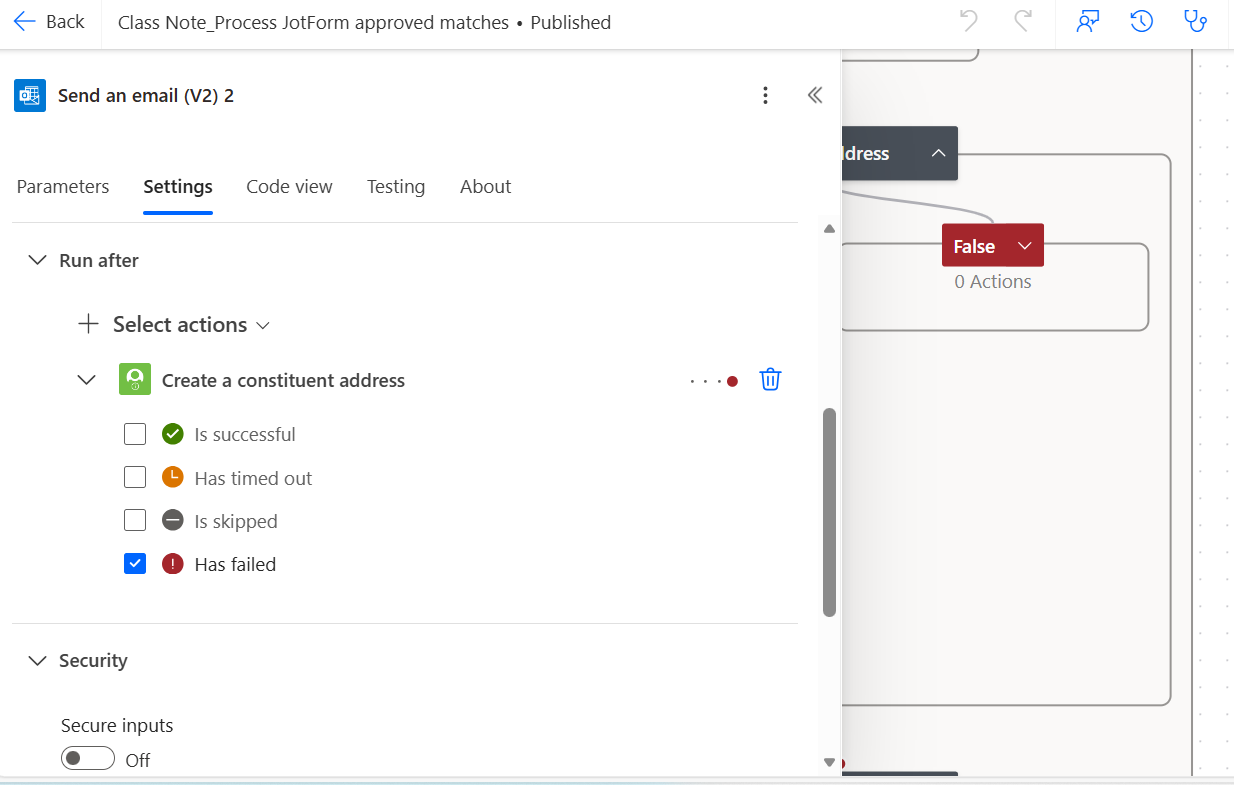
7. Save the flow.
0






Categories
- All Categories
- 6 Blackbaud Community Help
- 211 bbcon®
- 1.4K Blackbaud Altru®
- 403 Blackbaud Award Management™ and Blackbaud Stewardship Management™
- 1.2K Blackbaud CRM™ and Blackbaud Internet Solutions™
- 15 donorCentrics®
- 360 Blackbaud eTapestry®
- 2.6K Blackbaud Financial Edge NXT®
- 659 Blackbaud Grantmaking™
- 579 Blackbaud Education Management Solutions for Higher Education
- 3.2K Blackbaud Education Management Solutions for K-12 Schools
- 943 Blackbaud Luminate Online® and Blackbaud TeamRaiser®
- 84 JustGiving® from Blackbaud®
- 6.7K Blackbaud Raiser's Edge NXT®
- 3.8K SKY Developer
- 250 ResearchPoint™
- 120 Blackbaud Tuition Management™
- 165 Organizational Best Practices
- 241 Member Lounge (Just for Fun)
- 36 Blackbaud Community Challenges
- 37 PowerUp Challenges
- 3 (Open) PowerUp Challenge: Grid View Batch
- 3 (Closed) PowerUp Challenge: Chat for Blackbaud AI
- 3 (Closed) PowerUp Challenge: Data Health
- 3 (Closed) Raiser's Edge NXT PowerUp Challenge: Product Update Briefing
- 3 (Closed) Raiser's Edge NXT PowerUp Challenge: Standard Reports+
- 3 (Closed) Raiser's Edge NXT PowerUp Challenge: Email Marketing
- 3 (Closed) Raiser's Edge NXT PowerUp Challenge: Gift Management
- 4 (Closed) Raiser's Edge NXT PowerUp Challenge: Event Management
- 3 (Closed) Raiser's Edge NXT PowerUp Challenge: Home Page
- 4 (Closed) Raiser's Edge NXT PowerUp Challenge: Standard Reports
- 4 (Closed) Raiser's Edge NXT PowerUp Challenge: Query
- 798 Community News
- 3K Jobs Board
- 56 Blackbaud SKY® Reporting Announcements
- 47 Blackbaud CRM Higher Ed Product Advisory Group (HE PAG)
- 19 Blackbaud CRM Product Advisory Group (BBCRM PAG)