Report Builder Limitations




I am curious if anyone has had success creating reports with Webview Report Builder. My org does not have access to the Insight Designer feature. One thing I am trying to do is build a dashboard that includes some dropdown “slicers” like there are in the Standard Reports (screenshot below). I can't figure out how to do that. Does anyone know if you can create these in the Report Builder? Thanks!

Comments
-
I am curious if anyone has had success creating reports with Webview Report Builder. My org does not have access to the Insight Designer feature. One thing I am trying to do is build a dashboard that includes some dropdown “slicers” like there are in the Standard Reports (screenshot below). I can't figure out how to do that. Does anyone know if you can create these in the Report Builder? Thanks!
They do exist in Report Builder but you'll need to add them as page-level filters:
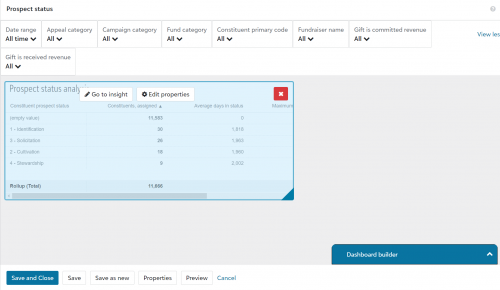
Under Dashboard Properties, you'll need to check the setting that allows people the ability to change the filters. It is just a yes or no option, so make sure it is set to yes.
To add the settings, pop open the Dashboard builder window on the right and click on the Filters option below Insights. That's how you can add to the page level.
Check your insights very carefully. I've been working with Blackbaud on an issue with the “Opportunity Status Analysis” insight - it isn't showing the correct information. If there are any discrepancies with what you can query in database view and what shows on your dashboard, follow up with Blackbaud because it might not be you.5 -
@Karen Diener Thank you, Karen! With the page filter option set to “yes” in Dashboard Properties. I still am not able to put filters with a dropdown menu in the actual dashboard like you would find in the standard Opportunities report. The filters are going up in the top bar. I would think there has to be a way to recreate the standard reports using Report Builder but maybe I am wrong.
0 -
@Steve Cyra Not only can you set global filters, but you can also set filters on the insights themselves that will override the page filters. But there is no way to have the insights look exactly like the standard reports. Is there a functionality that you are missing that you can't get with the filters?
3 -
@Dariel Dixon Thanks, Dariel! Mainly, I wanted to make a report with a similar theme to the standard Opportunities report to make it more user-friendly for people looking at multiple reports.
0 -
@Steve Cyra - Appearance will not be the same, but the ‘page filters’ Karen mentioned will do the exact same thing as those in your screenshot.
2










Categories
- All Categories
- 6 Blackbaud Community Help
- 211 bbcon®
- 1.4K Blackbaud Altru®
- 402 Blackbaud Award Management™ and Blackbaud Stewardship Management™
- 1.1K Blackbaud CRM™ and Blackbaud Internet Solutions™
- 15 donorCentrics®
- 360 Blackbaud eTapestry®
- 2.6K Blackbaud Financial Edge NXT®
- 656 Blackbaud Grantmaking™
- 577 Blackbaud Education Management Solutions for Higher Education
- 3.2K Blackbaud Education Management Solutions for K-12 Schools
- 941 Blackbaud Luminate Online® and Blackbaud TeamRaiser®
- 84 JustGiving® from Blackbaud®
- 6.7K Blackbaud Raiser's Edge NXT®
- 3.7K SKY Developer
- 248 ResearchPoint™
- 120 Blackbaud Tuition Management™
- 165 Organizational Best Practices
- 240 Member Lounge (Just for Fun)
- 34 Blackbaud Community Challenges
- 37 PowerUp Challenges
- 3 (Open) PowerUp Challenge: Grid View Batch
- 3 (Closed) PowerUp Challenge: Chat for Blackbaud AI
- 3 (Closed) PowerUp Challenge: Data Health
- 3 (Closed) Raiser's Edge NXT PowerUp Challenge: Product Update Briefing
- 3 (Closed) Raiser's Edge NXT PowerUp Challenge: Standard Reports+
- 3 (Closed) Raiser's Edge NXT PowerUp Challenge: Email Marketing
- 3 (Closed) Raiser's Edge NXT PowerUp Challenge: Gift Management
- 4 (Closed) Raiser's Edge NXT PowerUp Challenge: Event Management
- 3 (Closed) Raiser's Edge NXT PowerUp Challenge: Home Page
- 4 (Closed) Raiser's Edge NXT PowerUp Challenge: Standard Reports
- 4 (Closed) Raiser's Edge NXT PowerUp Challenge: Query
- 796 Community News
- 3K Jobs Board
- 54 Blackbaud SKY® Reporting Announcements
- 47 Blackbaud CRM Higher Ed Product Advisory Group (HE PAG)
- 19 Blackbaud CRM Product Advisory Group (BBCRM PAG)