NXT Why?





Who is actually on board with the merge over into NXT only? We use Financial Edge and this integration into NXT is really making it difficult for daily tasks, we can't complete any workflow in just one of the platforms we have to bounce between the two, so we can't successfully train our team with the new system since it isn't even fully functioning yet. The workflows in NXT takes more time then the work flows in the database view. In the database view you could complete an action in one area, with NXT we are having to go to three different spots to complete one transaction it can no longer be completed in 1 window which is why we never utilized NXT in the first place, and we stepped away from quickbooks because of the same reasons and the overall feel of that system, NXT is adopting to that same feeling of quickbooks making the program more difficult because it is too simple. Database view was perfect, efficient, we had control and workflows were quick. NXT is a lot of open white spaces, gives no information like the database view did, requires more steps to complete an action and we no longer have control, again, it is creating more steps to do anything giving the overall feel a negative one with the worry “did I complete that step?”.
**Additions: A comment was made on how it will be more difficult for users who have not been utilizing the web base version over the past few years. I don't see how any users with a high capacity of transactions could of ever utilized the web base version of the program. It was very limited and again, made one step turn into 3 steps. So no, we never utilized the web base version of FE, and we were not going to use both the data base view as well as the web base view for our daily tasks, it's silly to utilize two programs when 1 of those programs could do everything.
Our issue right now is that we can't properly function in just one of the programs. We have constant issues and roadblocks when we are working in NXT because something isn't fully functioning in it and we are forced to bounce back and forth but the systems don't talk to each other quick enough either which is causing a slow down there. You can't do one full workflow in NXT for anything, every workflow requires you to navigate to the menu icons to do a second part of your transaction. You can't even print a check in the system, you have to export it to a pdf and then print it, again, adding more time to our processes. We can't train staff efficiently because you can't work efficiently in the new system yet so when database view is turned off, THEN we can start with creating our workflow instructions and trying to use the program.
Our biggest issue is the terminology shift. NXT is clearly geared for companies who have employees that are not accounting trained. So those of us who are accounting trained struggle with the terminology. Words in the accounting realm are not treated the same in NXT as they are in the database view, we have to stop our selves and ask ourselves, what the hell is a ‘pre-payment report’? In the accounting universe that report is called a cash requirements report. Not seeing the normal accounting terminology slows us down as we second guess every action in NXT. Terminology is not consistent between the modules/tabs in NXT either, especially the verbiage between AR in the database view and NXT.
NXT is no longer for larger organizations with trained staff. It is now geared towards small business owners who have that youtube trained bookkeeper.
Comments
-
@Ashley Meneley I feel your pain, Ashley. Unfortunately, it appears that Blackbaud isn't listening to their customers who are frequently asking for training materials BEFORE functionality is turned off in DB view, for faster processing in NXT, and for a complete, tested NXT product so that they can learn the system and train staff.
7 -
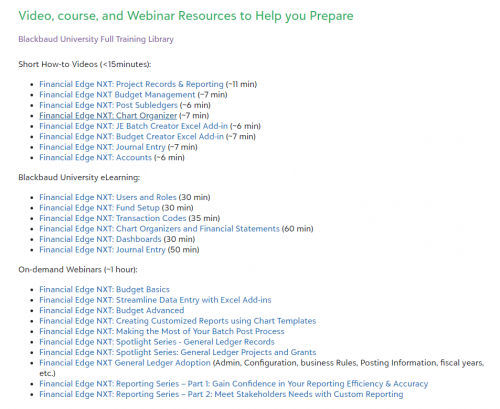
@Dan HoutReilly, have you been able to check out all the resources we're providing in-product and in the monthly email? We have a ton of free videos, webinars, BBU courses, etc. that are directly related to the features being turned off in database view and moving exclusively into webview?
If you go to the Total Web Solution page and click on the headers like General Ledger, you'll see a link under them to “watch <General Ledger> videos” that takes you to a KB with dozens of videos and course links (see image) with their exact topic and length to get the right training for the new to webview features and those that have been available for years that are being turned off in database view.We've also opened up free courses in BBU directly related to these rollouts, so whether you have a Learn subscription or not, you have access to these areas to learn the webview functionality. Sharing some of those links so you can get directly to the information you're looking for in regard to training.
Subscribe to The Financial Post on the Community to stay informed about all things Financial Edge NXT. On the first Thursday of every month, you’ll get the latest Financial Edge NXT news on everything from current projects and initiatives to release information and much more with The Financial Post!Bookmark the Total Web Solution page to track detail and timelines. That page and your What’s New notifications in-product will help you see when feature changes will affect you.
Check out our latest Product Update Briefing (PUB) from May 2nd, 2024, available on demand, to about the latest and upcoming releases for Financial Edge NXT.
Make sure you and your team are up to date on the latest training and How-to webinars from Blackbaud University and Customer Success! Blackbaud University has courses exclusively for webview including What's New in Financial Edge NXT on-demand videos to keep you prepared.
I understand the change management is difficult, especially for organizations who haven't been adopting webview features over the last several years, along with some of the areas like Query and Import not being fully baked out yet in webview. But we will continue to post the training videos and webinars in advance of the database view shut-offs so you do get that training before the features are removed. We will also continue to strive to make webview more efficient and intuitive with your valuable feedback. Appreciate both of you sharing your experience.3 -
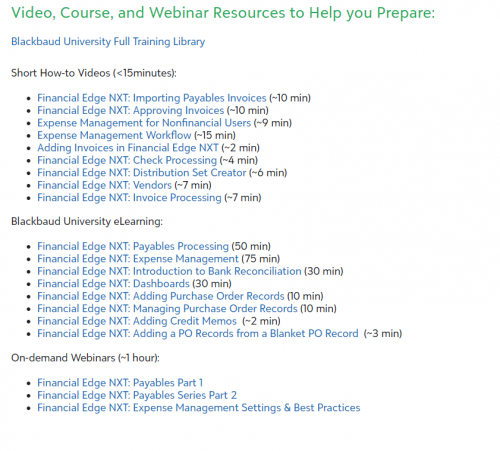
@Nikki Baldwin Hi Nikki. I have already had this information shared with me by other BB personnel. But since you've chosen to participate in this thread, the issue that I have is that if in fact an appropritae training video is there for an issue that I have, its time consuming to determe where the information is. For example, can you please let me know which of the videos for Accounts Payable addresses the configuration of AP Approval Rules which is noted in the most recent email as being turned off in DB view this month.
1 -

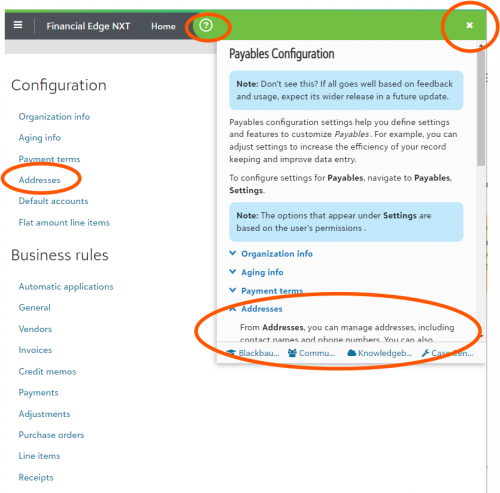
@Dan HoutReilly No problem – it's super straight forward if you navigate from the Payables section on the TWS page to select ‘watch payables videos’ and you'll see the large list of related content there. I've circled the items that are relevant to your specific question.
And don't forget that at any time while in FENXT, you can click on the green ? in the top right to get information about the area in which you're currently in (see example in 2nd screenshot).
Glad to hear you've been in tune with the resources we've been providing during this transition!0 -
@Nikki Baldwin I was adking about information on AP Approval Rules.
1 -
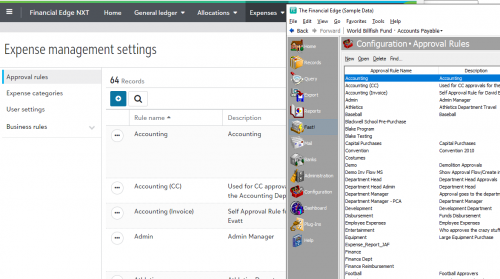
@Dan HoutReilly, The approval rules that you find in database view AP > Configuration > Approval Rules are managed in webview under Expenses > Settings > Approval Rules. That's why I've pointed you to those Expense Mgt. items there.
0 -
@Nikki Baldwin But Query and Import are things that we use SO often. Back and forth we go . . .
1 -
@Julie Goldsberry, yes we definitely understand how critical import and query are for our users. As I mentioned earlier, they will not be removed from database view until they are available in webview and our users have had time to adopt them. They are still actively being tested and further developed for webview and are both coming soon to webview for full add/edit functionality for everyone.
0







Categories
- All Categories
- 6 Blackbaud Community Help
- 211 bbcon®
- 1.4K Blackbaud Altru®
- 402 Blackbaud Award Management™ and Blackbaud Stewardship Management™
- 1.1K Blackbaud CRM™ and Blackbaud Internet Solutions™
- 15 donorCentrics®
- 360 Blackbaud eTapestry®
- 2.6K Blackbaud Financial Edge NXT®
- 655 Blackbaud Grantmaking™
- 576 Blackbaud Education Management Solutions for Higher Education
- 3.2K Blackbaud Education Management Solutions for K-12 Schools
- 941 Blackbaud Luminate Online® and Blackbaud TeamRaiser®
- 84 JustGiving® from Blackbaud®
- 6.7K Blackbaud Raiser's Edge NXT®
- 3.7K SKY Developer
- 248 ResearchPoint™
- 120 Blackbaud Tuition Management™
- 165 Organizational Best Practices
- 240 Member Lounge (Just for Fun)
- 34 Blackbaud Community Challenges
- 37 PowerUp Challenges
- 3 (Open) PowerUp Challenge: Grid View Batch
- 3 (Closed) PowerUp Challenge: Chat for Blackbaud AI
- 3 (Closed) PowerUp Challenge: Data Health
- 3 (Closed) Raiser's Edge NXT PowerUp Challenge: Product Update Briefing
- 3 (Closed) Raiser's Edge NXT PowerUp Challenge: Standard Reports+
- 3 (Closed) Raiser's Edge NXT PowerUp Challenge: Email Marketing
- 3 (Closed) Raiser's Edge NXT PowerUp Challenge: Gift Management
- 4 (Closed) Raiser's Edge NXT PowerUp Challenge: Event Management
- 3 (Closed) Raiser's Edge NXT PowerUp Challenge: Home Page
- 4 (Closed) Raiser's Edge NXT PowerUp Challenge: Standard Reports
- 4 (Closed) Raiser's Edge NXT PowerUp Challenge: Query
- 796 Community News
- 3K Jobs Board
- 54 Blackbaud SKY® Reporting Announcements
- 47 Blackbaud CRM Higher Ed Product Advisory Group (HE PAG)
- 19 Blackbaud CRM Product Advisory Group (BBCRM PAG)