Restrict Gradebook Calculation Method





Hello! Does anyone know if there is a way to “lock” in a gradebook calculation method for teachers? Our admin wants all teachers to use ‘total points’ this upcoming year. I see where I can restrict teachers from changing the ‘year’ or ‘marking period’ setting, but not the calculation method. Anyone find a way to do this?
Comments
-
Hi, @Amy Welsh. Take a look at Academics > Grades > Grading Setup > Gradebook Settings > Default Gradebook Settings. I believe you are able to set defaults for the gradebook calculation, the calculation method, and the number of decimal points to show, and there is also a checkbox for you to “restrict teacher of class from changing setting”. This can be set uniquely for each school level.
1 -
@Geoffrey Goodfellow
Thank you!I found that, but my teachers can still choose a different grade calculation method. It does seem to gray out the option to set gradebook settings by ‘year’ or ‘term’ (which seems silly to me…), but not the actual gradebook calculation. Maybe it's a glitch?
0 -
@Amy Welsh, I think you may want to open a support case for that, since I'm fairly certain my teachers didn't have that option. (Because they all have grades in the gradebook already, it is already greyed out, so I cannot test easily on my side.)
0 -
Well… I found this in the knowledgebase… see final note. It seems like the checkbox for restriction does not restrict the grade calculation method. I am going to call BB and see if there IS a way to restrict grade calculation method.
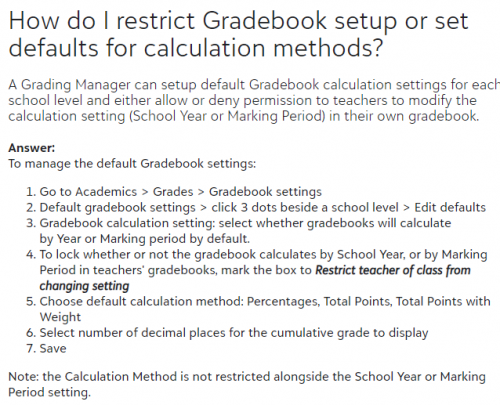
Thanks!!1 -
@Amy Welsh Interesting. At least setting a default should help nudge teachers in the correct direction. You may want to add an idea to the IdeaBank since I can see value in this idea.
1



Categories
- All Categories
- 6 Blackbaud Community Help
- 211 bbcon®
- 1.4K Blackbaud Altru®
- 403 Blackbaud Award Management™ and Blackbaud Stewardship Management™
- 1.2K Blackbaud CRM™ and Blackbaud Internet Solutions™
- 15 donorCentrics®
- 360 Blackbaud eTapestry®
- 2.6K Blackbaud Financial Edge NXT®
- 659 Blackbaud Grantmaking™
- 579 Blackbaud Education Management Solutions for Higher Education
- 3.2K Blackbaud Education Management Solutions for K-12 Schools
- 943 Blackbaud Luminate Online® and Blackbaud TeamRaiser®
- 84 JustGiving® from Blackbaud®
- 6.7K Blackbaud Raiser's Edge NXT®
- 3.8K SKY Developer
- 250 ResearchPoint™
- 120 Blackbaud Tuition Management™
- 165 Organizational Best Practices
- 241 Member Lounge (Just for Fun)
- 36 Blackbaud Community Challenges
- 37 PowerUp Challenges
- 3 (Open) PowerUp Challenge: Grid View Batch
- 3 (Closed) PowerUp Challenge: Chat for Blackbaud AI
- 3 (Closed) PowerUp Challenge: Data Health
- 3 (Closed) Raiser's Edge NXT PowerUp Challenge: Product Update Briefing
- 3 (Closed) Raiser's Edge NXT PowerUp Challenge: Standard Reports+
- 3 (Closed) Raiser's Edge NXT PowerUp Challenge: Email Marketing
- 3 (Closed) Raiser's Edge NXT PowerUp Challenge: Gift Management
- 4 (Closed) Raiser's Edge NXT PowerUp Challenge: Event Management
- 3 (Closed) Raiser's Edge NXT PowerUp Challenge: Home Page
- 4 (Closed) Raiser's Edge NXT PowerUp Challenge: Standard Reports
- 4 (Closed) Raiser's Edge NXT PowerUp Challenge: Query
- 798 Community News
- 3K Jobs Board
- 56 Blackbaud SKY® Reporting Announcements
- 47 Blackbaud CRM Higher Ed Product Advisory Group (HE PAG)
- 19 Blackbaud CRM Product Advisory Group (BBCRM PAG)