Query Assistance - Last Instalment/Payment Due Date





Hi,
I'm new and just trying to work my way around the query database.
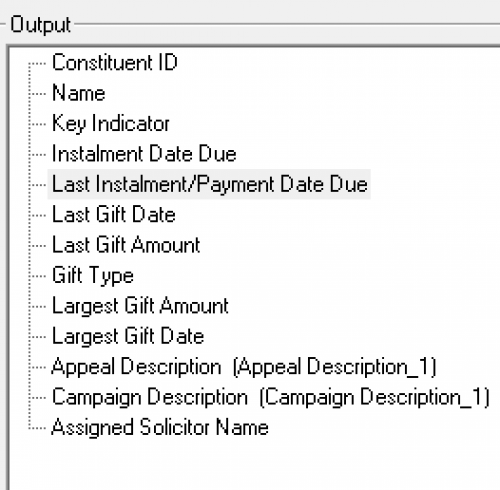
I have a few questions but will start with the first one. The field below has been located and selected on a query, yet I can't find this one on the outputs field where I intend to export the report. Is it normal for a field to be selected and popultaed once run but not avaliable on the output for exporting. Any ideas?
Thanks 
Comments
-
@Tasha Mikoz
don't quite understand what you mean by “yet I can't find this one on the outputs field".what type of query are you running (constituent, gift?)
what is your filter?
You selected some output that is specific to certain type of gift (installment is for pledge, maybe recurring gift too, but not sure), so if the gift is not pledge, that field will be empty/blank. a little more screenshot of the problem you experience will help answer your question
0 -
@Alex Wong What @Tasha Mikoz is saying is that this field isn't available in the export module, which it is not. This is not unusual, but you may need to look into another similar field that will do what you're looking for. Export has some added functionality in it's filtering, so there will be another field that should give you the information you're looking for.
Tasha, in times like these you might be well served to just export directly from query. If you need more information out of the export, you can append the last payment date if you have the GiftID fields in both reports.
3 -
@Dariel Dixon
Ok, if that's the case, just export from Query.@Tasha Mikoz exporting directly from Query is scarier and a taboo to some. However, if you master the art of exporting from Query, you will become the next level CRM manager/admin. The most important issue of exporting from Query is understand ONE-to-MANY relationship of different field/property used in the query (filter, output or sort), and when not done properly will provide you with “duplicate” result row. It is this understanding and knowing when to dedup in excel on what column of data that will make you better at this.
2 -
@Alex Wong: However, if you master the art of exporting from Query, you will become the next level CRM manager/admin. The most important issue of exporting from Query is understand ONE-to-MANY relationship of different field/property used in the query (filter, output or sort), and when not done properly will provide you with “duplicate” result row. It is this understanding and knowing when to dedup in excel on what column of data that will make you better at this.
Man, look…
THIS!!! I cannot emphasize enough the gem that @Alex Wong just laid down. Once you understand how having an understanding of One-to-Many relationships and how to write queries using those fields effectively is so important. And Suppressing Duplicate Rows won't help you.
3 -
Thank you both for the information, this is very helpful and explains more than I've been advised to date.
Are there any web pages/info sites you could reccomend reading up on the understanding of ONE-to-MANY relationship of different field/property used in the query? I assume this is specific to BB database?
Again, the query writing is relatively new to me in this job but am looking forward to being an expert!
Thanks
0 -
@Tasha Mikoz welcome to Community! If your organization has the Learn More package for BlackbaudU I would HIGHLY recommend using that as much as possible. They have classes out there for every aspect of NXT (as well as their other products). When I first started four years ago this was a huge help to getting me up to speed on all the specifics of NXT. Another great resource I used was Bill Connors' book, Fundraising with The Raiser's Edge: A Non-Technical Guide. I was completely new to the world of fundraising when I started my last job four years ago and this helped me understand many aspects of it, not just using NXT.
1 -
@Tasha Mikoz I don't know if there is a list of what fields can be many, but I think the concept is more important to understand. One-to-many basically means that there are fields that can have multiple entries. For instance, constituent records can have multiple addresses, but will only have one constituent ID. One-to-many fields will vary depending on the types of query used. I think it's going to be a bit of trial and error to figure it out at first,
0 -
@Tasha Mikoz
The absolute way to know all ONE-to-MANY relationship is reviewing the RE Database Schema file. however, that is a bit too much for a beginner.You will want to start out using observation. You can look at a gift record, and if you “can” have multiple of something, then it is a ONE-to-MANY relationship: for example, on a single gift record, the soft credit tab, you can enter more than one constituent as soft credit; a constituent can have multiple phone number; a pledge can have multiple installment; an installment can have multiple payment; etc
good luck, it's more about experience and doing some data mining on your own database to start to realize.
1 -
@Tasha Mikoz My recollection is the way to get the data for pledge balance, due date and installments is to run the Reminders in Mail module and export the fields from there. You can then append those fields onto another export output using vlookup function in Excel. You can run Reminders and opt to not mark them as Reminded so you can run it just to get data even if it's not time to run Reminders for real.
It takes a bit of patience to find the exact answers, but Blackbaud Knowledgebase does provide solutions for more complicated or seemingly hidden tasks you end up needing as a database admin. Blackbaud University is great to start learning when you're a beginner or intermediate but can't get into the nitty gritty needed once you're more advanced in your skills. But you've already found the best resource - Blackbaud Community. I can also recommend the Raiser's Edge User group on Facebook.
0
















Categories
- All Categories
- 6 Blackbaud Community Help
- 211 bbcon®
- 1.4K Blackbaud Altru®
- 402 Blackbaud Award Management™ and Blackbaud Stewardship Management™
- 1.1K Blackbaud CRM™ and Blackbaud Internet Solutions™
- 15 donorCentrics®
- 360 Blackbaud eTapestry®
- 2.6K Blackbaud Financial Edge NXT®
- 655 Blackbaud Grantmaking™
- 576 Blackbaud Education Management Solutions for Higher Education
- 3.2K Blackbaud Education Management Solutions for K-12 Schools
- 941 Blackbaud Luminate Online® and Blackbaud TeamRaiser®
- 84 JustGiving® from Blackbaud®
- 6.7K Blackbaud Raiser's Edge NXT®
- 3.7K SKY Developer
- 248 ResearchPoint™
- 120 Blackbaud Tuition Management™
- 165 Organizational Best Practices
- 240 Member Lounge (Just for Fun)
- 34 Blackbaud Community Challenges
- 37 PowerUp Challenges
- 3 (Open) PowerUp Challenge: Grid View Batch
- 3 (Closed) PowerUp Challenge: Chat for Blackbaud AI
- 3 (Closed) PowerUp Challenge: Data Health
- 3 (Closed) Raiser's Edge NXT PowerUp Challenge: Product Update Briefing
- 3 (Closed) Raiser's Edge NXT PowerUp Challenge: Standard Reports+
- 3 (Closed) Raiser's Edge NXT PowerUp Challenge: Email Marketing
- 3 (Closed) Raiser's Edge NXT PowerUp Challenge: Gift Management
- 4 (Closed) Raiser's Edge NXT PowerUp Challenge: Event Management
- 3 (Closed) Raiser's Edge NXT PowerUp Challenge: Home Page
- 4 (Closed) Raiser's Edge NXT PowerUp Challenge: Standard Reports
- 4 (Closed) Raiser's Edge NXT PowerUp Challenge: Query
- 796 Community News
- 3K Jobs Board
- 54 Blackbaud SKY® Reporting Announcements
- 47 Blackbaud CRM Higher Ed Product Advisory Group (HE PAG)
- 19 Blackbaud CRM Product Advisory Group (BBCRM PAG)