Project ID Revenue/ Expenses Spreadsheet





Good afternoon everyone:
Looking to see if anyone has found a way (besides using standard reporting functions, like an income statement - which is a mess to work with), to produce a proper, table-ready spreadsheet of revenue and expenses for project ID's.
I've tried running a few general ledger query types, but my queries seem to not want to limit themselves using the filters I have provided - I add “between” dates, and it just puts out additional years worth of data that takes time to crunch…
Anyone familiar with getting the information I'm looking for out of FE?
Comments
-
@Tyler Lester
Hi Tyler, have you tried using the standard report “Statement of Activities”? I don't use Income Statement either, but the Statement of Activities is very useful for me.0 -
@Arturo Sayco Unfortunately not quite what I'm looking for. I'm trying to identify revenue/expenses for Project ID's, not Accounts/Account codes.
The format is closer as well, but not at the level of a table-ready query output.
0 -
@Tyler Lester
As long as revenue and expenses are coded correctly to a particular project, you could add project ID filter in the report.0 -
I meant not for a particular project ID - but all Project ID's. Frankly, if I could customize that exact report but simply exchange Account Number for Project ID, and have revenues and expenses listed in that table format, that would be exactly what I want to produce.
0 -
@Tyler Lester what if you tried the format below and in the General area put the level at 2. Would that give you what you are looking for?
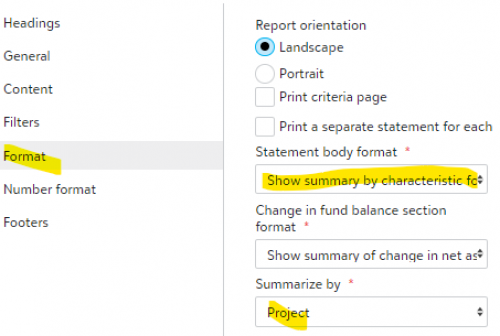 0
0 -
@Sylvia Cook
Definitely more helpful. Going to save that one. Getting pretty close to a pure table output…Thanks!
0 -
@Tyler Lester Just remembered, I also made a special chart organizer to get a table format with project ids.
Create a chart organizer template and name it “No Headings”. in the income statement add one account detail line with a range of all the income statement accounts.
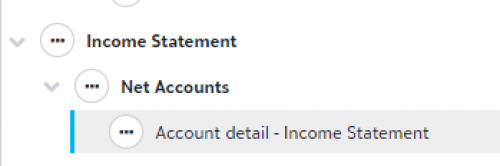
Now use that template in the report, and do the format setting that I mentioned previously.
1 -
@Tyler Lester
I was able to create a custom management report that lists one line for each project and then has columns going from left to right that list beginning fund balance, revenue (broken out into several columns, the expenses also broken out into several columns, net transfers in their own column, ending fund balance, asset/liability balance, and then calculated cash available balance. Not sure if this is what you are wanting.0








Categories
- All Categories
- 6 Blackbaud Community Help
- 211 bbcon®
- 1.4K Blackbaud Altru®
- 402 Blackbaud Award Management™ and Blackbaud Stewardship Management™
- 1.1K Blackbaud CRM™ and Blackbaud Internet Solutions™
- 15 donorCentrics®
- 360 Blackbaud eTapestry®
- 2.6K Blackbaud Financial Edge NXT®
- 655 Blackbaud Grantmaking™
- 576 Blackbaud Education Management Solutions for Higher Education
- 3.2K Blackbaud Education Management Solutions for K-12 Schools
- 941 Blackbaud Luminate Online® and Blackbaud TeamRaiser®
- 84 JustGiving® from Blackbaud®
- 6.7K Blackbaud Raiser's Edge NXT®
- 3.7K SKY Developer
- 248 ResearchPoint™
- 120 Blackbaud Tuition Management™
- 165 Organizational Best Practices
- 240 Member Lounge (Just for Fun)
- 34 Blackbaud Community Challenges
- 37 PowerUp Challenges
- 3 (Open) PowerUp Challenge: Grid View Batch
- 3 (Closed) PowerUp Challenge: Chat for Blackbaud AI
- 3 (Closed) PowerUp Challenge: Data Health
- 3 (Closed) Raiser's Edge NXT PowerUp Challenge: Product Update Briefing
- 3 (Closed) Raiser's Edge NXT PowerUp Challenge: Standard Reports+
- 3 (Closed) Raiser's Edge NXT PowerUp Challenge: Email Marketing
- 3 (Closed) Raiser's Edge NXT PowerUp Challenge: Gift Management
- 4 (Closed) Raiser's Edge NXT PowerUp Challenge: Event Management
- 3 (Closed) Raiser's Edge NXT PowerUp Challenge: Home Page
- 4 (Closed) Raiser's Edge NXT PowerUp Challenge: Standard Reports
- 4 (Closed) Raiser's Edge NXT PowerUp Challenge: Query
- 796 Community News
- 3K Jobs Board
- 54 Blackbaud SKY® Reporting Announcements
- 47 Blackbaud CRM Higher Ed Product Advisory Group (HE PAG)
- 19 Blackbaud CRM Product Advisory Group (BBCRM PAG)