excluding inactive email





Okay, I can't seem to find this kind of feature.
I'm pulling up a list of constituents who have emails (so preferred_email NOTBLANK)
But, it's pulling up constituents tho' where the email is not active. I've edited lots of these when we had bouncebacks before…
How do I remove these? Could use where the ‘preferred email comment’ is blank (i.e. we write in when we mark it inactive as to why/date), but there should be some ‘active' switch right?
Comments
-
nope, tried the ‘comment blank’ and still pulling people's inactive emails
0 -
@Ryan Moore I think this might pull what you want. I ran it for one year of alum and getting only active but looks like it pulled more records than there should be for one year.
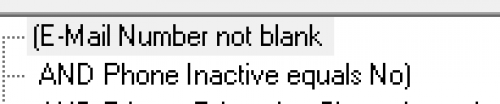
'Phone' is a one-to-many field so results often not exactly what desired. I don't always find Query the best option. To be sure I'm getting what I want I usually take query to Export function.
0 -
@JoAnn Strommen
ah… silly me assuming phone = ‘phone’thanks
0 -
@Ryan Moore
You will not get dup rows this way:
JoAnn, you get drup rows b/c of one-many relationship that has been “crossed”
0 -
That criteria may work for you but I get duplicates. (Put in class of so didn't have to pull entire db)
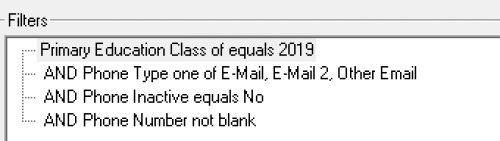
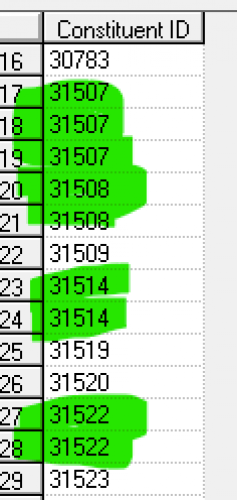
Record 31507 has 3 emails, one marked as primary. All active.
Yes, I know that dups are because it's a one-to-many field. That's why I commented that I prefer to pull phone/email data using Export.
0 -
@JoAnn Strommen
Yes, I wouldn't call them “dups”, but I can see why you might.For my org, our marketing decision is to email all emailable (active) email address. So meaning, if someone has 5 email addresses, 2 of them is inactive, then we will email the other 3 that are active, and in being able to use all 3 emails in a list for eblast, we need each email in its own row, meaning not Export, but Query exporting.
The question is, what is Ryan want to get. The title of this post is “excluding inactive email”. I am assuming that Ryan want to get all active email addresses. Meaning if a constituent have 3 active emails, he wants to get all 3 emails. I do not know the purpose of this “data pull” though, so if Ryan simply wants 1 active email address, and preferbly the “primary/preferred" one, then use Export, since Export can “priortize” exporting active preferred/primary email first.
0 -
Okay, I can't seem to find this kind of feature.
I'm pulling up a list of constituents who have emails (so preferred_email NOTBLANK)
But, it's pulling up constituents tho' where the email is not active. I've edited lots of these when we had bouncebacks before…
How do I remove these? Could use where the ‘preferred email comment’ is blank (i.e. we write in when we mark it inactive as to why/date), but there should be some ‘active' switch right?
What are you trying to do with the final list? Is it going to be imported into another system to send an email? Are you writing a query that will be plugged in to one of the Blackbaud email tools? Is this being shared with staff and the email field is informational, or will they be potentially contacting a constituent? Something else?
I have never worried about precision with emails in a query, because it is difficult to get and most of the time I was using Export because other information was necessary on the final output. It is much easier to exclude inactive emails when exporting, which is what I would recommend if you are creating a file to be uploaded to another system OR for internal staff use. Be sure you include the “Requests no email” checkbox, and any relevant solicit codes as well.
If you are writing a Query to be used in a Blackbaud email tool, I don't believe you have worry about inactive emails. The process will filter those out automatically.Karen
1 -
What I want to do is get those emails and then I copy/paste them into my own email I'll send them. I don't mind ‘dupes’, I can get excel to remove dupes, but … I was getting emails on the list that are inactive - I don't want to send an email and have it bounce…
0 -
Hi @Ryan Moore, one thing that works for our organization is that I set it up so phone type of “Email” would not be paired with the inactive checkbox. We change “Email” to “Email_previous”
Our records only have one occurrence of “Email” on the record - active or otherwise.
0












Categories
- All Categories
- 6 Blackbaud Community Help
- 211 bbcon®
- 1.4K Blackbaud Altru®
- 402 Blackbaud Award Management™ and Blackbaud Stewardship Management™
- 1.1K Blackbaud CRM™ and Blackbaud Internet Solutions™
- 15 donorCentrics®
- 360 Blackbaud eTapestry®
- 2.6K Blackbaud Financial Edge NXT®
- 655 Blackbaud Grantmaking™
- 576 Blackbaud Education Management Solutions for Higher Education
- 3.2K Blackbaud Education Management Solutions for K-12 Schools
- 941 Blackbaud Luminate Online® and Blackbaud TeamRaiser®
- 84 JustGiving® from Blackbaud®
- 6.7K Blackbaud Raiser's Edge NXT®
- 3.7K SKY Developer
- 248 ResearchPoint™
- 120 Blackbaud Tuition Management™
- 165 Organizational Best Practices
- 240 Member Lounge (Just for Fun)
- 34 Blackbaud Community Challenges
- 37 PowerUp Challenges
- 3 (Open) PowerUp Challenge: Grid View Batch
- 3 (Closed) PowerUp Challenge: Chat for Blackbaud AI
- 3 (Closed) PowerUp Challenge: Data Health
- 3 (Closed) Raiser's Edge NXT PowerUp Challenge: Product Update Briefing
- 3 (Closed) Raiser's Edge NXT PowerUp Challenge: Standard Reports+
- 3 (Closed) Raiser's Edge NXT PowerUp Challenge: Email Marketing
- 3 (Closed) Raiser's Edge NXT PowerUp Challenge: Gift Management
- 4 (Closed) Raiser's Edge NXT PowerUp Challenge: Event Management
- 3 (Closed) Raiser's Edge NXT PowerUp Challenge: Home Page
- 4 (Closed) Raiser's Edge NXT PowerUp Challenge: Standard Reports
- 4 (Closed) Raiser's Edge NXT PowerUp Challenge: Query
- 796 Community News
- 3K Jobs Board
- 54 Blackbaud SKY® Reporting Announcements
- 47 Blackbaud CRM Higher Ed Product Advisory Group (HE PAG)
- 19 Blackbaud CRM Product Advisory Group (BBCRM PAG)